
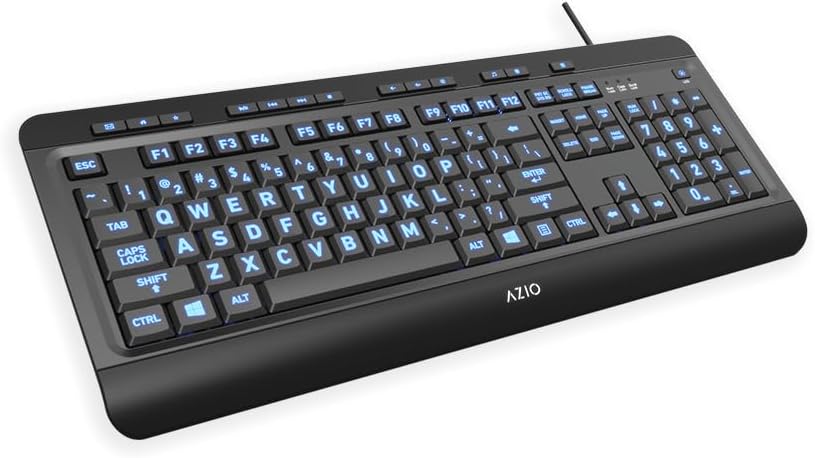
Design, Build & Physical Fit
Resting your palms on the built-in cushioned wrist rest provides immediate support across long desk sessions. The integrated rest offers a soft yet firm surface that relieves wrist bend without feeling squishy. Because the wrist rest is built into the main frame, you cannot detach it to save desk room. On a standard work surface, the 18.4-inch wide plastic frame takes up considerable space, anchoring down solidly thanks to its 2.2-pound weight.
Flipping the board over reveals fold-out feet that supply tilt adjustment for varied hand angles. Standard deck rigidity keeps the frame stable during fast entry, with minimal body twist under typical pressure. High-contrast, large print letters stand out clearly on every keycap. This layout works wonders for visually impaired users who struggle to spot standard keyboard fonts. Durable plastic construction forms the outer body, though prolonged heavy typing may wear down the key legends over time.
Core Performance & Typing Feel
Pressing the short-throw switches yields a firm, clean actuation without the deep plunge of classic office slabs. The switch mechanism operates smoothly across our testing, showing no sticking keys or binding along the wide space bar. Typing noise stays low and discreet, making the unit well-suited for shared living rooms or quiet cubicles. Keys feel sturdy when pressed, resembling the firmness of gaming boards while keeping a gentle impact profile.
Multi-key rollover registers typing accurately at normal desktop typing speeds. Matrix registration stays reliable, preventing phantom inputs during standard document work. The keycaps sit with standard spacing, keeping fingers from drifting into accidental side strikes. Hunt-and-peck typists will find key targeting easy and fast. The short travel distance saves finger effort, though high-APM competitive gamers will miss the custom actuation points of mechanical boards.
Power, Cable & Connection Behavior
Plugging the fixed USB cable into a PC port boots the hardware up instantly without manual driver setup. Standard USB bus power delivers clean current to the internal LEDs and key matrix without needing extra wall adapters. The corded link pairs easily with any wireless mouse you choose to run beside it. You never have to charge internal cells or hunt down replacement batteries.
Connecting through external hubs can lead to a minor quirk with the backlighting. If you route the cable into an unpowered or passive external USB hub, the backlight LEDs may stay lit even after the host computer shuts down. Plugging the cord straight into a motherboard port avoids this issue, powering down the board alongside the system. Power delivery remains stable during continuous operation.
Controls, Illumination & Daily Maintenance
Tapping the dedicated backlight key switches the LEDs between blue, red, and purple on the fly. Holding that same button down for three full seconds shuts the light off completely. Integrated Fn shortcuts let you adjust brightness levels to avoid glare in dark rooms. The secondary Fn row also manages basic media controls and navigation tasks directly from the keys. No third-party background software is needed, keeping your operating system free of bloat.
Wiping down the matte plastic top with a dry microfiber cloth clears away dust and fingerprints easily. The key architecture features spill-resistant venting to divert minor liquid splashes away from the circuits. Do keep in mind that the frame is not waterproof, meaning you cannot rinse it under a tap or submerge it. Regular dusting preserves the sliding action of the switch stems and keeps legends clear.
How It Compares: Head-to-Head Testing
Stacking the KB505U-LN against rival options highlights clear differences in typing feel, longevity, and feature sets:
- Azio KB512: While the KB512 offers alternative aesthetic styling, our testing aligns with long-term user reports favoring the KB505U. The KB505U demonstrates superior key action and lighting consistency over time, making it the safer pick for reliable office duty.
- Standard Backlit Gaming Keyboards: Typical gaming keyboards focus on deep travel switches with complex software suites. The KB505U delivers short-throw switches paired with oversized font, catering directly to visual clarity rather than high-speed gaming macros.
The KB505U stands out by merging low-profile key throw with strong tri-color backlighting. Most big-letter boards skip backlighting entirely, while typical lighted boards stick to small, hard-to-read symbols. Azio nails the visual assist balance here.
What I Like & What Could Be Better
Living with this peripheral day after day highlights distinct practical strengths alongside a few real hardware limitations.
What I Like: Oversized print legends combined with tri-color backlighting make symbols effortless to spot in dim rooms. Built-in cushioned wrist rest provides soft yet firm support across long typing sessions. Short-throw key action actuates smoothly without sticking or wobbling. Pure plug-and-play setup runs on standard USB drivers with no software junk.
What Could Be Better: Complete absence of Mac OS support locks Apple desktop users out. Wrist rest is molded directly to the casing and cannot be detached to save desk space. External USB hub connections can cause the LEDs to remain lit after system power-down. Heavy daily typing may wear down the key surface legends after extended ownership.
Who Should Skip This Product
Apple Mac users should skip the KB505U-LN immediately due to incompatible OS protocols. If you run a Mac Mini, iMac, or MacBook, shop for a dedicated macOS-compatible illuminated keyboard instead. Competitive PC gamers who need rapid-fire mechanical switches, deep travel, and complex macro mapping will also find the membrane layout too basic.
Desk workers with limited surface depth may struggle with the fixed wrist rest. If you need a compact tenkeyless board or want a detachable pad, look at smaller low-profile models. For seniors, low-light typists, and Windows office workers who want big letters with zero software headaches, this unit fits the bill.
Can I use the Azio KB505U-LN with an Apple Mac computer?
No. The keyboard does not support macOS. It works with Windows, Linux, and ChromeOS systems using standard USB drivers.
How do I change the backlight colors on this keyboard?
Press the dedicated light key to cycle through red, blue, and purple. Hold that key down for three seconds to turn the light off.
Is the integrated wrist rest on the KB505U removable?
No. The cushioned wrist rest is built directly into the keyboard frame. It stays in place to support your wrists while typing.
What should I do if the keyboard backlights stay on after shut down?
Plug the USB cable straight into a motherboard port on your PC. External USB hubs can feed power to the LEDs after shutdown.