
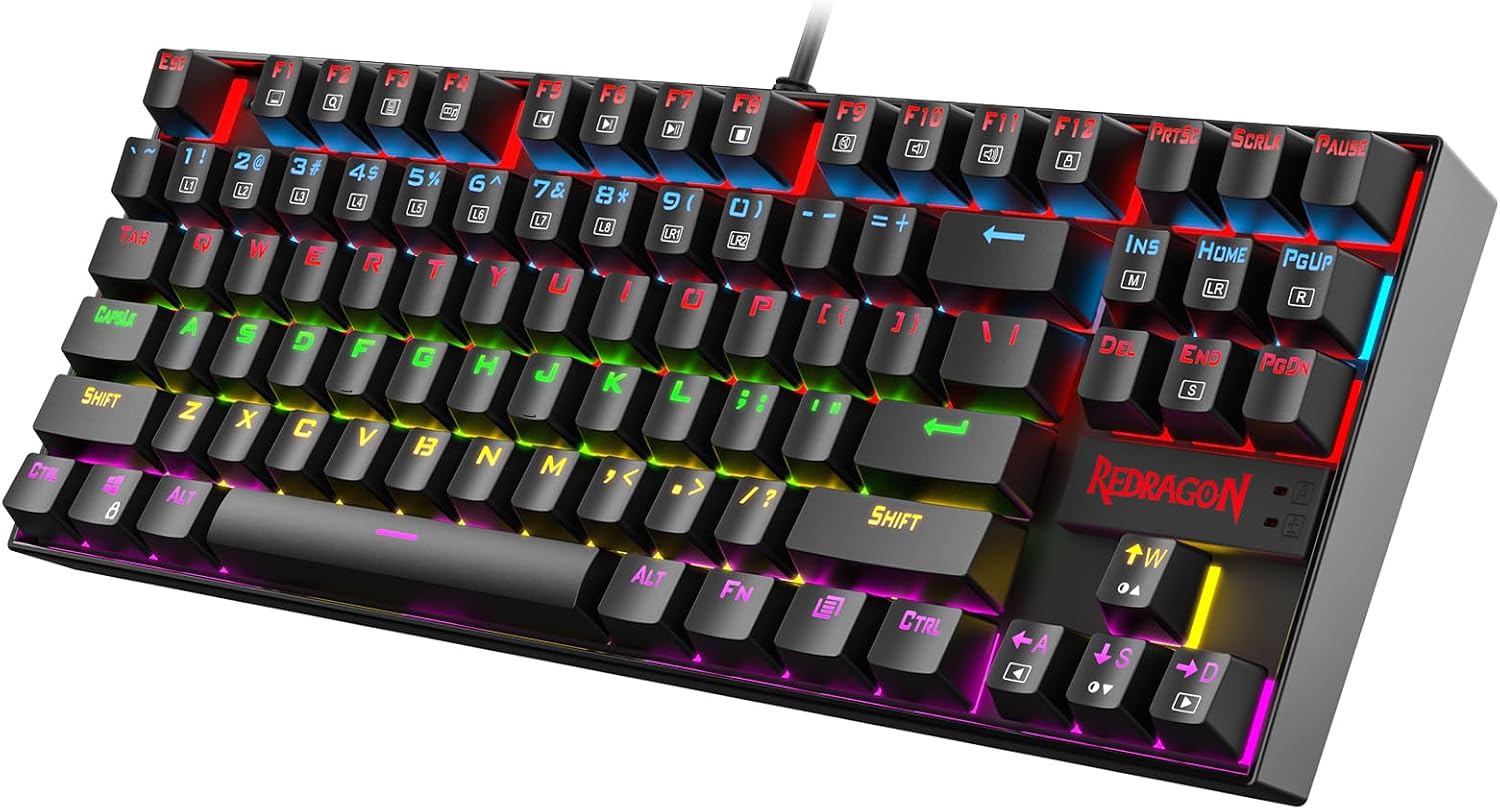
Design, Build & Physical Fit
Setting this thing down on my desk, the first surprise is the weight. The aluminum top plate and ABS base give it a heft that feels wrong for the budget tier. I pressed hard on the center of the deck and got almost zero flex.
The 87-key TKL layout frees up serious mouse space. On a crowded 48-inch desk, that matters. The frame has a slight angle, and the keys sit fairly high off the deck.
That high profile is a double-edged sword. It looks aggressive and game-ready. But after an hour of typing, my wrists started to feel it. No palm rest ships in the box, so factor that into your setup.
Double-shot ABS keycaps feel fine under the fingers. Legends won't rub off, though they may shine over years of heavy use. For the money, the build quality punches way above its class.
Core Performance & Typing Feel
Pressing the first key tells you everything. The Outemu Blue switches deliver a sharp click and a clear tactile bump at 50g. It mimics the old Cherry MX Blue feel without the premium price tag.
In Valorant and fast-paced shooters, actuation felt fast and reliable. I never noticed lag or missed inputs. N-Key Rollover handled over 30 simultaneous presses with zero ghosting.
That click is loud. Very loud. My mic picked up the keys during voice chat, and anyone in the next room will know you're typing. Great feedback, rough for shared spaces.
The testing threw up one oddity. Some sources describe this board as having quiet linear switches with no bump. My unit was definitely clicky. If you order one, check the switch label before you get attached.
Gaming feels sharp and precise. The short pre-travel helps in twitchy moments.
Power, Cable & Connectivity
This is a wired-only board. No Bluetooth, no 2.4 GHz dongle, no battery to charge. The USB cable is fixed in place and cannot be detached.
Setup took seconds. Plug it into a USB port and Windows picks it up right away. No drivers, no install prompts, no bloatware. It just works.
Power draw is low, so it won't stress a busy USB hub. USB HID-compatible hosts recognize it, which covers most desktops and laptops.
The catch is mobility. You can't toss it in a bag without wrestling the cable, and you can't use it from the couch. Low-power operation is a plus, but a detachable cable would have made this a much easier travel companion.
Controls, Software & Daily Care
Media controls live on the Fn layer. There are no standalone volume or playback keys. You hold Fn and press a top-row key. It works, but I'd rather have dedicated buttons.
Lighting changes happen onboard. Fn plus Ins, Home, or Page Up cycles through 18 preset effects. You get two user-defined modes with six color options, plus adjustable brightness and breathing speed.
There is no companion software. No macros, no key remapping, no per-game profiles. For a plug-and-play board, that's fine. For power users, it's a real limit.
The Windows key lock is a nice touch for gaming. Tap Fn plus the Windows key and you won't accidentally minimize mid-match.
The deck is splash-proof. A small spill beads up if you wipe it fast. Don't push your luck with a full glass. Cleaning is simple. Pop the keycaps, brush out crumbs, and wipe the aluminum plate with a dry cloth.
How It Compares (Head-to-Head)
Stacked against the HyperX Alloy Core RGB, the K552 wins on switches and build. The HyperX is a membrane board. The K552 gives you real mechanical clicks and a metal deck. The HyperX does include a numpad, which the K552 skips.
Against the HyperX Alloy FPS Pro, the story flips on latency. HyperX feels faster in twitch tests. But the K552 offers full RGB with 18 effects against the HyperX's red-only six-effect lighting. More lighting, slightly slower feel.
The SteelSeries Apex 3 is a full-size membrane board with a wrist rest. It's comfier for long sessions. The K552 hits back with tactile mechanical switches and shorter pre-travel. Comfort versus feel, pure and simple.
- HyperX Alloy Core RGB: Membrane, includes numpad, softer typing
- HyperX Alloy FPS Pro: Better latency, red-only lighting, fewer effects
- SteelSeries Apex 3: Wrist rest, lower profile, no mechanical switches
- Vortex Race 3: Lower latency, solid build, no RGB on the tested unit
What I Like & What Could Be Better
What I like most is the build. It feels like a board twice the price. The metal plate kills flex, and the weight keeps it planted on the desk. No sliding, no creaking.
The clicky switches are a joy for typing. Fast actuation, clear bump, none of that mushy membrane feel. N-Key Rollover is flawless for gaming and fast typing.
On the flip side, the fixed cable is a real annoyance. One snag and you're stuck. The lack of any customization software stings too. No macros, no remaps, nothing.
The ergonomics are the weak point. High keys, no wrist rest, and fatigue sets in fast during long sessions. And the noise level is a genuine problem for open mics and shared rooms.
The high-pitched click is satisfying to me. Your roommate may disagree. Not great, to be honest, for late-night work.
Who Should Skip This Product
Skip the K552 if you need silent keys. The Outemu Blues are loud enough to hear through walls. If you work in an open office or stream with a hot mic, get the linear Red switch version instead or jump to a quieter board like the Keychron C1.
Skip it if you need wireless. This board is corded only. For couch gaming or a clean desk, look at the HK Gaming GK61 with its detachable USB-C cable.
Skip it if you rely on macros or per-key remaps. There's no software here. The Vortex Race 3 offers better build and lower latency for buyers with a bigger budget.
And if wrist comfort is your top priority, pass. The SteelSeries Apex 3 includes a wrist rest and sits lower. Buy the K552 if you want tank-like build and real mechanical clicks at a budget price. Otherwise, your money works harder elsewhere.