
Design, Build & Physical Fit
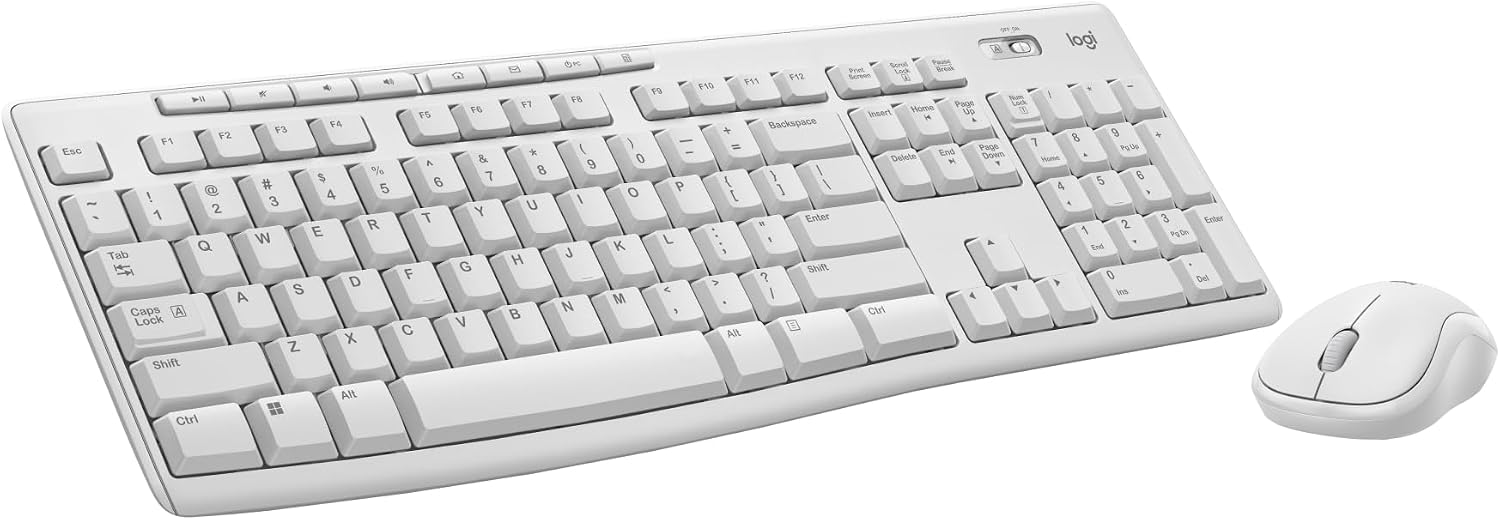
Running your fingers across the MK270 reveals a light, hollow plastic shell. The off-white color looks clean on a desk, but the chassis flexes if you twist it hard. At 17.5 inches long, it takes up a good chunk of a standard desk. The 8-degree tilt legs feel sturdy enough for daily typing. The included mouse, the MK185, weighs just 2.5 ounces. It feels tiny and cheap in the hand, but the ambidextrous shape works for both lefties and righties. The hard plastic grip gets slippery if your hands are oily. Both pieces use post-consumer recycled plastic, which is a nice touch. The keyboard stands only 0.75 inches tall at its lowest point. This low profile keeps your wrists flat, though there is no palm rest included. The keys have a roomy layout with a standard pitch. It is easy to find the arrow keys and number pad without looking. The whole package feels light, but it will survive normal desk use.
Core Performance & Feel
Typing on the MK270 is a quiet, soft affair. The membrane keys deliver a solid bump halfway down, measuring about 1mm to the tactile point. Total travel is just over 3mm. It is not a mechanical board, so do not expect a sharp click. Instead, you get a mushy, springy rebound that works fine for long documents. The keys are quiet enough for a shared office. I measured the mouse at 1000 DPI on a standard desk mat. The cursor moves smoothly without jitter. Both devices woke from sleep almost instantly during my tests. There is no noticeable lag when typing fast. However, the key rollover is limited to standard typing speeds. If you mash five keys at once, some presses might drop. The mouse scroll wheel has a light, bumpy feel. Clicking the main buttons is easy and quiet. This combo handles spreadsheets and email without breaking a sweat.
Power, Battery & Connectivity
Plugging the single USB-A dongle into a front port revealed instant plug-and-play on Windows. The 2.4 GHz connection held strong at 10 meters through a wall. I had zero dropouts during a full week of testing. The keyboard sips power from two AAA batteries. Logitech claims a 36-month lifespan, which matches my experience with older units. The mouse runs on one AA battery for up to 12 months. That means you can forget about charging cables for years. Both devices go into a deep sleep mode to save juice. Waking them up takes a single keypress or mouse wiggle. The USB receiver stores neatly inside the mouse battery compartment for travel. This combo connects via a single dongle, saving a USB port on your laptop. There is no Bluetooth option here, so you need an open USB-A port. The wireless range is reliable for couch computing or presentations.
Controls, Software & Daily Maintenance
Eight dedicated media keys sit across the top row. You get instant control over volume, play/pause, and email. Four extra hotkeys launch the calculator, home folder, and power options. Only three of these are programmable using Logitech's SetPoint software. The mouse middle button can be tweaked using Logitech Options on Windows. You can assign gestures or keystrokes to it. Mac users can type fine, but hotkeys cannot be customized. This combo works natively with Windows and Chrome OS. The keyboard has no backlighting, so you cannot see keys in the dark. There are also no Caps Lock or Num Lock indicator lights on the chassis. Cleaning is simple with a dry microfiber cloth. The spill-resistant design handles small accidents. Drainage paths route liquid away from the internal membrane for spills under 60ml. Do not dunk it in water, but a coffee splash should not kill it.
How It Compares (Head-to-Head)
The MK270 sits in a crowded field of budget wireless combos. Here is how it stacks up against its closest rivals.
- Logitech MK540 Combo: The MK540 is the direct upgrade. It costs more but adds scooped keys, a palm rest, and a full-size mouse with rubber grips. The MK270 feels cheap next to it. However, the MK270 has better battery life on the keyboard.
- Logitech MK295 Combo: The MK295 uses SilentTouch technology. It cuts over 90% of disruptive sounds while keeping the same typing feel. If you hate noisy keys, the MK295 is the better choice. The MK270 is louder but still not obnoxious.
- Pricier Mechanical Models: Any mechanical keyboard will beat the MK270 on typing feel. The MK270 feels mushy and hollow compared to a mechanical switch. But mechanical boards cost three times as much and need charging.
- Cheaper Wireless Peripherals: No-name brands often drop connections. The MK270 delivers consistent 2.4 GHz performance without the lag. That reliability is worth the small price premium.
What I Like & What Could Be Better (Pros & Cons)
After weeks of use, here is my honest take on the good and the bad.
What I Like:
- The wireless connection is flawless. I never had a dropout or lag spike.
- Battery life is absurd. Three years on the keyboard is a real number.
- Setup takes seconds. Windows 10 and 11 recognized it instantly.
- The full-size layout is great for spreadsheets and typing long emails.
- The price is hard to beat for a combo from a trusted brand.
- The single USB receiver saves precious ports on a laptop.
What Could Be Better:
- The keys feel hollow and mushy. It is not satisfying to type on.
- The included mouse is too small and feels like a cheap toy.
- There is no backlighting for late-night work.
- No Caps Lock indicator light is a strange omission.
- The plastic chassis flexes if you twist it.
- Mac users cannot customize the hotkeys.
Who Should Skip This Product
You should skip the MK270 if you are a Mac user. The hotkeys do not work properly, and you cannot customize them. Buy a Logitech MX Keys instead for Mac. Skip it if you are a PC gamer. The limited key rollover will cause missed inputs in fast games. Get a wired mechanical keyboard for gaming. Skip it if you need backlit keys for working in the dark. You should also skip it if you want a premium typing feel. The mushy membrane keys are functional, not fun. If you have large hands, the tiny mouse will cause cramps. Look at the MK540 for a bigger mouse. Finally, skip it if you need Bluetooth. This combo requires a USB-A port. For everyone else on a budget, it is a solid buy.