
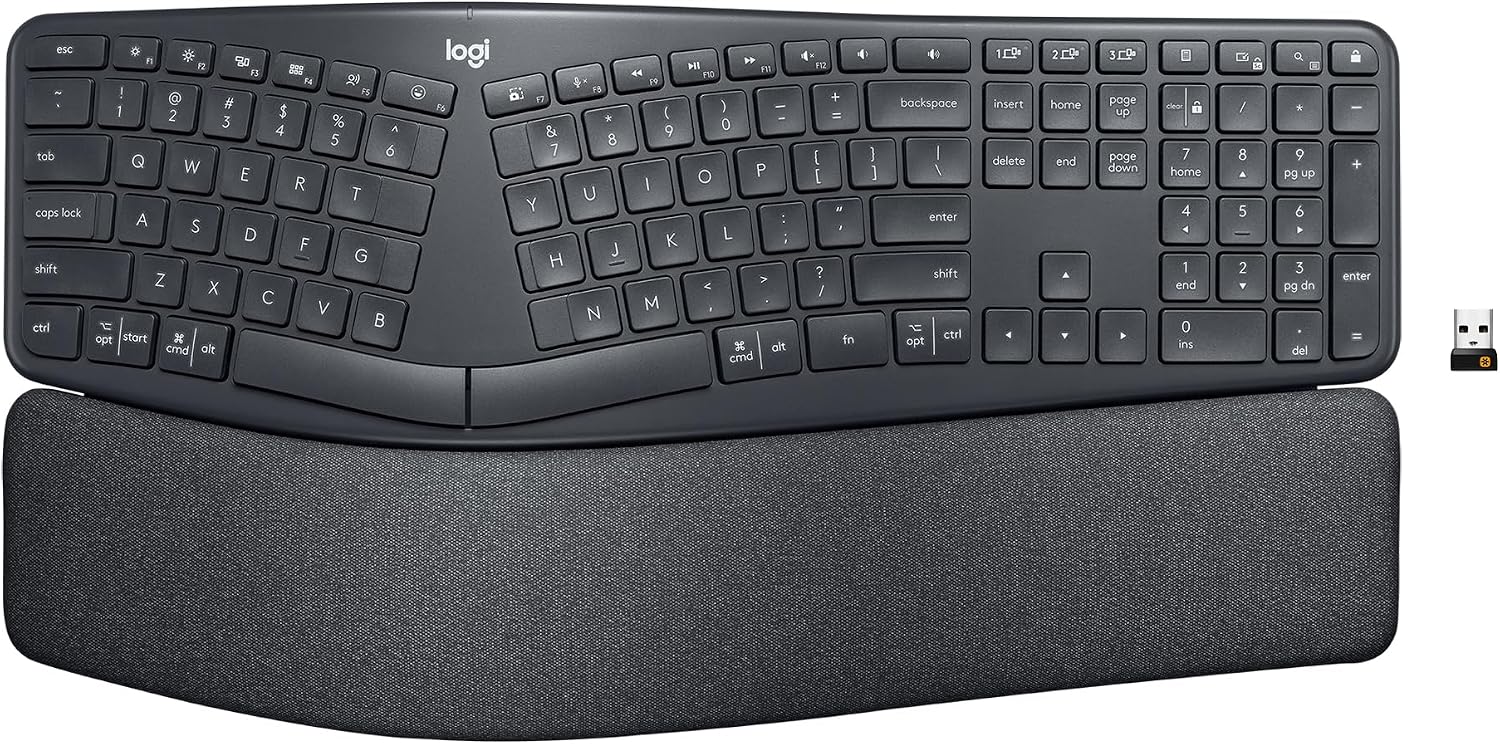
Design, Build & Physical Fit of the Logitech Ergo K860
The Graphite variant uses plastic for most parts. This includes 71% certified post-consumer recycled plastic. The packaging also uses FSC-certified paper, which is nice. The keyboard feels sturdy. It avoids feeling bulky even with its built-in wrist rest. That pillowed wrist rest holds a memory foam layer. It gives 54% more wrist support than basic keyboards. This helps a lot during long typing stretches.
Measuring 17.95 inches wide by 9.17 inches deep, the K860 takes up a good chunk of desk space. It has a full set of alphanumeric keys, media hotkeys, and a number pad. The split layout, along with integrated wrist rests, takes cues from boards like the Microsoft Sculpt. This design choice makes it easier for new users to get used to an ergonomic shape. It avoids looking too alien, which some ergonomic boards do.
Flipping the keyboard over reveals two sets of legs under the wrist cushion. The larger pair tilts the board 7 degrees. The smaller pair raises it 4 degrees. You can also keep it flat. These tilt options let you find a posture that keeps your wrists straight. This is key for sitting or standing desk setups. This flexibility in tilt, including a reverse tilt, is a premium feature. It's not something you see on every ergonomic board.
Core Performance & Typing Feel
Typing on the Ergo K860 feels smooth. The keys are scooped to match your fingertips. This makes for precise, fluid typing. They give satisfying tactile feedback. The operation is quiet, which is great for shared spaces. This quiet, fluid feel sets it apart from louder mechanical keyboards.
Under the keycaps are chiclet switches. These use a rubber dome over a membrane. This gives a soft bump with each press. Key travel feels like a laptop keyboard. It's not as crisp as some premium mechanical boards. Keys are light to press. The bump is gentle. Some keys, over time, might need a harder press to register after the bump. That's a durability concern.
Input speed is okay for productivity. The effective update rate hits 250 Hz. The polling rate is 500 Hz. The lower update rate is a limit here. For general work, this is fine. But for fast-paced gaming, it’s not ideal. Any gamer needing precision will notice a lag. The board also lacks n-key rollover. That means it cannot register many keys at once. For rhythm or FPS games, this becomes a problem.
Power, Battery & Connectivity for the Logitech Ergo K860
Getting started with the K860 is simple. You plug the USB receiver dongle into a port on your PC or Mac. Then, flip the keyboard's power switch. You get an instant connection. This wireless USB receiver gives a stable link. It generally works better than Bluetooth for reliability.
Bluetooth is also an option. It lets you connect to up to three devices at once. You can switch between them easily. But, Bluetooth performance can vary. Some users report occasional drops when using multiple devices. This is not great if you need rock-solid connectivity across systems. For competitive gaming, either the USB receiver or Bluetooth might add a tiny latency. This suggests a wired option is best for those intense moments.
The keyboard runs on two AAA batteries. It does not have a built-in rechargeable battery. This means you will swap out batteries. However, the battery life is stellar. It lasts up to two years on one set of AAA batteries. This is a huge plus. It means very few battery changes. Logitech Options software can even show battery-life notifications. This helps you avoid surprise power-offs.
Controls, Software & Daily Maintenance
The K860 comes with a full set of keys. This includes media playback, volume controls, and a search button. You also get a lock function. Customizable Fn keys are a real benefit here. Logitech Options or Logi Options+ software helps manage these. You can set custom shortcuts. The software also provides battery notifications. However, only the 16 upper-row function keys can be changed. This limits deep customization for some.
Combined Windows and Mac key legends can cause some confusion. You might hit the wrong key by mistake. Print screen and lock screen keys are close. This can lead to accidental presses. There is no manual or guide in the box for Fn key toggling. This can be annoying during initial setup. Also, the keyboard has no backlighting, which makes it tough to use in dim light. There is no simple way to know Caps Lock status, which is a miss for some.
Cleaning and maintenance present a mixed bag. The wrist rest has stain-resistant fabric. This makes it easy to wipe down. But, you cannot take the keyboard apart. You also cannot remove keycaps safely. This makes deep cleaning hard. Liquids are less of an issue, though. The keyboard is waterproof, which is a major win for spill resistance.
How the Logitech Ergo K860 Compares
Against a standard keyboard, the Logitech Ergo K860 stands out for ergonomics. Its pillowed memory foam wrist rest boosts wrist support by 54 percent. It also cuts wrist bending by 25 percent. This is a huge gain for anyone typing all day. Standard boards offer none of this, making them poor for long-term health.
When you put it next to a Microsoft Ergonomic Pro 4000 or 7000, the K860 feels better. It offers faster, quieter, and more fluid key action. The older Microsoft models feel clunkier. However, the K860 loses out on minor things. It lacks a dedicated context menu key. It also does not have independent media keys. This is a small trade-off, but it exists. The Microsoft boards have a bit more dedicated control.
Its weight is 1093 grams. This is on the heavier side for a non-mechanical board. A full-size mechanical keyboard can hit 1217 grams. The K860 feels solid. It is not as light as some thin, non-ergonomic options. But the weight adds to its sturdy feel. It stays put on your desk.
What I Like & What Could Be Better (Pros & Cons)
I find a lot to like about the Logitech Ergo K860, especially for its core purpose.
What I Like:
- The curved, split design truly reduces wrist strain. My arms, neck, and shoulders felt more relaxed over time.
- The included pillowed wrist rest is incredibly comfortable. It feels soft and supportive for hours of typing.
- Typing is quiet and fluid. The keys have a satisfying tactile bump without being loud.
- Setup is instant with the USB receiver. Pairing to three devices via Bluetooth is super handy for multitasking.
- That two-year battery life from AAA batteries is fantastic. No need to constantly recharge.
- The adjustable palm lift angles are a smart touch. They help keep my wrists straight whether I'm sitting or standing.
- It's waterproof. A minor spill won't ruin your day, or your keyboard.
What Could Be Better:
- No backlighting means using this in dim rooms is a challenge, to be frank. Finding keys can be hard.
- The keycap labels wear off too quickly. My C and M keys started to look blank after just a few months.
- The plastic construction, while 71% recycled, still feels like plastic. For the price, a more premium material would be nice.
- You cannot safely remove keycaps or disassemble the keyboard for deep cleaning. This makes long-term maintenance harder.
- Gaming performance is inadequate. The latency and lack of n-key rollover make it a poor choice for any serious player.
- The software only lets you customize the top 16 function keys. More control over other keys would be better.
Who Should Skip This Product
If you are a serious PC gamer, bypass the Logitech Ergo K860 entirely. Its raw performance is poor for gaming. Input latency and the lack of n-key rollover will hurt your scores. Instead, look for a low-latency mechanical keyboard built for gaming.
Users who type in low-light conditions should also skip this board. The complete absence of backlighting is a major dealbreaker. You will struggle to see the key legends in the dark. An alternative with integrated backlighting, even a simple white LED setup, would be a much better fit.
Also, if you need a USB-rechargeable keyboard, this is not it. The K860 uses disposable AAA batteries. While they last two years, some prefer a built-in rechargeable option. Consider a keyboard with a USB-C port for charging if that is a must-have for your setup. Finally, if you expect to swap keycaps or deep clean your keyboard by taking it apart, you will be disappointed. This board does not allow for that.