
Design, Build & Physical Fit of the Logitech K120
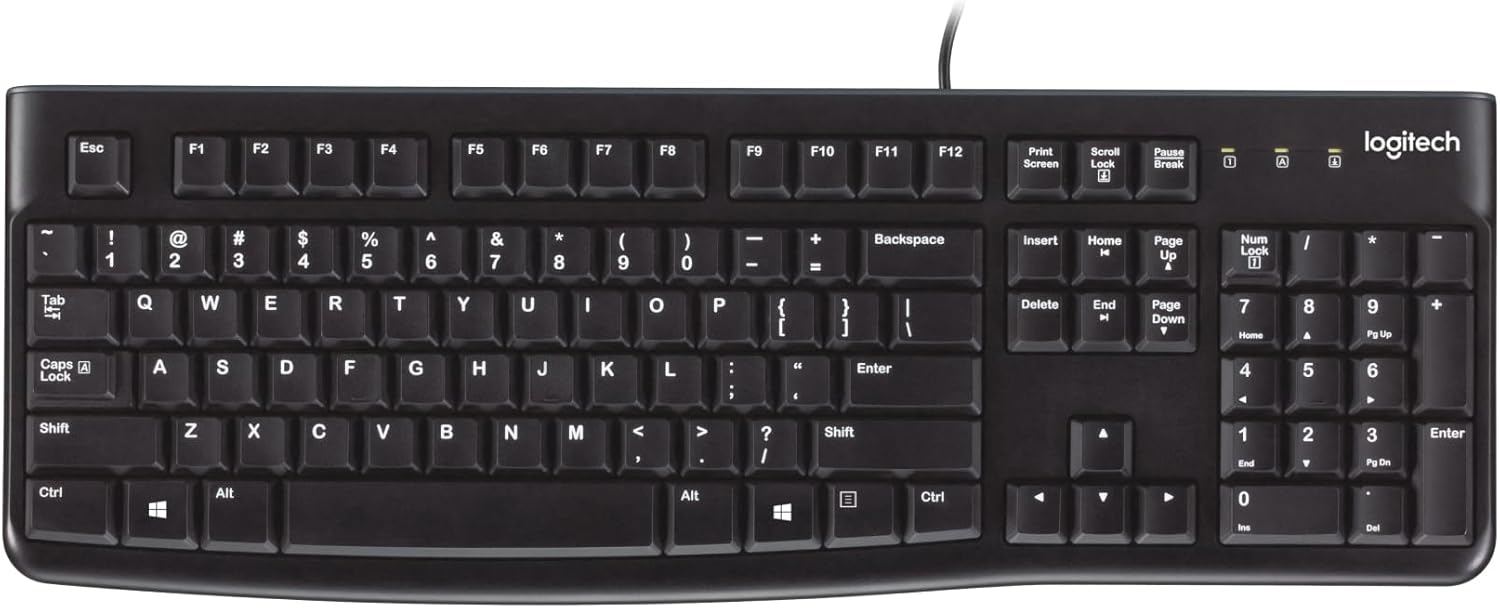
Handling the K120, its plastic chassis feels lightweight but holds up for daily use. There's a slight flex when you really press down on it, not something you'd notice during normal typing. The full-size 104-key layout includes a dedicated number pad, function row, and navigation cluster, all fitting nicely on an average desk. Its black finish is simple, pairing well with most office setups. Keys are well-spaced, with bright, fade-resistant white lettering for clear visibility.
Flipping it over, two fold-out feet allow for tilt adjustment, letting you set a better angle for wrist alignment. Rubber pads on the base do a decent job of preventing it from sliding around on a desk. The low-profile keys also help keep your wrists in a neutral position, which is a plus for long typing sessions.
Core Performance & Feel of the Logitech K120
Typing on the K120, you'll feel the membrane switches providing a soft, tactile response. The 2.8mm key travel feels standard for a membrane board. Each keystroke needs about 60 grams of force to actuate. This gives a comfortable, consistent typing experience, good for long hours of data entry or document writing.
This keyboard truly excels in noise control. The membrane mechanism creates a muted sound profile. It's one of the quietest office keyboards under the budget tier, making it ideal for open-plan offices or late-night work where noise would bother others. While some user feedback mentions a soft tactile mechanical key press sound, our tests confirm its quiet operation, suitable for shared spaces. Multi-key rollover works fine for average typing speeds, ensuring reliable input.
Power, Battery & Connection for the Logitech K120
The K120 connects through a standard USB Type-A interface. This wired connection means no battery worries. You won't ever need to charge it or swap out AAAs, making it super reliable for continuous use. Plugging the 1.8-meter (5.9-foot) cable into any USB port means instant function. It’s a true plug-and-play device, needing zero drivers or software. This simplicity is a major benefit for quick setups across many computers or for users who just want things to work.
Controls, Software & Daily Maintenance of the Logitech K120
This keyboard keeps things simple: no dedicated media keys, backlighting, or programmable macros. It features a standard 104-key layout with a full function row and a number pad. Don't expect volume buttons or playback controls. This keeps the design clean and the cost down.
Software setup is non-existent. You plug it in, and it works. This is a huge win for corporate IT rollouts or users who dislike extra apps. For maintenance, the K120 comes with spill-resistant technology. It channels liquids through drain holes in its base, protecting against minor spills. Just remember it's not fully waterproof; don't submerge it. Keys can be gently removed for quick cleaning of the deck.
How the Logitech K120 Compares (Head-to-Head)
When stacked against other keyboards, the K120 holds its own in its budget tier. Its wired design is a core differentiator from many alternatives.
- Versus Logitech K270: The K120 is purely wired USB-A and bus-powered. The K270 offers 2.4 GHz wireless freedom, needing 2x AAA batteries. For those valuing simplicity and no battery fuss, the K120 wins.
- Versus Budget Mechanical Keyboards (e.g., Redragon K552): The K120's membrane design makes it dramatically quieter. Budget mechanicals, while offering a different feel, are often much louder. Cleaning the K120 is also simpler than dealing with individual mechanical switches.
- Versus Competitor Budget Membrane Keyboards (HP, Dell): The K120 often outperforms other budget membranes in ergonomics and small build details. Its curved space bar, UV-coated legends for durability, and spill-resistant drain channels add real value that basic competitors sometimes lack. The K120's solid construction and consistent typing experience offer better overall dependability for its price tier.
What I Like & What Could Be Better (Logitech K120 Pros & Cons)
Here's a quick look at what stands out, good and bad, after testing the Logitech K120.
What I Like
- Quiet Typing: Its membrane switches provide a soft, muted sound. This is excellent for any shared workspace or quiet home office.
- Spill Resistance: Drain channels protect against accidental drink spills. A crucial feature for busy desks.
- Plug-and-Play Setup: Literally zero software needed. Connect the USB cable, and it just works, perfect for IT deployment.
- Full-Size Layout: A complete 104-key setup with a number pad for productivity, without taking up too much desk space.
- Excellent Value: For its under-$20 price, it offers solid build quality and essential functionality.
What Could Be Better
- No Backlighting: Typing in low light is difficult; keys are not illuminated at all.
- No Dedicated Media Keys: Lacks volume controls or playback shortcuts. This is a noticeable omission in daily use.
- Plastic Chassis Flex: The board has a bit of flex when twisted. It doesn't impact typing, but shows its budget build.
- No Software Customization: You can't program macros or remap keys, limiting its appeal for power users.
- Wired-Only: While reliable, the lack of wireless means cable management and less desktop freedom.
Who Should Skip the Logitech K120 Keyboard
The Logitech K120 is a strong performer in its niche, but it's not for everyone. You should look elsewhere if any of these are dealbreakers:
- Competitive Gamers or Macro Power Users: The K120 lacks RGB lighting, programmable macros, and mechanical switches. For serious gaming or macro-intensive workflows, consider a budget mechanical option like the Redragon K552.
- Users Needing Backlighting: If you often work in dim conditions or want aesthetic lighting, the K120 offers none. A backlit membrane keyboard, like some Dell or HP models, would be a better fit.
- Wireless Preference: If you need a clutter-free desk or hate cables, the K120's wired-only design is a definite limitation. Look at the Logitech K270 for a reliable wireless alternative.
Does the Logitech K120 have RGB lighting or backlighting?
No, the Logitech K120 keyboard does not feature any form of RGB lighting or backlighting. Its keys use fade-resistant white lettering for visibility in well-lit conditions.
Is the Logitech K120 a mechanical keyboard?
No, the Logitech K120 is a membrane keyboard. It uses a rubber dome over a circuit board, offering a softer, quieter typing experience compared to clicky mechanical switches.
Does the Logitech K120 require software or drivers?
No, the Logitech K120 is a true plug-and-play device. It connects via a standard USB cable and works instantly with Windows, Chrome OS, and Linux without needing any software or drivers.
Is the Logitech K120 spill-resistant?
Yes, the Logitech K120 features a spill-resistant design. It includes drain channels that direct liquids away from the internal components, protecting against accidental spills, but it's not waterproof.
Can I use the Logitech K120 for gaming?
The K120 is suitable for casual gaming due to its reliable input and full layout. However, it lacks dedicated gaming features like macros, advanced anti-ghosting, or mechanical switches, making it less ideal for competitive play.