
Design, Build & Physical Fit
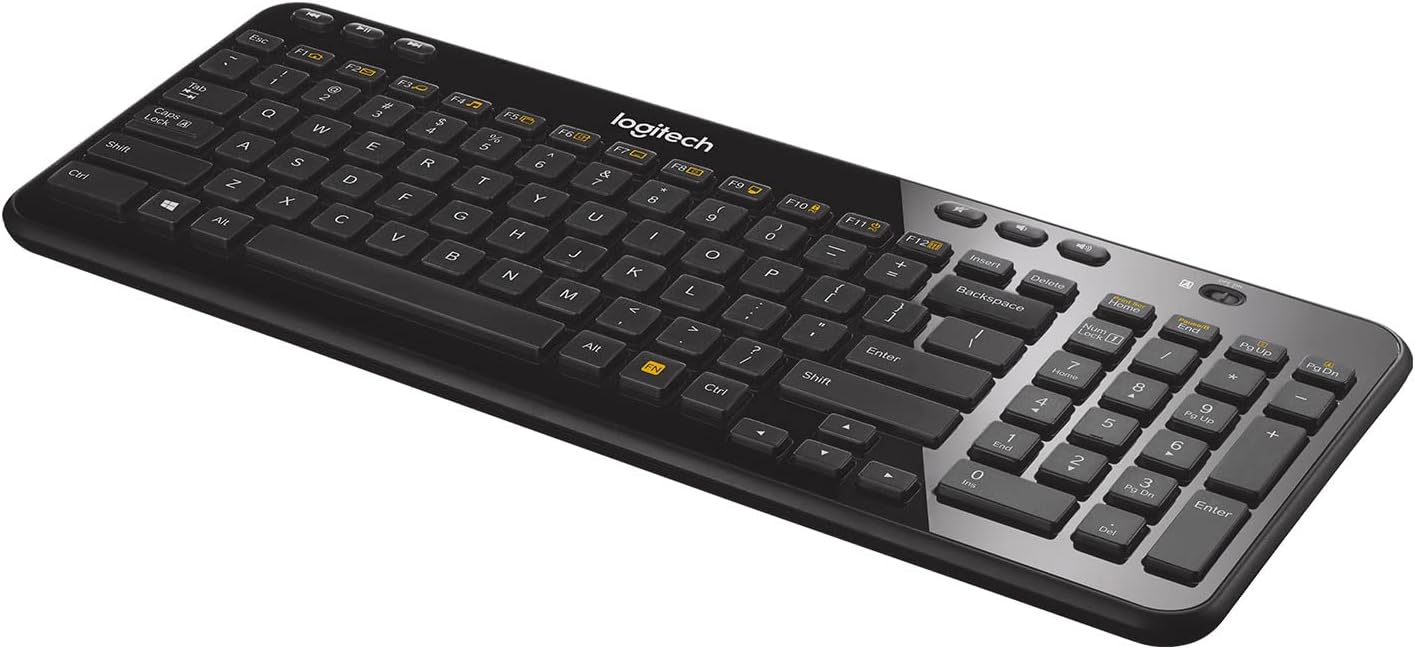
Running your fingers across the K360 quickly reveals its budget nature. The casing is made of cheap plastic, which exhibits noticeable flex, especially when pressing down on the middle of the board. This isn't a robust piece of gear, to be honest. It is a compact, space-saving layout, which helps it fit into crowded workspaces without much trouble.
On a crowded 48-inch desk, the compact size leaves plenty of room for a mouse and other items. However, the non-standard arrow key sizes are a minor irritant; they are smaller, leading to occasional mistypes if you're not looking. The keyboard offers a singular adjustable incline setting. While this helps with ergonomics, the feet itself can make the board prone to sliding on smoother desk surfaces. It's not great for stability.
Core Performance & Feel of the Logitech K360
Typing on the K360 gives a quiet, comfortable experience, a welcome surprise given its budget price. The low-profile keys, likely membrane or scissor switches, offer a light operating force and decent key travel. This setup helps reduce hand fatigue during long typing sessions. The acoustic profile is very quiet, making it suitable for shared office spaces or late-night work.
Gaming performance is sub-par, due to the cheap plastic frame's flex, long key travel, and lack of programmable macros. This is not a gaming keyboard. For standard typing, the 2.4 GHz wireless connection provides a stable, lag-free experience. I found multi-key rollover sufficient for fast typing speeds, meaning no missed key presses during normal use. Overall, the typing feel is enjoyable, though generic. It just works.
Power, Battery & Connectivity for the K360
Plugging the 2.4 GHz dongle into a front USB port revealed instant connection. The K360 uses a proprietary USB receiver, a Logitech Unifying receiver to be exact, which is a nice touch if you have other Logitech wireless items. This keeps things simple, though it means no Bluetooth support. The wireless operating range reaches up to 30 feet in ideal conditions.
The K360 boasts an impressive battery life of up to 36 months, running on two AA batteries. These batteries come included in the box, which is handy. A physical power button lets you turn the keyboard off to save battery life, a smart feature for extending those three years. You won't be changing batteries often with this board, certainly.
Controls, Software & Daily Maintenance
The K360 includes essential controls for daily use. On the top-left, you find three dedicated media buttons: previous/rewind, pause/play, and next/fast-forward. The F1-F12 keys also have alternate functions, triggered using the 'FN' key, such as taking a screenshot. These 12 F-keys are programmable through Logitech's SetPoint software. Keep in mind this software is only for Windows. LED indicator lights show lock states.
For daily care, the keyboard is designed to minimize gaps between keys and the inside chassis. This reduces how much food crumbs and dirt can get stuck, making cleaning simpler than many standard office keyboards. Just wipe it down. While the K360 works with Windows XP, Vista, and 7, and via standard USB HID with Linux and ChromeOS, it explicitly does not work with Mac computers, which is a big drawback for Apple users. There is no listed spill-resistance rating.
How the Logitech K360 Compares
When stacked against other Logitech keyboards, the K360 holds its own in value but shows its budget limits. The Logitech K380, for example, offers better build quality, Bluetooth support, and multi-device pairing. The K360, however, has a lighter operating force and higher key travel, which some typists prefer.
- Against the Logitech MX Keys: The MX Keys has superior build quality, Bluetooth, and white backlighting. The K360 offers equally comfortable ergonomics at a much lower price tier, without the premium features.
- Against the Logitech G413: The G413 is a gaming board with red backlighting, dedicated macros, and robust software with Cloud Sync. The K360 provides wireless freedom, but that's its only advantage here. It's not a gaming board.
- Against the Logitech K780: The K780 feels much better built, supports Bluetooth and multi-device pairing, and offers a quieter, more enjoyable typing experience. The K360's main advantage is its dedicated media keys and generally better value for its feature set.
What I Like & What Could Be Better
From my testing, the K360 has a few key strengths that make it a decent pick for its intended user:
Pros:
- Comfortable, quiet typing experience with a tactile feel.
- Exceptional battery life, often lasting three years.
- Includes dedicated media keys, always useful.
- Compact size fits easily into smaller workspaces.
- Good value for a basic wireless board.
However, it's far from perfect, and some flaws stand out prominently:
Cons:
- The cheap plastic build has too much flex.
- No backlighting, making use in dim light tough.
- Lacks Bluetooth or multi-device pairing.
- No programmable macros for complex tasks.
- Not compatible with Mac computers.
- Prone to sliding on smooth desks when using the incline feet.
- No integrated wrist support.
Who Should Skip This Product
You should definitely skip the Logitech K360 if your needs extend beyond basic office typing. Gamers, for instance, will find it sub-par due to its flexible frame, lack of backlighting, and no programmable macros; look at something like the Logitech G413 instead. Mac users should also avoid it entirely, as it lacks macOS compatibility; consider the Logitech MX Keys or K380 for Apple setups. Those needing a keyboard for dimly lit environments will miss backlighting. If multi-device pairing or Bluetooth is a must, the K360 won't cut it, making the K780 or K380 a better choice. Programmers or users needing advanced customization and macros will also find its basic software and limited F-key programmability inadequate. Its cheap feel is a dealbreaker for many.
Does the Logitech K360 work with Mac computers?
No, the Logitech K360 is not compatible with Mac computers. It primarily works with Windows operating systems, though it can function with Linux and ChromeOS via standard USB HID.
Does the Logitech K360 keyboard have backlighting?
The Logitech K360 does not feature any backlighting. This makes it challenging to use in dark or dimly lit environments without an external light source to illuminate the keys.
Does the K360 connect via Bluetooth or a USB dongle?
The K360 connects wirelessly via a proprietary 2.4 GHz USB receiver, known as a Logitech Unifying receiver. It does not support Bluetooth connectivity for pairing with multiple devices.
What is the battery life of the Logitech K360?
The Logitech K360 boasts an impressive battery life of up to 36 months, or three years, on a single set of two AA batteries. These batteries typically come included with the keyboard.
Is the Logitech K360 suitable for gaming?
No, the Logitech K360 is not suitable for gaming. It lacks programmable macros, backlighting, and its flexible plastic build and long key travel make it sub-par for gaming performance.