
Design, Build & Physical Fit
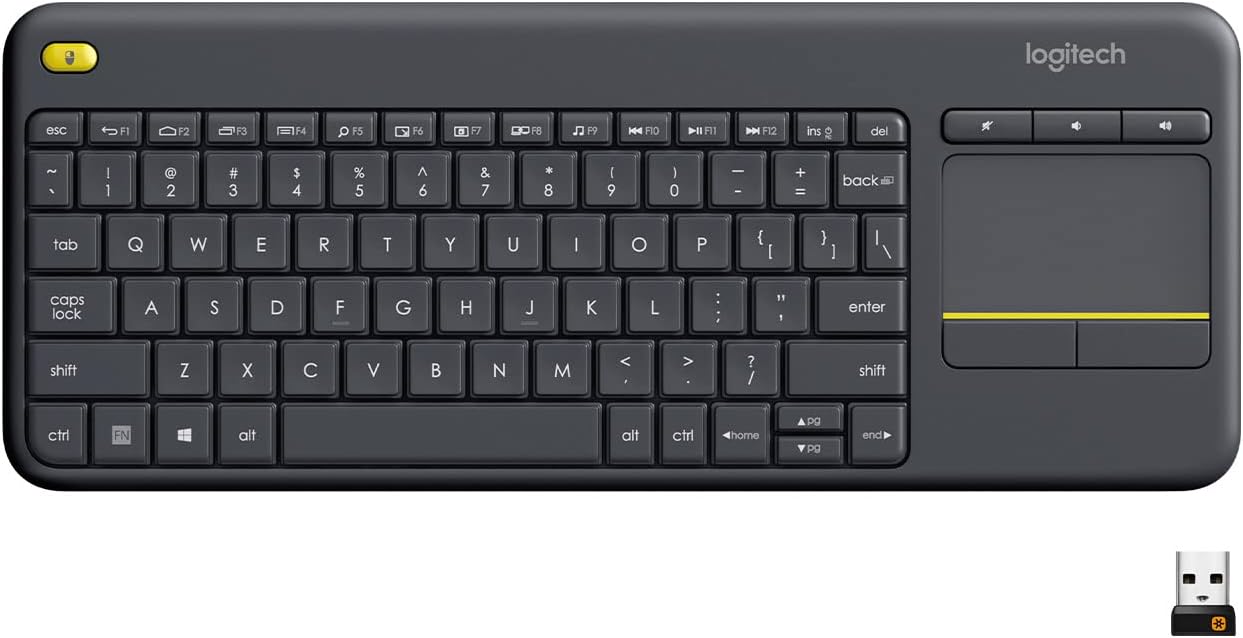
Running your fingers across the top case reveals a rough, matte plastic that feels cheap. The all-plastic board flexes and twists under moderate pressure. It is light, so it slides a bit on a smooth desk unless you press the rear riser down flat. That riser is actually the battery door, and it tilts the board slightly forward.
At 355.6 mm wide, it is narrow enough for a coffee table but not a lap. The chiclet keys sit close together with no frame. My average hands felt cramped after 20 minutes. The low-profile shape and slight incline kept my wrists from aching, though. If you have large hands, the narrow Enter and Shift keys will cause miss-hits. The trackpad sits right of center, with left and right click buttons below it. The left button is a bit longer than the right, which helps right-handed thumb use.
Core Performance & Feel
Typing on the K400 feels loose and wobbly. The membrane switches wiggle more than basic scissor switches. I hit far more typos than usual while writing this review. The spacebar also jammed when I pressed its far left edge. Key travel is short, and actuation needs very little force. That makes for fast taps but poor accuracy.
On Monkeytype, I struggled to get near 100 WPM with extra-low accuracy. The 2-key rollover is the real killer for fast typing and games. Press three keys at once, and the board drops one. Gaming is a no-go. Latency feels high compared to wired boards, so twitch shooters will frustrate you. The good news? Noise. Typing is almost whisper quiet even when I mashed the keys. The trackpad buttons give a slight quiet click. No one nearby will be annoyed. For media browsing on a couch, that quiet feel is welcome.
Power, Battery & Connectivity
Plugging the Unifying receiver into a front USB port gave instant plug-and-play on Windows. No software needed for basic use. The 2.4 GHz link stayed rock solid. I walked over 60 feet away with the dongle alone and still had a signal, beating Logitech's 33-foot claim. One receiver can pair up to six compatible Logitech devices.
The bad news? No Bluetooth. You cannot pair this with a phone, tablet, or smart TV that lacks a USB-A port. Android works only through a USB OTG cable. That is a big limit for modern living rooms.
Power comes from two AA batteries. Logitech rates them at 18 months. My set lasted several months of regular in-bed use. There is a two-way on/off switch on the back with a green/red color indicator. Sadly, there are no LED lights anywhere, so you never know when the battery is low until it dies. The receiver stores inside the battery bay when you travel.
Controls, Software & Daily Maintenance
Function keys F1 through F12 handle media controls, a desktop toggle, an app switcher, and Windows 8 charms shortcuts. On Windows 7, the Share, Devices, and Settings keys do nothing, and Search opens a browser search. There are five hotkeys on the top left, plus a second left-click button for two-handed couch use. Dedicated volume keys sit right above the trackpad, which I used constantly.
The Logitech Options app lets you edit function keys, flip scroll direction, and turn on basic multi-touch gestures. It is limited. You get no macros and no deep setup. MacOS and Linux work partly. The Android function keys are there, but the lack of Bluetooth makes those keys mostly useless.
Cleaning is easy. A dry microfiber cloth wipes the rough plastic clean. There is no spill rating in the source data, so keep liquids away. The loose keycaps trap dust and crumbs, so shake it out weekly if you eat near it.
How It Compares
Against the Arteck keyboard-touchpad combo, the K400 loses badly. The Arteck costs about the same and adds Bluetooth plus a dedicated dongle. It beats the K400 in nearly every way.
Upgrade to the Lenovo ThinkPad TrackPoint Keyboard II and you get far better build and Bluetooth. But you pay a lot more. That board is for serious typists who want a trackpoint, not a couch remote.
The Corsair K83 Wireless is smarter for two-handed controller grip. Its ergonomics and build are much better. It also sits in a far pricier tier.
- Arteck Combo: Better connection options and value at the same price.
- Lenovo TrackPoint: Way better keys and Bluetooth, much higher cost.
- Corsair K83: Slick controller feel, premium price.
- K400: Wins only on tested range and very low price.
The K400 is a one-trick pony for cheap living room browsing.
What I Like & What Could Be Better
I like how quiet this board is. Even angry typing made almost no noise. The tested wireless range surprised me at over 60 feet. The battery life is great, and the AA cells are easy to swap. The on/off switch with color coding is a small but smart touch. The volume keys above the trackpad are well placed.
What could be better? The plastic feels cheap and flexes too much. The lack of any status lights is a real pain. I never knew when the battery would die. The loose keycaps and 2-key rollover make serious typing a chore. And the missing Bluetooth hurts. That one cut limits where this keyboard can go. For the money, I wanted fewer missed keys. A slight bump in build quality would fix most of my gripes.
Who Should Skip This Product
Skip the K400 if you type for a living. The cramped layout, dragging spacebar, and high typo rate will slow you down. Writers and coders should buy a standard scissor-switch board instead. Gamers must skip it too. Two-key rollover and high latency kill any fast input. No macros either. Buy a wired gaming board.
If you need Bluetooth for a tablet or phone, walk away. The K400 has no Bluetooth at all. Get the Arteck combo if you want Bluetooth at a similar price. If you want premium build and a trackpoint, save for the Lenovo ThinkPad TrackPoint Keyboard II. Only buy the K400 for a cheap HTPC or couch setup where a USB dongle works. For that one job, it is fine.