
Design, Build & Physical Fit
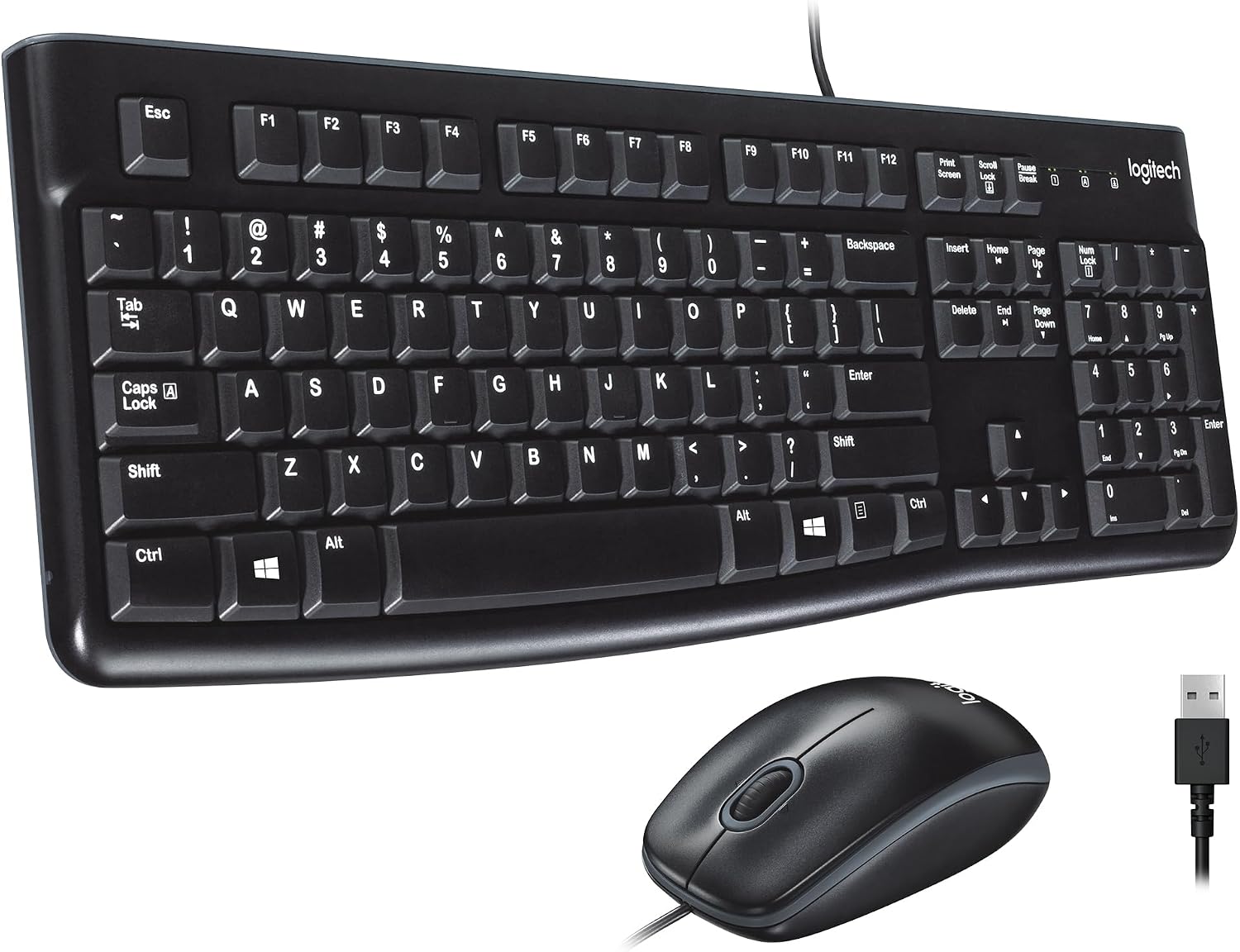
Running your fingers across the keys, you feel a glossy finish that looks better than the price tag suggests. The chassis is light at 453 grams, but it flexes slightly if you twist it hard. On a crowded desk, the full-size footprint takes up serious room, so measure your space first.
The fold-out tilt legs give you two angles. Rubber pads on the base keep it from sliding during fast typing. The keys are concave, which helps your fingers find the home row without looking. It is a simple, black plastic slab that does not try to be fancy.
The mouse is small and shaped for right-handed use. It matches the keyboard in matte black. Nothing here feels premium. But for a budget combo, it feels sturdy enough to survive daily use.
Core Performance & Feel
Typing on the MK120 is a quiet affair. The membrane switches produce a soft, muted thud. It is one of the quietest office keyboards under $20. The 2.8 mm travel is longer than many laptop keys, and the 60-gram actuation force gives you a clear bump when a key registers.
I typed for hours without finger fatigue. The concave keycaps keep your fingers centered. The mouse tracks smoothly on a cloth pad, though it lacks the precision for fast-paced shooter games. For report writing and document editing, it is accurate with very little lag.
Keep in mind: this is not a mechanical keyboard. The keys have a mushy bottom-out if you press hard. But for the price, the tactile feedback is surprisingly pronounced. The white legends are bold and easy to read against the black keys.
Power, Battery & Connectivity
Plugging the USB-A cable into a front port revealed the best part of this combo: it never needs batteries. The keyboard is bus-powered. It draws juice straight from your PC or laptop.
The 1.8-meter cable is long enough to reach around a desktop tower. Setup is truly plug-and-play. I plugged it in, and Windows 11 recognized it instantly. No software downloads. No pairing menus.
The mouse also connects via its own USB cable. Yes, that means two cords on your desk. If you hate cable clutter, this is not the combo for you. But if you hate hunting for AA batteries, the wired MK120 is a relief.
Controls, Software & Daily Maintenance
There are no media keys. You will not find a volume dial or play/pause button. The function row is standard F1 through F12. This is a bare-bones keyboard. If you rely on hotkeys for music or apps, you will miss them here.
Software is not required. The MK120 works with Windows, macOS, and Linux right out of the box. The mouse has no side buttons or DPI switch. It is a simple two-button scroll wheel design.
Cleaning is easy. The glossy keycaps wipe clean with a damp cloth. The keyboard has drain holes in the base for spills. Logitech rates it for up to 2 spill incidents. I would not test that with coffee, but it is nice to know a splash will not kill it.
How It Compares (Head-to-Head)
The most obvious rival is the Logitech MK270 Wireless Combo. The MK270 gives you wireless freedom, media hotkeys, and battery power. But it needs two AAA batteries and a USB receiver. The MK120 never needs charging. If you want a clean desk, the MK270 wins. If you want zero battery hassle, the MK120 wins.
Against the Logitech K270 keyboard, the MK120 is wired and cheaper. The K270 is wireless and uses batteries. The K120 keyboard is essentially the same as the MK120 keyboard but sold alone. The MK120 adds a mouse for a few bucks more.
Compared to generic budget combos, the MK120 has better key durability. The 10-million-press rating beats most no-name brands. The spill resistance is also a rare find at this price. You pay a tiny premium for the Logitech name, but you get a 2-year warranty.
What I Like & What Could Be Better (Pros & Cons)
What I Like:
- The quiet keys are perfect for shared offices or late-night typing.
- Bold white letters are easy to read, even in dim light.
- The spill-resistant design gives peace of mind.
- Plug-and-play setup took me seconds.
- The price is hard to beat for a full-size combo.
What Could Be Better:
- The plastic chassis flexes if you twist it. It does not affect typing, but it feels cheap.
- No backlighting means you cannot type in the dark.
- The mouse is too small for large hands and lacks side buttons.
- Two cables on the desk can get messy.
- The glossy keycaps show fingerprint smudges quickly.
Who Should Skip This Product
Skip the MK120 if you need a wireless setup. The cords will drive you crazy if you like to lean back or move your keyboard around. Buy the Logitech MK270 instead for wireless freedom.
Skip it if you are a competitive gamer. The mouse sensor is basic. It cannot keep up with fast flicks in shooters. You need a gaming mouse with high DPI and low click latency. Also skip if you work in the dark. There is no backlight, so you will be hunting for keys by feel.
Finally, skip it if you have large hands. The mouse is tiny. It will cramp your palm during long sessions. Look for a combo with a larger mouse or buy a separate ergonomic mouse.