
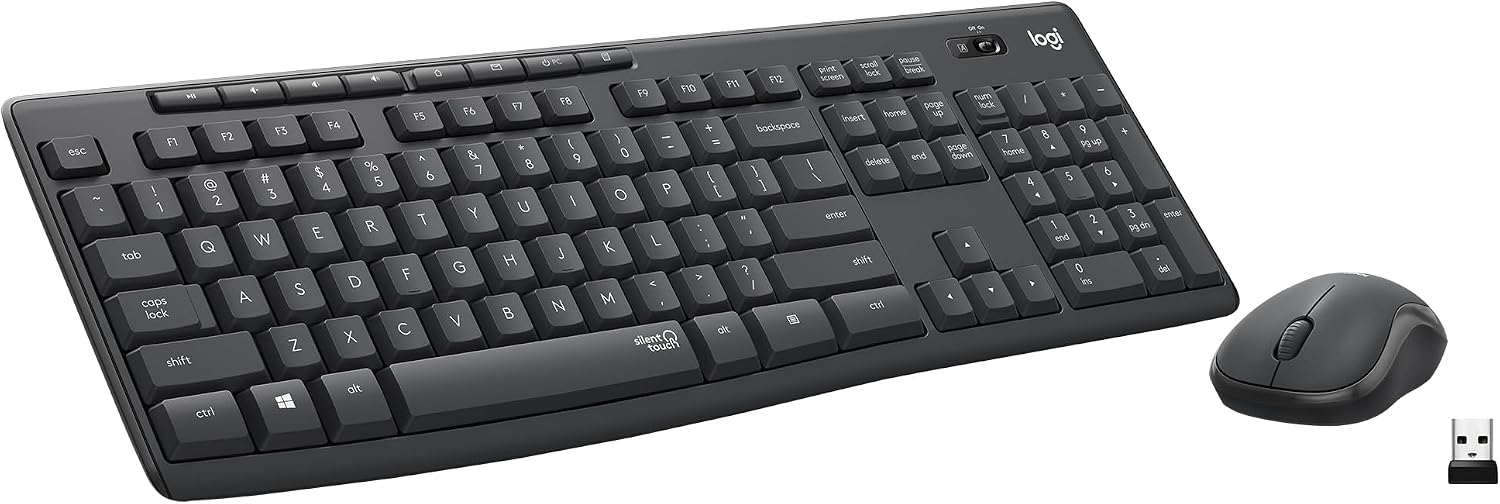
Design, Build and Physical Fit
Pulling the keyboard from the box, the first thing you notice is the width. At 20.08 inches across, it eats a big chunk of a 48-inch desk. There is no way this fits in a laptop bag. The set lands at 1.6 lbs total, so it stays put in normal use.
Both parts are plastic with a mix of matte and glossy finishes. The glossy patches on the mouse pick up fingerprints fast. After a month, the mouse shell already looked smudged and worn. The keyboard flexes a bit if you twist it, and the build is passable at best. It is not a travel board.
On the plus side, the keyboard has sturdy adjustable tilt legs underneath. You can set two typing angles without any wobble. That small touch matters for long days at the desk.
The mouse is small and light. It survived multiple drops onto a wood floor during my month of testing, so it is tougher than it looks. But the compact shape is a problem for big hands. My fingers felt cramped after an hour.
Core Performance and Typing Feel
Typing on this combo feels soft and shallow. Key travel is shorter than on most standard boards, which slows down fast typists. If you like a deep, tactile click under your fingers, this will frustrate you.
The SilentTouch claim is the main draw. Logitech says it cuts noise by about 90% versus standard keys, and out of the box that held up. For the first three months, the board was genuinely quiet. My roommate stopped complaining about my late-night typing.
Then things changed. Keys got louder over time. By month twelve, the noise matched a plain keyboard I had in a drawer. The space bar developed a click and a slight screech after about two months. That was annoying, to be honest.
The mouse tracks fine for web browsing and documents. Clicks are soft and accurate at first. Speed is stable on the 2.4 GHz link with no lag I could feel. There is no DPI button, so you cannot tune cursor speed beyond your OS settings. Multi-key rollover covers normal typing speeds, nothing more. This is not a gaming setup.
Power, Battery and Wireless Connection
Plug the tiny nano USB receiver into a front port and you are done. No pairing, no Bluetooth menus, no driver hunt. It worked right away on Windows 11 and on a Chromebook in my house.
The 2.4 GHz link stayed solid up to about 10 meters. I walked to the next room and the cursor still moved. No dropouts during my testing.
Battery life is the headline here. The keyboard runs on 2 x AAA and Logitech rates it up to 36 months under normal daily use. That is a long time between swaps. The mouse runs on 1 x AA with a rated 18 months. I am more skeptical of the mouse figure. Leave it switched on all day and it will not last that long.
Both parts have individual on/off switches, which helps a lot. Use them at night and you will stretch the cells well past the rated numbers.
One clear miss. There is no battery level indicator on either device. When the keys die, they just die. Keep spare AAAs in a drawer.
Also note the single receiver. Only one ships in the box. If you want to jump between a desktop and a laptop, you have to unplug and move the dongle each time.
Controls, Software and Daily Upkeep
Across the top row sit eight one-touch shortcut keys. They cover play, pause, volume up, volume down, mute, and browser controls. They work without any software, which is a real plus for locked-down work laptops.
That is also the catch. You cannot remap them. No Logitech Options install fixes that here. What ships is what you get.
There are no dedicated media keys as separate buttons. The shortcuts live in the top row and double as function keys. Some buyers want a true volume knob or standalone transport buttons. This combo does not offer that.
OS support is narrow and clear. Windows 7, 8, 10, and 11 work out of the box, plus Chrome OS. Mac users should walk away. The layout is Windows-style with Ctrl, Win, and Alt in that order, and keys like Print Screen, Menu, Mail, and Calculator do not work on macOS at all. The listing even says no Mac support.
Cleaning is simple but not fun. The matte keyboard hides dust well. The glossy mouse shell shows every fingerprint and skin oil mark, so keep a microfiber cloth nearby.
The keyboard is spill-resistant for light accidents. A small splash should survive. Do not test it with a full mug.
How It Compares: MK295 vs the Competition
Against the older Logitech MK270, the MK295 wins on noise alone. Logitech claims over 90% less typing and click noise thanks to SilentTouch, and in the first months my ears agreed. The MK270 is louder and uses the same basic plastic build. If quiet matters most, the MK295 is the better pick.
Against a standard wired keyboard and mouse, the MK295 still comes out ahead on sound. A plain membrane board clacks on every key. This one is softer and duller. That difference matters in an open office or a shared apartment.
Against a more expensive wireless combo from a premium brand, the gap flips. Those boards use better plastics, feel stiffer in the hand, and add features like backlit keys, DPI buttons, and multi-device switching. The MK295 has none of that. It feels cheaper, and it is.
Where the MK295 stands apart is the price tier. There are almost no direct rivals sold as a complete silent combo at this budget level. Silent keyboards I have tested that work with Windows often make more noise. So the combo holds a small but real niche.
Quick breakdown:
- MK295 vs MK270: Quieter, similar build, better for shared spaces.
- MK295 vs standard wired sets: Softer typing, no cords, similar price tier.
- MK295 vs premium wireless combos: Fewer features, weaker feel, far lower cost.
What I Like and What Could Be Better
After a year of daily use, the good parts still stand out.
What I like:
- The early noise drop is real. Month one to three felt softer than anything else I owned at this price.
- Battery runs are huge. 2 x AAA for the board and 1 x AA for the mouse means very few swaps.
- The full numpad is a gift for spreadsheets and data entry.
- The one-touch volume and mute keys work with no install.
- Setup takes seconds. Plug in the dongle, and you are typing.
What could be better:
- The quiet fades. By month twelve, my board was as loud as a standard one.
- The space bar picked up a click and screech after roughly two months.
- Mouse buttons on my unit lost click registration after about a year of steady use.
- The tiny mouse cramps big hands and never survives long sessions for me.
- No backlit keys, no DPI button, no battery gauge. Small things, but they add up.
- One receiver in the box limits two-computer setups.
- The warranty is about 12 months, which expired well before my mouse failed at the 21-month mark.
Who Should Skip This Product
Mac users should skip it outright. The MK295 does not support macOS, and the Windows key order will fight your muscle memory. Buy a Logitech MX Keys or an Apple Magic Keyboard instead.
Skip it if you have large hands. The mouse is compact and caused me cramping after long sessions. No DPI button means you cannot tune cursor speed either. Go for a Logitech M720 Triathlon or a full-size wired mouse.
Skip it if you travel. At just over 20 inches wide, the board will not fit a laptop bag. Pick a compact 75% wireless board instead.
Skip it if you game seriously, edit video, or need thumb buttons. The optical sensor and basic rollover are fine for documents, not for shooters or timeline work. A Logitech G-series mouse is the better call.
Skip it if you want a volume knob, backlit keys, or a battery indicator. This combo has none of those.
But if you work in a shared space, use Windows or Chrome OS, want a long-lasting budget combo, and can live with plastic that ages fast, the MK295 still earns its keep in the under-$50 tier.