
Design, Build & Physical Fit
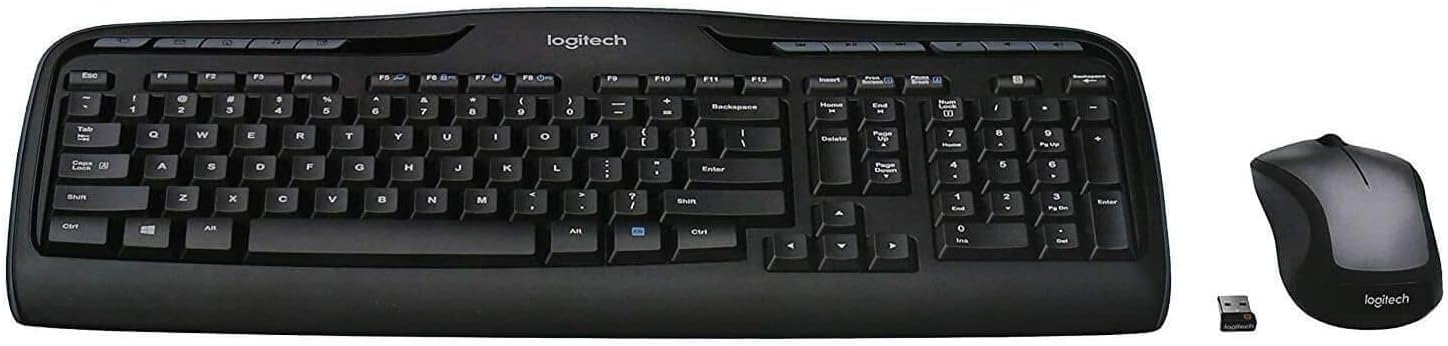
Setting the keyboard down on a standard desk reveals an expansive footprint. The plastic chassis measures 17.56 inches wide and tips the scale at 1.47 pounds. Integrated rubber feet grip smooth wood tables securely during intense typing sessions.
The contrasting black and silver finish looks tidy in a home office. While the casing uses lightweight plastic, chassis flex remains well within acceptable limits. You will not notice creaks unless you intentionally twist the frame with two hands.
Its low-profile deck slopes gently toward your wrists. The slim profile prevents extreme wrist bends, which reduces fatigue after typing for hours. The bundled mouse features a compact, ambidextrous shell that slips neatly into a laptop bag.
Core Performance & Feel
Pressing down on the keys provides soft, cushioned travel with minimal acoustic noise. The low-profile membrane keys produce a quiet sound, making it a great pick for shared rooms. The tactile bump feels distinct enough to prevent accidental strikes without slowing your natural rhythm.
Key pitch allows standard finger spacing across the home row. You will not suffer from finger cramps during long spreadsheet entry. The keys do not stick or bind on off-center keypresses.
Fast typists get clean key registration during daily email tasks. However, key rollover stays tuned strictly for standard typing speeds. Fast twitch gaming will cause missed inputs. The simple mouse sensor tracks reliably on cloth pads, but it lacks the dpi headroom required for fast esports.
Power, Battery & Connectivity
Plugging the 2.4 GHz nano receiver into a front USB port links both peripherals instantly. Logitech's wireless link avoids cable clutter without demanding manual Bluetooth syncing steps. The tiny USB dongle handles both inputs at once, freeing up extra ports.
Power efficiency remains a standout highlight for this package. The keyboard runs for up to 24 months on a single pair of AA cells. The accompanying mouse delivers up to 12 months before requiring fresh batteries.
Internal battery indicator LEDs alert you before your gear runs completely dry. There is no rechargeable USB port, so keep spare alkaline cells in your desk drawer. Wireless range remains rock-solid within normal desk distances, showing zero input lag or dropped keystrokes in everyday use.
Controls, Software & Daily Maintenance
Reaching across the top row gives you access to 11 dedicated hot keys. These buttons let you adjust system volume, mute audio, and skip music tracks with one tap. You also get four programmable F-keys for personal quick actions.
Software setup runs through the Logitech Options utility on Windows 10 and 11. Customization stays somewhat basic, limiting deep macro building to select shortcut zones. Plug-and-play works out of the box on Windows setups without installing drivers.
Daily upkeep requires caution around open drinks. The chassis lacks spill resistance entirely, meaning an accidental coffee splash can ruin internal traces permanently. Use compressed air and dry microfiber wipes rather than wet cleaners to protect the membrane sheet.
How It Compares: Logitech MK335 vs Competitors
Stacking the MK335 against popular rivals shows clear lines between pure value and premium comfort.
- Logitech Wave Keys: The Wave Keys keyboard features an ergonomic wave layout and a cushioned wrist rest. It scores an 8.3 rating thanks to deep ergonomic support, but it sits in a much higher price tier and skips the bundled mouse.
- HP 230 Wireless Keyboard: The HP 230 posts an 8.1 performance score with ultra-low key profiles. It suits buyers seeking an ultra-cheap standalone board, though it lacks the 11 dedicated media hot keys found on the MK335.
- ProtoArc Foldable Keyboard: The ProtoArc scores 9.0 in our database by offering pocketable foldability and multi-device Bluetooth. It beats the MK335 for travel, but the MK335 remains far more stable for permanent desktop setups.
What I Like & What Could Be Better
Living with this combo highlights distinct practical perks alongside a few clear hardware compromises.
What I Like: - Dedicated media keys provide instant volume and playback controls - Low-profile keys deliver whisper-quiet keystrokes in shared spaces - Long battery lifespan reaching 24 months on the keyboard - Shared USB receiver frees up peripheral ports
What Could Be Better: - Zero spill resistance leaves the membrane vulnerable to liquids - No Bluetooth mode limits use with phones or slim tablets - Plastic chassis lacks a built-in wrist rest
Who Should Skip This Product
Competitive gamers should steer clear of this bundle completely. The general-purpose wireless link and standard matrix rollover cannot keep pace with fast-paced gaming inputs. Look at dedicated mechanical wired boards like the Redragon K552 instead.
Coffee lovers who drink near their keyboards might want to look elsewhere too. A single liquid spill can destroy the membrane circuitry. Shoppers seeking multi-device Bluetooth pairing for tablets should skip this and choose the ProtoArc Foldable board.
Does the Logitech MK335 work with Bluetooth?
No. The MK335 relies strictly on its included 2.4 GHz USB nano receiver and does not support direct Bluetooth connections.
Is the Logitech MK335 keyboard spill-resistant?
No, it is not spill-resistant. Keep all liquids and open drinks far away from the keys to avoid permanent circuit damage.
What batteries does the Logitech MK335 use?
The set runs on AA alkaline batteries. The keyboard lasts up to 24 months, while the mouse operates for up to 12 months.
Does the MK335 work with Windows 11?
Yes. The combo offers plug-and-play support for Windows 10 and Windows 11 right out of the box via USB.