
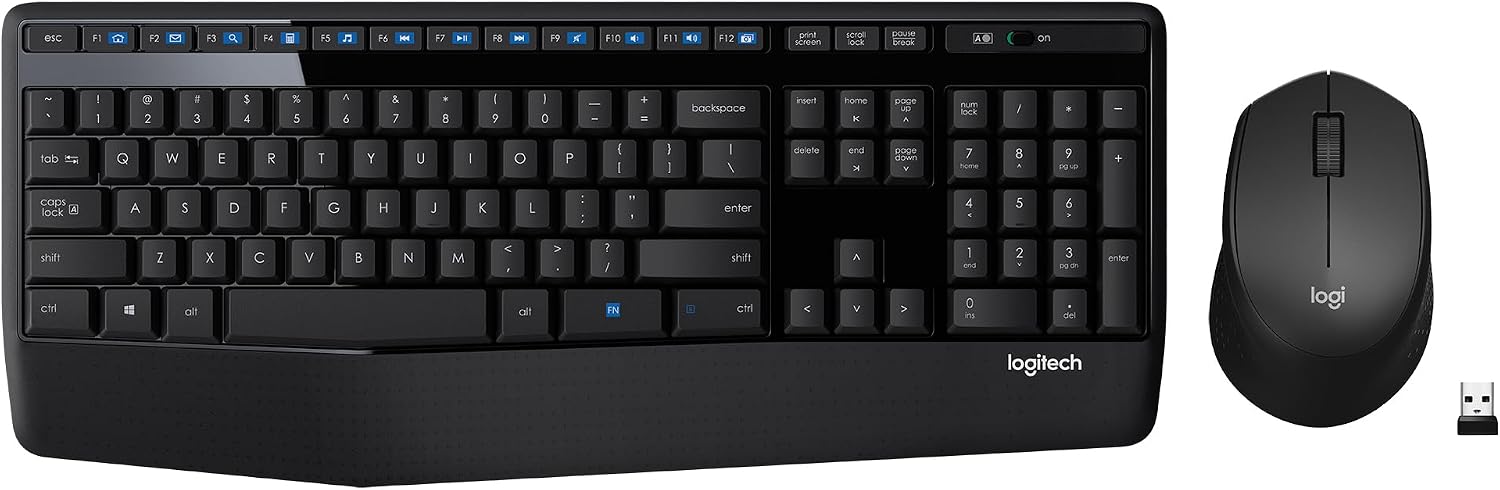
Design, Build and Physical Fit
Under the keycaps sits a plain plastic plate that flexes a little if you press hard on the middle. That flex is normal at this price tier. The board still sits flat and stable on a desk thanks to rubber feet and a reasonable 3.66 kg listed weight. The full-size layout spreads wide, so measure your tray before buying.
The integrated palm rest is the standout touch. My wrists rest on it through long work sessions without going numb. Keys are well spaced and easy to find by feel. The glossy black finish looks sharp for a week, then every fingerprint shows up.
The mouse is where the build story sours. Its shell feels hollow and light next to something like a Logitech M720. The right-handed contour fits a medium palm, but the plastic creaks when I squeeze it. Small-handed users may find it a touch long.
Core Performance and Typing Feel
Typing on the MK345 is quiet and light, closer to a laptop deck than a mechanical board. Key travel is shallow but responsive enough for fast writing. I knocked out several thousand words in a day without finger fatigue. The keys are not mushy, and they bottom out with a soft thud instead of a sharp click.
Noise readings, subjectively, land on the quiet side. My microphone never picked up clacks during calls. That helps if you share an office or take meetings all day.
Multi-key rollover handles normal typing speeds fine. Slam in three or four letters at once and it keeps up. Push it further and fast key combos can drop.
Here is the catch. Over months of use, letters on the keycaps wear off. Mine started fading around the nine-month mark. Logitech does honor warranty swaps for worn keycaps if you send proof of purchase and photos.
Power, Battery and Wireless Setup
Plug the tiny USB receiver into a free port and you are typing in seconds. No drivers, no pairing screen, no software download. The MK345 runs on AAA batteries, and both devices have a physical on/off switch on the bottom.
Battery life is the headline. Logitech claims up to 36 months for the keyboard and 18 months for the mouse. In my continuous daily testing, the keyboard ran over six months of 8-hour workdays on one battery change. That claim holds up in the real world.
The 2.4 GHz link works from up to 10 meters in open space. Walls and desk clutter eat into that. I saw the odd dropped keystroke when a metal monitor stand sat between the receiver and the board.
One risk to know before you buy. Logitech will not sell you a spare USB receiver unless you have proof of purchase. Lose the dongle and the combo becomes a paperweight.
Controls, Cleaning and Daily Maintenance
Twelve enhanced F-keys handle volume, play, pause, and track skips without leaving your document. On a work-from-home desk, that shortcut row earns its space fast. There is a Caps Lock light, but no Num Lock indicator. I still get tripped up by that.
No software is needed, and none is offered. You cannot remap keys, build macros, or tweak the mouse buttons beyond the basics. That keeps setup dead simple for office users, but power users will feel boxed in.
The keyboard deck is spill-resistant, so a coffee splash is survivable if you wipe it fast. The glossy top does show dust, oil, and crumbs. A microfiber cloth and a soft brush between the keycaps are all you need. Pull the batteries out before any deep cleaning.
The mouse is sealed with no screws on top, so cleaning means wiping the shell and clearing the sensor window with a dry cloth.
How It Compares
Stacked against the Logitech M720, this combo loses on mouse quality. That M720 tracks smoother, feels denser in the hand, and holds up better over years. If the mouse matters most to you, spend up.
Left-handed buyers should look at ambidextrous or left-side mice. The MK345 mouse is carved for right hands only, and mirrored options cost more but fit better.
If you want key remapping, macros, or custom shortcuts, the MK345 is not the board. Premium keyboards give you layers and software control the MK345 simply does not offer. Its key legends also sit centered on the caps rather than in the top-left corner, which some typists take a week to get used to.
- Logitech M720: Better tracking and build, higher price, more features.
- Left-handed mice: Better comfort for lefties, MK345 mouse is right-handed only.
- Premium customizable keyboards: Offer remapping and macros, MK345 has zero key customization.
What I Like and What Could Be Better
The palm rest sold me first. It turns a cheap board into something you can use for a full workday without wrist ache. Spill resistance is a real safety net for clumsy desks. The 12 media keys are a small thing I now miss on other boards. And honestly, the battery life is silly good. You tuck the combo under a monitor and forget it exists for a year.
What I do not like starts with the legends. Nine months of heavy typing and mine were fading. That is not acceptable, even at this tier. The lack of a Num Lock light bugs me daily. No backlight means the board vanishes in a dark room.
Wireless reliability is hit or miss. Most days the link is rock solid. Every so often, usually with a metal stand in the path, keystrokes vanish mid-sentence. Not great, to be honest.
Mac users, walk away. Source data flags the combo as not built for macOS, and macOS support varies across listings.
Who Should Skip This Product
Skip the MK345 if you want backlit keys. Working in a dim room or a night-shift desk means you will be hunting for keys by feel. Buy a board with LED lighting instead.
Skip it if you game. Latency and dropped keystrokes show up in fast titles. Grab a wired or low-latency wireless gaming board and a proper gaming mouse.
Skip it if you are left-handed. The mouse contour fights your grip all day. Buy an ambidextrous or left-handed mouse.
Skip it if you live in macro software. There is no remapping and no customization here. Power users need a board that supports key layers.
Skip it if you need USB-C. The pair runs on older USB-A via the receiver dongle. Modern laptops with only USB-C ports will need an adapter.
Skip it if you use a Mac as your daily driver. Compatibility claims conflict across listings, and the safe call is to buy a combo certified for macOS.