
Design, Build & Physical Fit
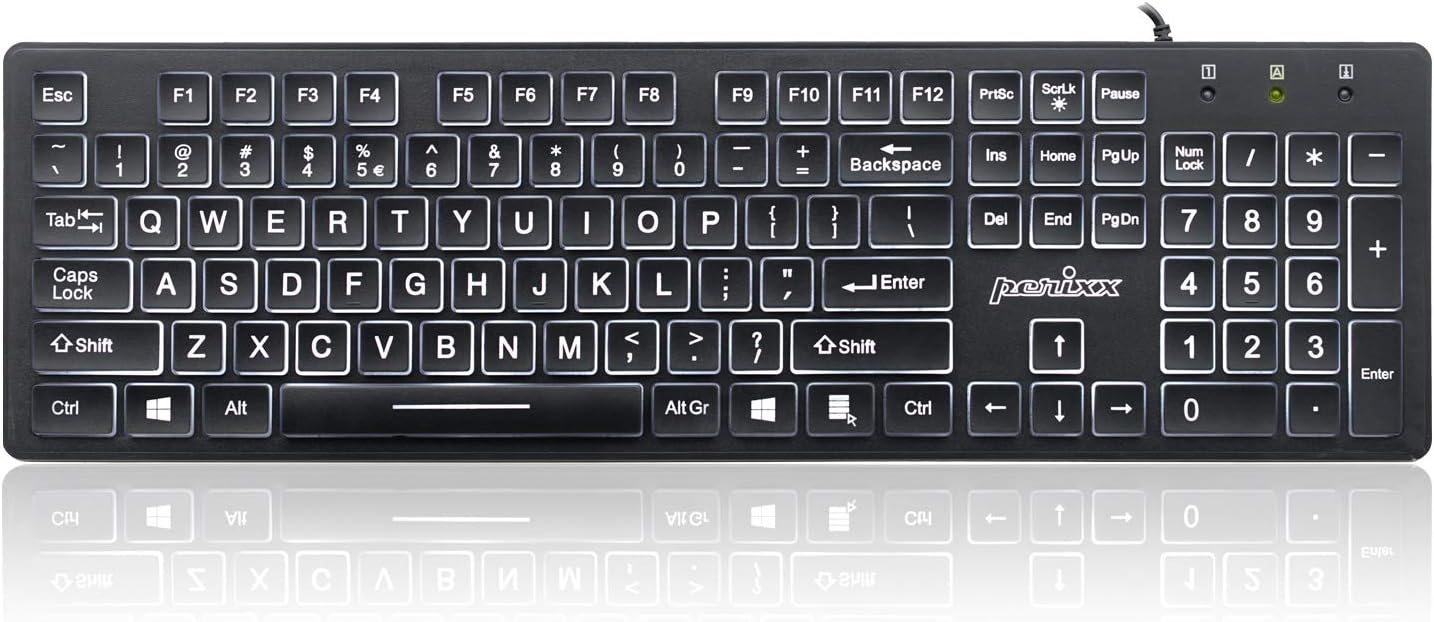
Picking up the Perixx PERIBOARD-317, you notice its lighter build. It feels substantial enough for desk use but lacks the heavy, planted feel of a premium mechanical board. The full-size layout includes 104 keys, measuring 17.32 x 5.08 x 1.06 inches. This footprint is typical for a full-size keyboard, fitting well on standard desks without demanding too much space. Despite its light weight of just 1.3 lb, the keycaps do not wobble under normal use.
The key legends are a standout feature. They are white on matte black, roughly three times larger than standard text. This drastically improves readability. The legends are printed deep, so they should resist wear for a long time. Unlike many large-print boards that skip key lights or use distracting RGB, this one uses a clean, calm white backlight. The keys have a chiclet design, helping with typing accuracy and reducing eyestrain. It works fine with or without a wrist rest.
Core Performance & Typing Feel
Under the keycaps sit durable membrane switches, rated for 5 million presses. This provides a typing feel that is solid for a membrane board. It's quiet, yet it avoids feeling mushy. Key presses offer a responsive experience, and the low-profile design contributes to accurate typing.
A key aspect for comfort, especially for users with joint pain or arthritis, is the soft cushion at the bottom of the press. This means keys don't snap harshly at bottom-out, making for a gentler experience over hours of use. For standard typing speeds, multi-key rollover works reliably, and I never saw key blocking. Tactile bumps on the F, J, and numpad 5 keys help with finger placement without looking. The white backlight illuminates characters cleanly from underneath, without light bleeding around the edges. This keeps legends crisp day or night.
Power, Connection & Setup
Plugging the USB-A cable into a port immediately gets you started. The Perixx PERIBOARD-317 is a strictly wired keyboard. It does not offer a wireless version, lacking Bluetooth or battery power. This makes for a dependable, plug-and-play experience, needing no extra software or drivers. The wired connection also means you never worry about battery life.
The approximately 5-foot sturdy cable gives enough reach for most desktop setups. This wired design simplifies setup across different systems. It works with Windows, macOS, Chrome OS, and Linux right out of the box. This broad OS support means you can move it between machines without fuss. Power delivery comes straight from the USB port, so no external power bricks are needed. This is a simple, no-frills connection designed for reliability.
Controls, Software & Daily Maintenance
The Perixx PERIBOARD-317 keeps things simple on the control front. You will find integrated Fn shortcuts for media and navigation. These are handy for quick volume changes or track skipping without leaving the keyboard. The white LED backlight has three adjustable brightness levels. You can tweak these settings directly on the keyboard, not through software. There are no dedicated volume keys, relying on these Fn shortcuts instead.
Since it's a plug-and-play device, there's no software suite to install or manage. This is a pro for ease of use but a con for deep customization. Compatibility with Windows, macOS, Chrome OS, and Linux is solid. However, Mac users might find customization options limited compared to Windows. For cleaning, the chiclet key design with distinct gaps should make wiping down surfaces easy. I recommend checking the specific spill-resistance rating before exposing it to any liquids. The keycaps are ABS, a common material.
How the Perixx PERIBOARD-317 Compares
When you stack the Perixx PERIBOARD-317 against others, its niche becomes clear. Most generic large-print keyboards often skip backlighting entirely. If they do include it, it's frequently distracting rainbow RGB that washes out letters. The 317, however, uses a clean, non-bleeding white LED backlight. This makes a huge difference for visibility.
Compared to a standard office keyboard, the 317 shines in comfort for some users. Its membrane keys offer a softer cushion at the end of key travel. This is much easier on arthritic hands than the snappy bottom-out common in many office boards. It's also a world apart from chunky vintage IBM keyboards. The 317's lighter build, at about 1.3 lb, does not have the hefty, immovable feel of those older mechanical giants. While some wireless options exist, like the Logitech K810, the 317 focuses on a reliable wired connection and its unique accessibility features. Many budget wired options, like the Microsoft Wired Keyboard 600, lack backlighting, making the Perixx a stronger choice for low-light needs.
- Versus Generic Large-Print Keyboards: Better backlighting quality and legibility.
- Versus Standard Office Keyboards: Softer key feel, more comfortable for joint pain.
- Versus Vintage IBM Keyboards: Much lighter and more compact.
- Versus Wireless Keyboards (e.g., Logitech K810): Lacks wireless, but offers reliable wired connection with its key backlight.
What I Like & What Could Be Better
After using the Perixx PERIBOARD-317, its strengths really pop. The oversized, high-contrast legends with sharp white backlighting are fantastic for visibility. Typing feels quiet and consistent, good for office or home. The soft bottom-out cushion makes a real difference for long hours, especially if your hands tire easily. I also appreciate the simple, plug-and-play setup. You just connect the cord, and it works with nearly any OS. The price point is competitive, delivering great value for an illuminated keyboard.
However, some things could be better. It's strictly wired, with no wireless options, a deal breaker for some. The lack of programmable macro keys limits its use for gaming or advanced workflows. While macOS works fine, deeper customization might be hard. Also, the build quality is on the lighter side; a bit more heft would make it feel more premium. I also couldn't verify replacement keycap availability, which impacts long-term maintenance.
Who Should Skip This Perixx PERIBOARD-317
If you are a serious gamer who needs macro keys or advanced anti-ghosting, this Perixx PERIBOARD-317 is not for you. Look instead at something like a Redragon K552 for a budget mechanical gaming board. If you need wireless freedom for a clean desk setup or for connecting to multiple devices at once, pass on this one. A Bluetooth keyboard, like a Logitech K380, would be a much better fit.
Those who prefer heavy, rigid chassis might also find this keyboard too light. It's not a tank. If you need robust software for key remapping or custom profiles, this keyboard’s plug-and-play simplicity will frustrate you. Its best use is for its core purpose: clear, comfortable typing for productivity and accessibility. If your needs fall outside that, there are better options out there, even in the same price tier.