
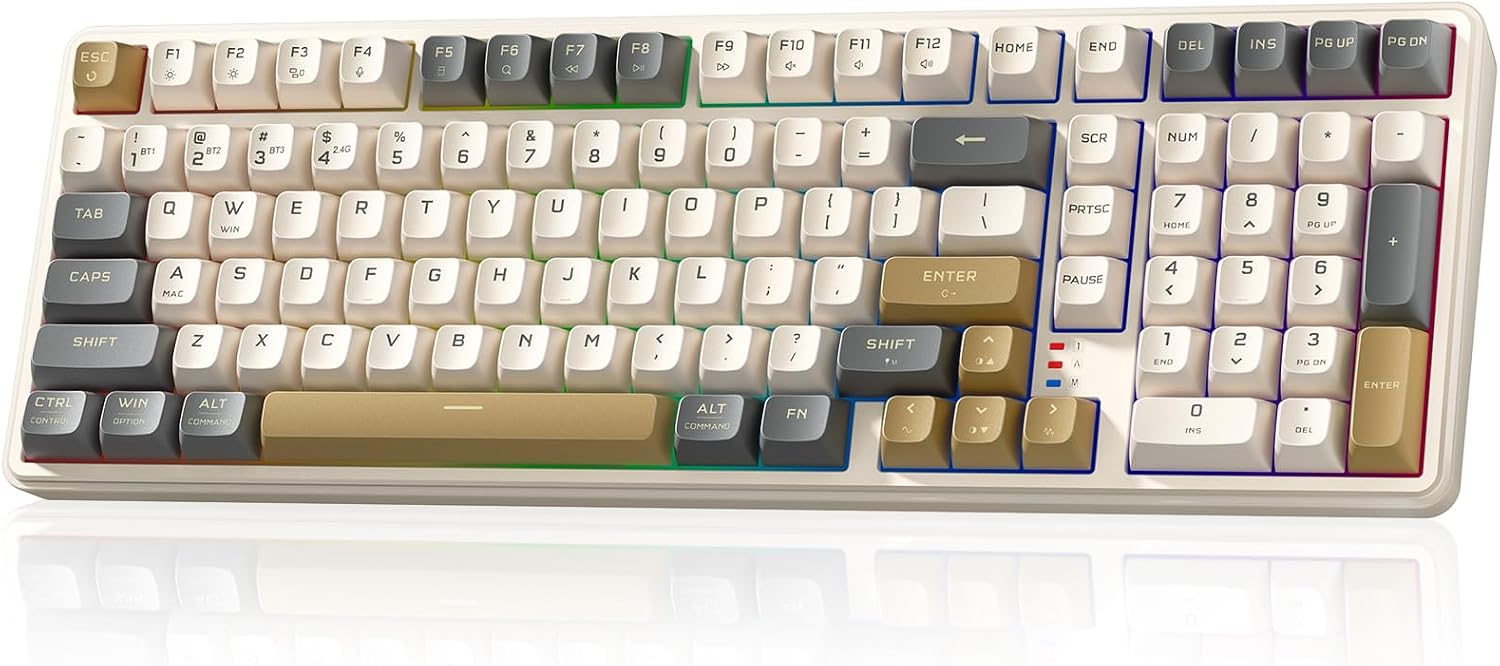
Redragon K528 Design, Build & Physical Fit
Running your fingers across the K528, you immediately feel the plastic enclosure. This is a common choice in the under-$70 tier. While it keeps costs low, it results in a bit of deck flex. It's not the most premium feel, to be honest. The overall build is standard, fitting Redragon's reputation for providing affordable, durable options.
Integrated rubber feet on the base do a good job preventing unwanted sliding. This keeps the keyboard stable on your desk during heavy typing or gaming. The full-sized, 104-key layout, including a numpad, means a larger footprint. Be ready for that on a crowded desk. This board aims for a commercial look, so color options are basic.
The keycaps are ABS plastic with an OEM profile. They use either pad-printed legends or thin shine-through ABS. This can mean legends wear off over time with heavy use. Also, thin ABS walls can create a higher-pitched, hollow acoustic signature. The F and J homing bumps, sadly, are not very pronounced. This makes touch typing without looking down a bit harder.
Redragon K528 Core Performance & Feel
Typing on the K528 uses house-brand Mint Mambo linear red switches. These actuate at about 45 grams of force, with 2 mm of pre-travel and 4 mm total travel. This is a standard spec for linear reds, offering a smooth, consistent press. However, the switches show some loose stem wobble out of the box. You might also notice spring weighting drift across different keys. Some scratchiness is present, too. This is not uncommon in this price range.
The stock stabilizers are Cherry-style PCB-mount, using a 1.5 mm wire gauge. These are prone to spacebar rattle and key ticking. This is due to inconsistent factory lube. The thin ABS keycap walls contribute to a higher-pitched, hollow sound. This differs from the deeper, more solid acoustics of premium boards. For gaming, the K528 supports N-Key Rollover (NKRO). This means every key press registers, even when pressing many at once. This makes it suitable for most gaming. However, it lacks the rapid trigger or analog input needed for high-end competitive play.
Redragon K528 Power, Battery & Connectivity
Connecting the Redragon K528 is simple, thanks to its tri-mode capability. You can use it wired via the included USB-C cable. This cable is detachable and unbraided. For wireless use, you have two choices: Bluetooth or a 2.4 GHz RF dongle. A dedicated switch on the keyboard lets you toggle between these modes easily. This is a great feature for multi-device setups.
Setting it up is plug-and-play. You just connect via USB-A or USB-C, and drivers install automatically across standard operating systems. This means you're up and running fast. The board operates with low power, which is good. However, specific battery life details are not available. Enthusiast alternatives in a slightly higher price bracket often include larger batteries. Still, for its price, having three connection modes is a strong selling point.
Redragon K528 Controls, Software & Daily Maintenance
The K528 features useful on-board controls. You can adjust basic RGB backlight settings using FN key shortcuts. This works without needing to install any software. A physical mode toggle switch also helps switch between connection types easily. There's even a tactile, intuitive dedicated volume knob. This is a nice touch for quick audio adjustments.
For deeper settings, Redragon offers configuration software. But it's only for Windows. macOS and Linux users must rely on the hardware controls. The software itself is basic, clunky, and limiting. It lets you set macros, remap keys, and fine-tune RGB. But don't expect the advanced options found in enthusiast-level software. In terms of care, the keyboard is easy to wipe down with a dry microfiber cloth. Always check for specific spill-resistance ratings before exposing it to liquids.
How the Redragon K528 Compares
When comparing the Redragon K528 to others, its budget position becomes clear. Take the NuPhy Halo 65, for instance. That board feels more planted and dense, using superior materials. The K528's lighter plastic enclosure, by contrast, feels less sturdy. NuPhy options also cost easily double the K528's price. The Redragon provides core mechanical functionality at a fraction of that cost. This makes it a value leader.
- NuPhy Halo 65: Offers a more premium build and denser feel but costs significantly more.
- Gateron G Pro Yellow Switches: These actuate lighter at ~35 gf. They also have noticeably tighter stem wobble and a smoother factory glide than Redragon's red switch clones.
- Laptop/Low-Profile Keyboards: The K528's standard mechanical switches need more key travel and force. Low-profile laptop keys offer a much shorter, snappier press.
What I Like & What Could Be Better (Redragon K528 Pros & Cons)
After using the Redragon K528, a few things really stand out, both good and bad. I appreciate its versatile tri-mode connection; being able to switch between wired, Bluetooth, and 2.4 GHz is super handy. It’s a very serviceable and affordable keyboard, true to Redragon's reputation. The dedicated volume knob is a great practical addition. Also, the hot-swappable sockets are a big plus. They let you easily change switches over time if you want a different feel.
On the downside, the plastic enclosure with its deck flex is noticeable. The thin ABS keycaps create a higher-pitched, hollow sound. The legends on these keycaps will wear off under heavy use, and some even look a bit chipped, like the 'O' and '0' appearing broken. The stock Mint Mambo switches have loose stem wobble and scratchiness. The stabilizers also suffer from rattle and ticking due to poor factory lube. These are common trade-offs in this price range, but they affect the typing experience.
Who Should Skip the Redragon K528 Keyboard
This Redragon K528 isn't for everyone. If you are a high-end competitive gamer, you should skip this product. It lacks features like rapid trigger, analog input, or Hall Effect sensing. These are critical for peak competitive performance. Look at boards like the Wooting 60HE or SteelSeries Apex Pro Mini instead. Power users and enthusiasts who want deep firmware customization should also pass. The Redragon software is basic and Windows-only, limiting advanced configuration.
Anyone prioritizing premium build materials and acoustics will find the K528 lacking. Its plastic casing, hollow sound profile, and stock switch issues won't satisfy those seeking a more refined experience. Consider alternatives like a NuPhy Halo series board for superior materials and typing feel, even if it means spending more. If you need robust macOS or Linux software support for keyboard customization, this isn't your board.
Is the Redragon K528 a good keyboard for gaming?
The Redragon K528 is suitable for general PC gaming thanks to N-Key Rollover and RGB lighting. However, it lacks advanced features like rapid trigger for competitive esports players, who may need specialized gaming boards.
What kind of switches does the Redragon K528 use?
The Redragon K528 uses Redragon's house-brand Mint Mambo linear red switches. These actuate at 45 gf with 2 mm pre-travel, offering a smooth, consistent keystroke. The board also features hot-swappable sockets.
Does the Redragon K528 have companion software?
Yes, the Redragon K528 has basic Windows-only software for macros, key remapping, and RGB control. macOS and Linux users must rely on on-board hardware controls, as the software is not available for those platforms.
Is the Redragon K528 keyboard hot-swappable?
Yes, the Redragon K528 includes hot-swappable switch sockets. This lets you easily change out the Mint Mambo switches for other 3-pin mechanical switches. This allows for simple customization and repairs.
What is the build quality of the Redragon K528?
The K528 features a plastic enclosure with some deck flex, common for its budget price. It has ABS keycaps that can wear over time, and basic Cherry-style stabilizers. Integrated rubber feet provide good desk stability during use.