
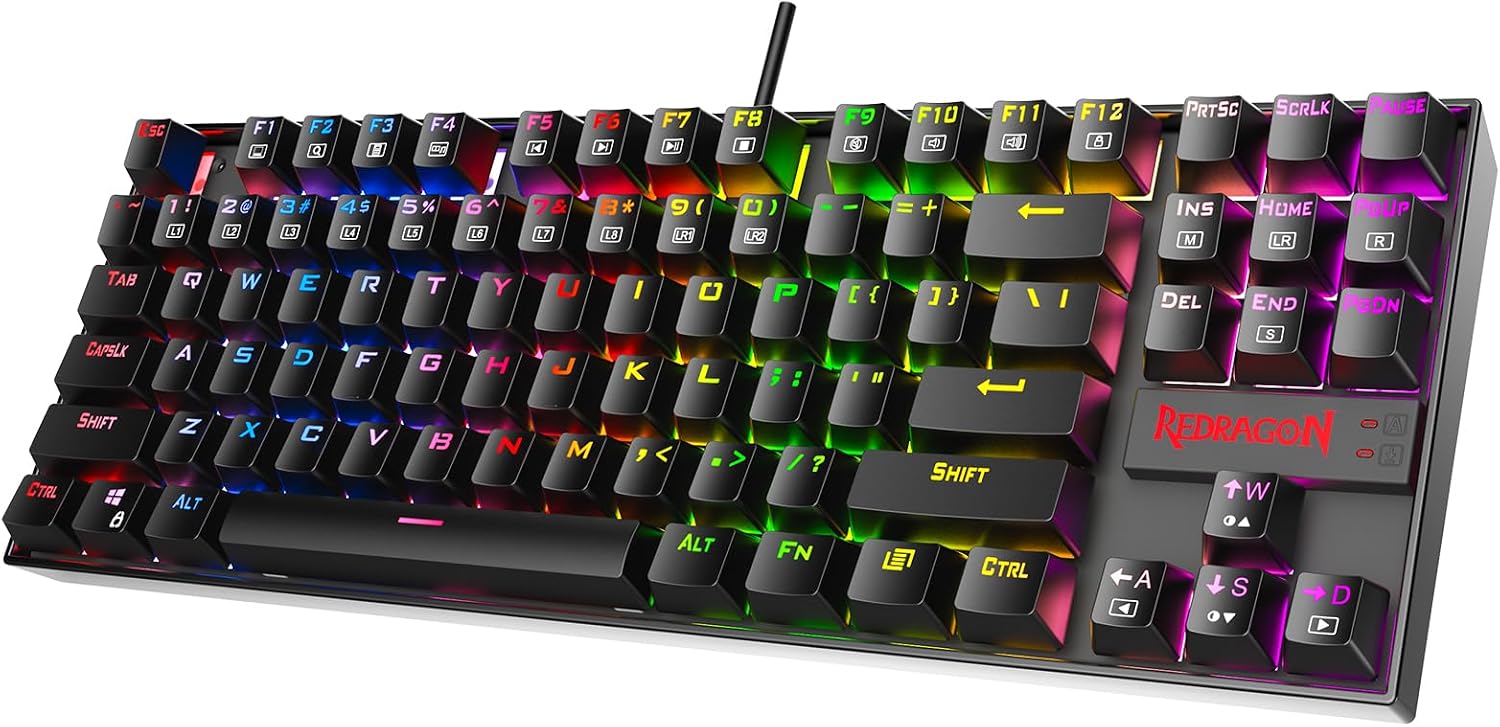
Design, Build & Physical Fit
Lifting the board out of the box reveals a heavy, solid feel. The aircraft-grade aluminum top plate gives it a rigidity that most plastic keyboards in this price range lack. There is no flex in the chassis. I tried twisting it, and it barely moved. The laser-etched keycaps have a textured, smooth finish that feels good under your fingertips. They are double-shot injection molded, so the legends will not wear off easily.
The 87-key layout is compact. It frees up space for mouse movement. The keyboard sits flat on the desk, but it also has flip-out feet for a slight angle. At 2.6 pounds, it stays put during intense play. The black design with the red accent keys looks sharp. It blends in well with a standard desktop setup. You do need to consider the height. The keys sit a bit high, which might fatigue your wrists if you type for hours without a rest.
Core Performance & Feel
Typing on the Outemu Red switches is a smooth experience. These are linear switches, meaning there is no tactile bump. You press down, and it glides straight to the bottom. This makes them quiet compared to clicky Blue switches. They are not silent, but the noise is a low thud rather than a sharp click. I found them responsive for fast-paced gaming. The actuation is light, so your fingers do not get tired easily.
The anti-ghosting performance is great. I hit complex key combos in FPS games and never missed an input. The N-Key rollover supports over 30 keys at once. The 50 million click lifespan means this board will last for years. While marketed for gaming, the linear feel is also good for typing. I typed several long articles without issues, maintaining my usual speed and accuracy.
Power, Battery & Connectivity
This is a wired-only keyboard. There is no Bluetooth or 2.4 GHz wireless option here. You plug the gold-coated USB cable into your PC, and that is it. The keyboard draws power directly from the USB port. This means you never have to worry about battery life or charging. The gold coating on the connector helps prevent rust and ensures a stable data transfer.
The setup is true plug-and-play. I plugged it into a Windows 10 PC, and it installed drivers instantly. There is no bloatware or mandatory software installation. It works with Linux too. If you have a Mac, some keys might not work as expected, though basic typing functions are fine. The braided cable is sturdy and long enough to route behind a desk comfortably.
Controls, Software & Daily Maintenance
There is no companion software for the K552P. You control everything through Fn key combinations. This keeps the keyboard simple, but it limits customization. You can adjust the RGB lighting using shortcuts like Fn + Ins or Fn + Home. There are 18 lighting modes to cycle through. However, you cannot set individual key colors. The media controls are also on the Fn layer. It is a bit slower than dedicated media buttons, but it works.
The board features a splash-resistant design. I spilled a small amount of water on it during testing, wiped it off, and it kept working. The plate-mounted switches make cleaning tricky. You cannot easily remove them without soldering. However, the double-shot keycaps are easy to pull off for a deep clean. The lack of software means you cannot program macros on the fly. You are stuck with the factory presets.
How It Compares
Compared to the Eagle Tec KG010, the K552P offers similar features but with a better aluminum build. The Eagle Tec uses blue lights, while the Redragon gives you RGB. The K552P feels more premium due to the metal top plate. It is a step up in materials.
If you have a higher budget, the SteelSeries Apex Pro Gen 3 is a more well-rounded option. It offers adjustable switches and dedicated software. However, it costs significantly more. The Corsair K100 RGB is a top-tier premium board with a price tag to match. It has a volume wheel and per-key lighting that the K552P lacks.
Against the Redragon S101-3 PRO, the K552P is a major upgrade. The S101-3 is a full-size membrane keyboard. The K552P gives you mechanical switches, a smaller footprint, and a metal frame. For pure value, the K552P is hard to beat.
What I Like & What Could Be Better
I really like the build quality. The aluminum frame makes it feel like a much more expensive keyboard. It does not slide around the desk. The red linear switches are also a highlight. They are fast, snappy, and great for both gaming and long typing sessions. The plug-and-play setup is a relief if you hate installing drivers.
However, the lack of software is a downside. You cannot remap keys or create complex macros. This is a dealbreaker for MMO players who rely on macros. The lighting is also basic. You get pretty colors, but you cannot customize them per key. The media controls being tied to the Fn layer is annoying. I prefer dedicated buttons for volume control. Also, the keys are loud. They are not clicky, but the bottoming-out sound is noticeable in a quiet room.
Who Should Skip This Product
You should skip this if you need a wireless keyboard. The K552P is strictly wired. If you want a clean desk setup without cables, look at the Logitech G系列 or similar wireless boards.
Skip it if you need silent switches for a shared office. While quieter than Blue switches, the Reds still make noise. Your coworkers will hear you typing. You should also skip this if you are a macro-heavy gamer or streamer. Without software, you cannot automate complex commands. You need a board like the Corsair K100 or a Redragon model with software support.
Finally, skip it if you need a numpad. This is a TKL board. If you work in accounting or data entry, the missing number pad will slow you down. You would be better off with a full-size keyboard like the Redragon S101.