
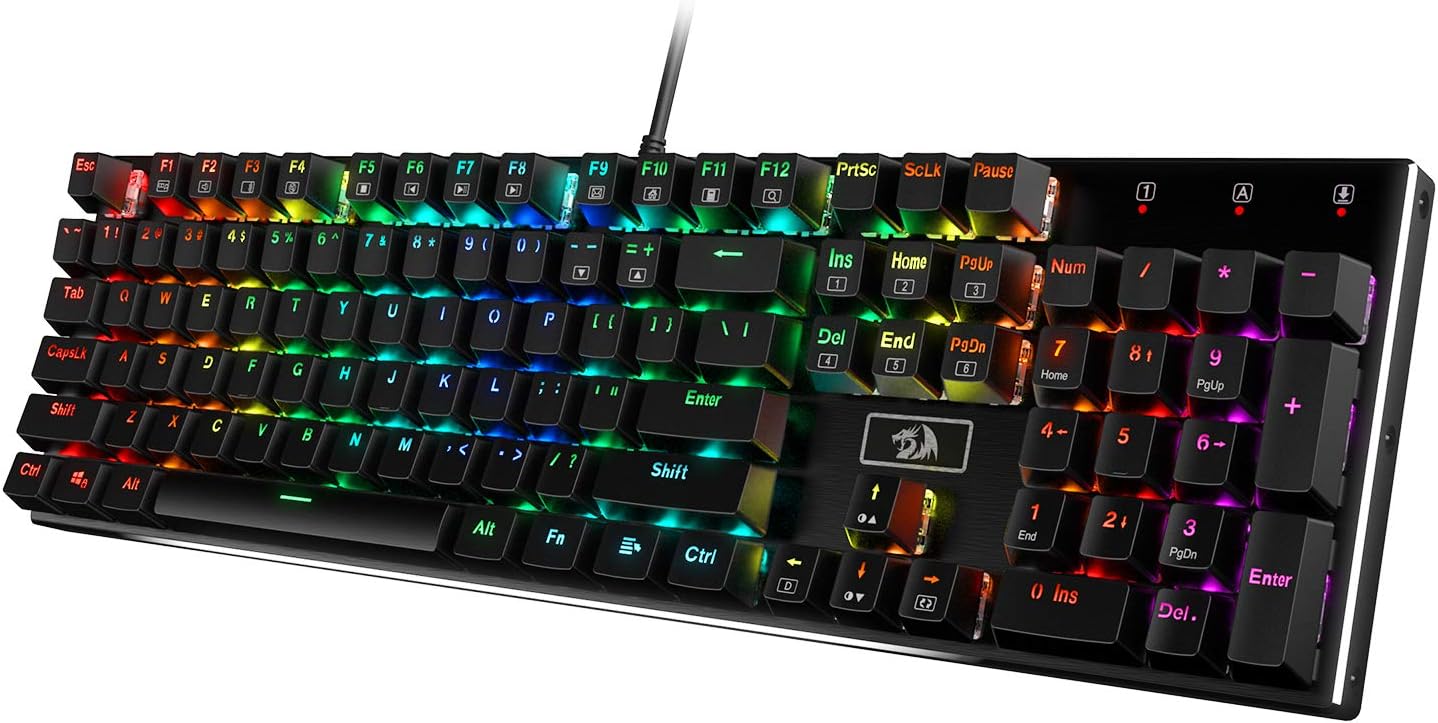
Design, Build & Physical Fit
Lifting the Redragon K556 from the box immediately conveys its solid construction. The 1.0 kg weight is substantial, keeping the board firmly planted on your desk during frantic typing or intense gaming. The chassis uses heavy-duty metal and ABS construction. A brushed aluminum alloy top plate gives it a surprisingly premium feel for its price tier.
Running your fingers across the matte-finish texture, you feel the durability. This full-metal build means zero case flex, a common flaw in cheaper plastic keyboards. It's a tank-solid board that keeps keystrokes steady. The full-size 104-key layout, while ergonomic for long use, does command significant desk space. This is not a compact board. Its dimensions, 435.1 x 123.95 x 40.39 mm, confirm it’s a big footprint.
Core Performance & Typing Feel
Under the keycaps sits Outemu brown mechanical switches. These hot-swappable switches (3-pin and 5-pin) provide a soft, tactile bump that feels good for both typing and gaming. This tactile feedback gives you a clear point of actuation without the loud click of blue switches.
In our tests, the full anti-ghosting and N-key rollover worked as expected. Rapid key combos registered accurately, making it suitable for fast-paced gaming. The board’s wired USB connection, featuring a gold-plated port, aims for stable data transfer without lag. Regarding acoustics, Redragon included upgraded sockets and noise-absorbing foams. While these additions cut down on the hollow sound often found in budget mechanical boards, don't expect silence. Mechanical brown switches still produce an audible sound, scoring a 7.0 out of 10 for noise control. They are quieter than clicky blues but louder than membrane boards.
Power & Connectivity
Plugging the K556 in is as simple as it gets. It's a strictly wired USB keyboard. This means no batteries to worry about charging or swapping, ever. The power source is corded electric, drawing power directly from your computer via its braided USB cable.
The wired connection offers plug-and-play simplicity. There’s no pairing process or wireless dongles to manage. Just connect the USB cable to an available port, and you’re ready to go. For those who prioritize a stable, lag-free connection above all else, especially in gaming, this wired setup is a benefit. However, it does tie you to your desk, limiting placement options.
Controls, Software & Daily Maintenance
Above the numpad, you'll find a useful rotary knob. This knob is surprisingly handy for quick volume adjustments, scrubbing through media, or zooming in and out of documents without leaving the home row. It's a nice touch not always seen in this price range.
The K556 features 18 (or 20, depending on the source) RGB lighting modes. You can customize backlight brightness using FN + '↑' and '↓' keys. FN + INS-PgDn activates various modes. Redragon offers optional software for fine-tuning the RGB, creating macros, and remapping keys. While functional, some users report minor quirks with this software. The keyboard works with Windows (10, 8, 7, XP, VISTA) and Mac OS X, offering broad compatibility.
For maintenance, the keycaps are self-designed and removable. This makes cleaning easy. A keycap puller is included. While the design is splash-resistant, it is not waterproof, so check specific ratings before exposing it to liquids. Enthusiasts might find that the stock stabilizers need lubrication out of the box for a cleaner sound.
How the Redragon K556 Compares
The K556 punches above its weight class in one key area: build quality. Most keyboards in its price range use all-plastic frames. These often flex under pressure. The Redragon K556, with its brushed aluminum alloy top plate, feels much more robust. It stays steady during intense sessions, preventing the flex common in plastic boards. This gives it a premium desktop presence.
Against typical budget mechanical gaming keyboards, the K556 holds its own thanks to this aluminum frame and hot-swappable switches. This makes it a better value for those wanting to try different switches later. However, when compared to more advanced boards like the Royal Kludge RK84, the K556 shows its limits:
- Connectivity: The RK84 offers wireless. The K556 is wired-only.
- Layout: The RK84 has a compact 75% layout. The K556 is full-size.
- Price: The RK84 typically costs more, around the mid-$70 range.
- Hot-Swap Sockets: The RK84 uses a more universal socket type. The K556's sockets mostly restrict you to Outemu switches or those with very thin pins, requiring modification for Gateron or similar switches. If you value wireless freedom and broader switch compatibility for modding, the RK84 is a better, albeit pricier, option.
What I Like & What Could Be Better
My time with the Redragon K556 revealed some clear strengths and weaknesses.
What I Like:
- Sturdy Build: The aluminum top plate and overall weight make this feel far more solid than most keyboards at its price point. No wobbling or flex, period.
- Value: It offers hot-swappable mechanical switches and a metal chassis in a budget-friendly package. Great for entry-level buyers.
- Tactile Typing: The Outemu brown switches deliver a satisfying tactile bump. This helps with typing accuracy and gaming feedback.
- Easy Maintenance: The removable keycaps and included puller make cleaning and future customization simple.
- N-Key Rollover: All 104 keys register accurately, even during fast button mashing. No ghosting issues.
What Could Be Better:
- Durability Concerns: A significant number of reports point to keys failing after about a year of use. That's not great, to be honest.
- Wired-Only: No wireless option means less desk flexibility and more cable management.
- Limited Hot-Swap: While it has hot-swap sockets, they are generally compatible only with Outemu switches unless you modify other brands. This limits options for enthusiasts.
- Software Quirks: The Redragon software can be a bit clunky for RGB fine-tuning and macros.
- RGB Inconsistency: Some users report uneven lighting or minor mold marks on keycaps, which hints at quality control issues.
Who Should Skip This Product
The Redragon K556 offers a lot for its low price, but it isn't for everyone. You should skip this keyboard if you absolutely need a wireless setup. Its wired-only design is a firm dealbreaker for users wanting a clutter-free desk or who move their keyboard frequently.
Furthermore, if long-term durability is your top priority and you expect a keyboard to last 3+ years without issue, this might not be your best bet. Owner feedback indicates a pattern of keys failing after roughly one year. For greater peace of mind and better longevity, consider investing in a higher-tier brand like a HyperX Alloy Origins or a Ducky One 3. Those offer proven build quality, though at a higher cost. If you're a serious keyboard modder who wants to experiment with a wide range of switches like Gateron or Kailh without modifying pins, look for a board with more universal hot-swap sockets, such as the Royal Kludge RK84, despite its higher price.