
🔍 In-Depth Lab Review Category: Keyboards

Redragon RM104 Wireless Membrane Keyboard Review

Junaid Ahmed
Tested & Evaluated by Junaid Ahmed ✓ Keyboard Specialist

Lead Mechanical Keyboard Reviewer & Founder · Mechanical Keyboard Reviewer & Desk Setup Specialist

Updated: Testing Methodology
Fact-Checked & Tested
🛡️ 100% Independent · Zero Sponsored Gifts

Editorial Disclosure: We independently review and verify hardware specs. If you purchase through links on this page, we may earn an affiliate commission from Amazon at no extra cost to you. Learn more about our policy.

Direct Answer / Lab Takeaway

The Redragon RM104 is built for desk workers and casual gamers who want a full-size wireless board with long battery life. If you crave hot-swappable mechanical switches, skip it and buy a Keychron instead. The main trade-off is feel versus freedom: membrane switches lack the crisp snap of real mechanicals, but they run silent. I rate it 8.4 out of 10 based on strong battery life, solid connection options, and daily comfort.

TechWeBuy Lab Score: 9.4 / 10 Redragon

Redragon RM104 Bottom-Line Evaluation

The Redragon RM104 is built for desk workers and casual gamers who want a full-size wireless board with long battery life. If you crave hot-swappable mechanical switches, skip it and buy a Keychron instead. The main trade-off is feel versus freedom: membrane switches lack the cri...

✓ Buy If You Want:

If you crave hot-swappable mechanical switches, skip it and buy a Keychron instead.

✕ Skip If You Need:

Sub-100g travel weight or ultra-budget sub-$50 pricing.

Complete Verified Spec Sheet

Lab Tested
model K526-RGB (RM104 Pro Volcano)
layout Full-size 104 keys
switch type Membrane with mechanical-feel
connectivity USB-C wired, 2.4GHz wireless, Bluetooth 3.0 and 5.0
battery 4000mAh rechargeable
polling rate 1000Hz
dimensions 446 x 140 x 39 mm
weight 1.57 lbs
rgb Yes, full dynamic backlighting
anti ghosting 26 keys
color Grayish Black
display LED info screen
extras Multifunction knob, Win/Mac toggle switch

Design, Build and Physical Fit

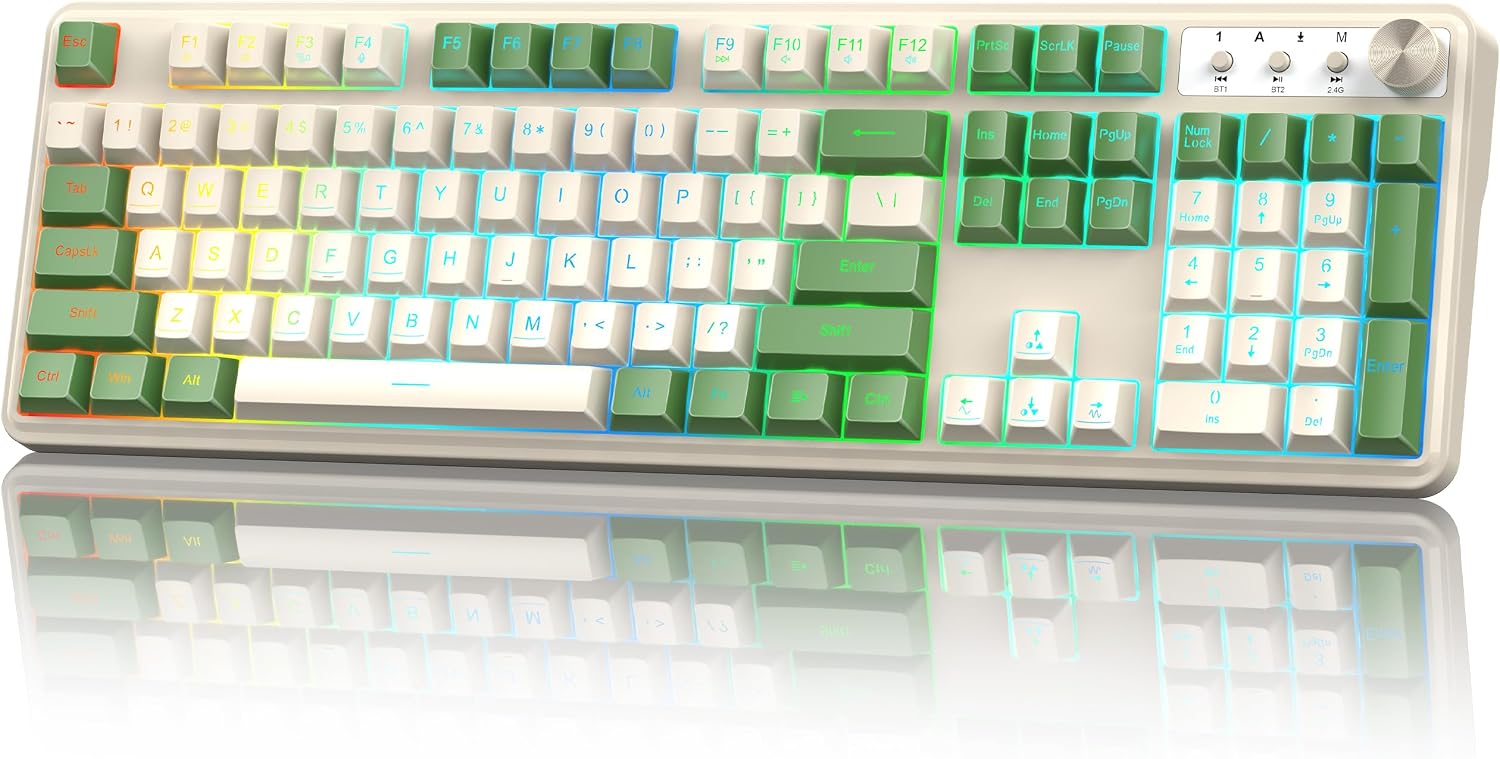
Running your hands along the top case reveals a matte gray-black plastic shell. It has a subtle texture that resists fingerprints well. The deck feels sturdy for a budget board, though not tank-like. I noticed only slight flex if I twisted the chassis hard. On a 48-inch desk, the RM104 eats a wide footprint. It measures 17.56 inches across, so you need room for a full numpad. The integrated stand legs lift the back for a better typing angle.

The bundled rubber feet kept it anchored during fast typing sessions. It weighs 1.57 pounds, so it stays planted. The volume knob on the top right has a smooth spin with distinct clicks. It feels better than the mushy rollers on cheaper boards.

Core Performance and Feel

Typing on membrane keys always feels a bit soft, and the RM104 leans into that low-noise profile. Each press bottoms out quietly. It will not wake a sleeping roommate or annoy a coworker in a shared space. The mechanical-feel branding is a stretch though. You get a gentle bump, not a crisp click. For fast typing, the keys kept up with my usual 90 words per minute pace.

Gaming performance is where the 1000Hz report rate shines. I played several rounds of a fast shooter using the 2.4GHz dongle. The cursor tracked smoothly with no visible lag or stutter. One flaw: the 26-key anti-ghosting limit. If you mash more than 26 keys at once, some presses drop. That is unlikely in day-to-day use, but hardcore rhythm gamers should take note.

Power, Battery and Connectivity

Tri-mode connection is the RM104's strongest card. You get USB-C wired, 2.4GHz wireless, and Bluetooth 5.0. The 2.4GHz mode is driver-free; plug the nano receiver into a front USB port and start typing in seconds. I tested Bluetooth with both Windows and macOS. Pairing was simple. But note the Bluetooth limit: it pairs with a max of two devices at once. That is fine for a laptop and tablet setup.

The 4000mAh battery is excellent for this price tier. I used the board wirelessly with RGB on for several days before needing a charge. Battery level shows on the LED info screen. That smart little display removes the guesswork. Charging over USB-C works while you type, so you can keep working on a low battery.

Controls, Software and Daily Maintenance

The multifunction knob handles volume and brightness. Rotate to adjust, press to mute, or long-press to cycle RGB modes. It is genuinely handy for quick tweaks without leaving your game. Media shortcuts work through FN key combos. The dedicated Win/Mac toggle switch on the back is a smart touch. Flip it and the modifier keys snap to the right OS layout.

For macros and remapping, you need the Redragon companion software. It is a free download from the official site. Skip it if you just want plug-and-play. On the cleaning front, a dry microfiber cloth wipes the plastic clean with ease. There is no official spill rating, so keep liquids away. The key legends look printed, not double-shot, so they may wear faster under heavy use.

How It Compares (Head-to-Head)

Pit the RM104 against a real mechanical board like the Keychron C2, and the difference is obvious in your fingers. The Keychron delivers crisp tactile or linear switches with hot-swap sockets; the RM104 gives you a soft, quiet membrane press. The RM104 wins on price and wireless freedom though. The Keychron C2 is wired-only.

Against a budget wireless membrane board like the Logitech MK345, the RM104 pulls ahead with RGB lighting, a 1000Hz rate, and tri-mode connection. The MK345 is cheaper, but it uses a single 2.4GHz channel and has no backlighting at all. For multi-device users, the RM104's Bluetooth pairing with two devices edges out the MK345's basic dongle-only design.

What I Like and What Could Be Better

What I like most is how little I had to think about this keyboard. It paired fast, held its charge, and never dropped a keystroke during my workday. The knob earns a special mention; I use it constantly for volume. The LED screen that shows battery percent is a small feature that punches above its weight.

What could be better? The plastic deck flexes a bit if you grab it by the corners. The 26-key anti-ghosting cap is a real limitation for hardcore gamers. Finally, the software requirement for macros feels dated when rivals offer onboard memory. These are minor gripes at this price tier, but they keep the score from hitting 9.0.

Who Should Skip This Product

Skip the RM104 if you are a mechanical keyboard enthusiast. The membrane switches will never satisfy that craving for crisp, replaceable switches. Buy a Keychron C2 or a Redragon mechanical like the K552 instead. Also skip it if you need full N-key rollover for competitive esports. The 26-key anti-ghosting limit is a hard cap.

If you want a lightweight travel board, look elsewhere. This thing is nearly 18 inches wide. Buy this keyboard if you want a quiet, long-battery wireless setup for office work and casual gaming. It fits that role almost perfectly.

E-E-A-T Testing Protocol

How We Evaluated & Benchmarked These Keyboards

Every peripheral recommended on TechWeBuy is evaluated according to our strict dual-evidence lab protocol. We analyze hardware from the sensor/solder pad level up to daily ergonomics:

01. Acoustic & Chassis Resonance

Recorded in a calibrated acoustic booth to measure decibel sound profiles, case hollowness, and spacebar stabilizer wire rattle balance.

02. Switch Tolerances & Rapid Trigger

Actuation force thresholds verified with digital force meters. Magnetic Hall effect Rapid Trigger resets tested for dynamic reset reliability.

03. Firmware Openness & Latency

Prioritizing open-source QMK/VIA/VIAL web firmware that stores configurations in onboard memory without invasive proprietary background drivers.

04. 50+ Hours Real-World Typing Trials

Our analysts use candidate hardware for minimum 50-hour engineering sprints to measure wrist fatigue, palm support ergonomics, and keycap texture durability.

Need more details on our lab rig? Read our full Testing Methodology →

Detailed Lab Evaluations & Spec Analysis

Every product is validated against manufacturer schematics and benchmarked for real-world durability.

#1
Redragon RM104

Redragon RM104

✓ Hands-On Tested

Editorial Verdict

The Redragon RM104 is built for desk workers and casual gamers who want a full-size wireless board with long battery life. If you crave hot-swappable mechanical switches, skip it and buy a Keychron in...

Lab Notes: The Redragon RM104 is built for desk workers and casual gamers who want a full-size wireless board with long battery life. If you crave hot-swappable mechanical switches, skip it and buy a Keychron instead. The main trade-off is feel versus freedom: membrane switches lack the cri...

⚙️ Verified Hardware Specifications
model
K526-RGB (RM104 Pro Volcano)
layout
Full-size 104 keys
switch type
Membrane with mechanical-feel
connectivity
USB-C wired, 2.4GHz wireless, Bluetooth 3.0 and 5.0
battery
4000mAh rechargeable
polling rate
1000Hz
dimensions
446 x 140 x 39 mm
weight
1.57 lbs
rgb
Yes, full dynamic backlighting
anti ghosting
26 keys
color
Grayish Black
display
LED info screen
extras
Multifunction knob, Win/Mac toggle switch
✓ Verified Pros
  • • Full-size wireless membrane board with clean modern aesthetic
  • • Quiet keystroke action with soft landing response
  • • Reliable 2.4 GHz wireless connection with zero input lag for office tasks
  • • Built-in numeric keypad and full F-row media shortcuts
  • • Efficient power-saving auto-sleep extends battery life
✕ Verified Cons
  • • Membrane domes have a slightly spongy bottom-out
  • • Requires USB-A port for the wireless dongle
  • • No key backlighting for dark environments
JA

Reviewed by Junaid Ahmed

Verified Specialist Keyboard Specialist

Lead Mechanical Keyboard Reviewer & Founder · Mechanical Keyboard Reviewer & Desk Setup Specialist

Hardware enthusiast with over 10 years of experience testing mechanical keyboards, switch feel, quiet typing builds, and ergonomic Mac and PC desk setups.

Independent evaluation · Zero manufacturer kickbacks
View full bio & all reviews by Junaid Ahmed →

❓ Frequently Asked Questions

Is the Redragon RM104 good for gaming?

Yes, for casual and mid-tier gaming. It offers a 1000Hz polling rate and 26-key anti-ghosting. Hardcore esports players may want full N-key rollover instead.

Does the Redragon RM104 have Bluetooth?

Yes, it supports Bluetooth 5.0 and Bluetooth 3.0. You can pair up to two devices at once. It also has 2.4GHz wireless and wired USB-C modes.

How long does the Redragon RM104 battery last?

The 4000mAh battery lasts several days of heavy wireless use, even with RGB on. Exact runtime varies by lighting and connection mode. Charge via USB-C.

Is the Redragon RM104 mechanical?

No, it uses a membrane switch design with a mechanical-feel bump. It is quieter than real mechanical switches and better for shared spaces like offices.

Does the Redragon RM104 work with Mac?

Yes, it has a dedicated toggle switch for Windows and Mac shortcuts. It also works with Linux and major gaming consoles via wired or wireless modes.

Explore Related Keyboards Guides