
Design, Build & Physical Fit
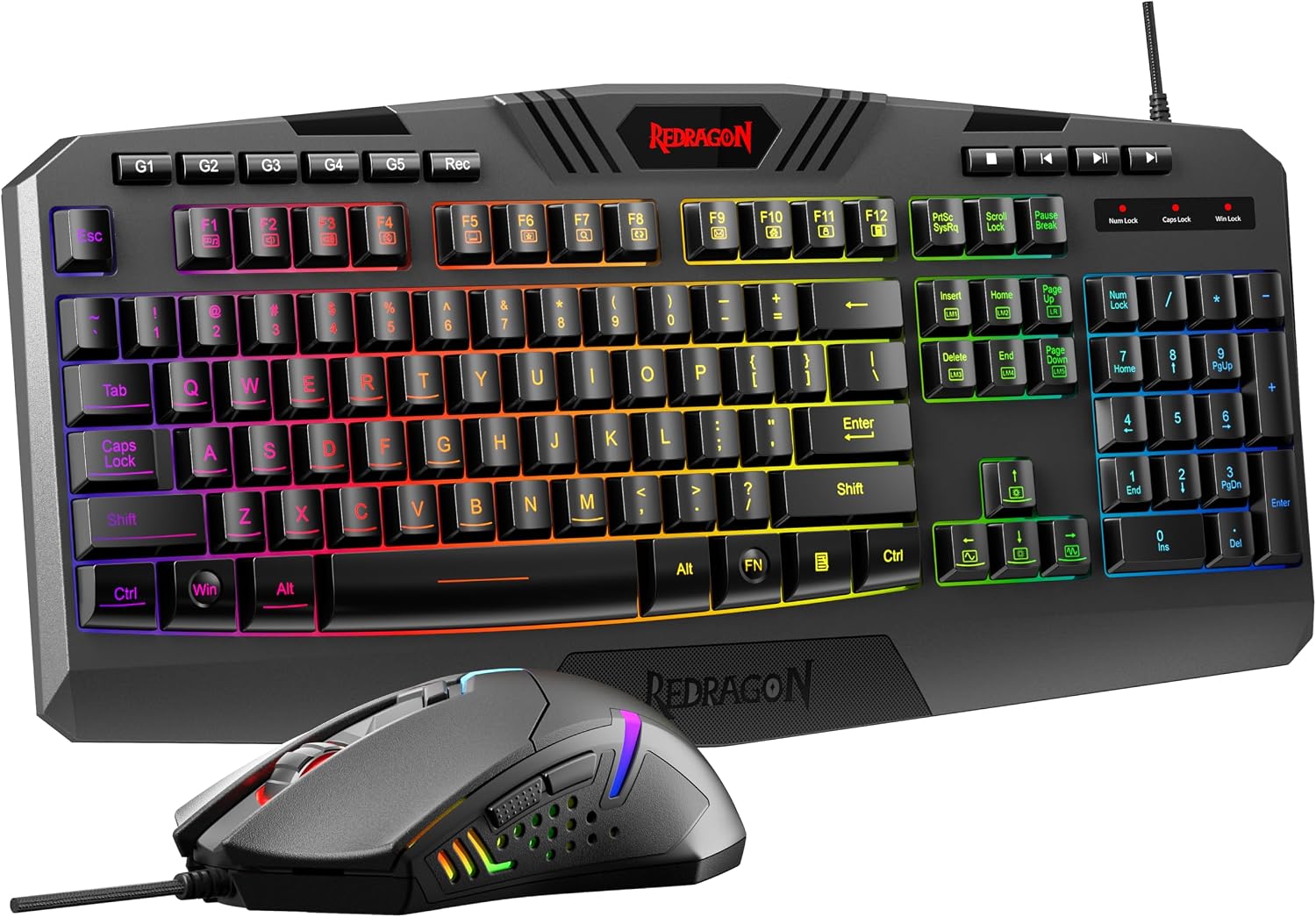
Running your fingers across the matte black chassis, the first thing you notice is how little it flexes. The plastic shell feels dense, not hollow. At 0.98 kg for the set, the keyboard stays put on a desk. The mouse is light enough for quick flicks but not so light it feels cheap. The full-size layout takes up serious desk space, so measure before you buy. The included wrist rest clips on and off with a firm click. It sits low, which helps if you have wrist pain. The mouse is right-handed only, with a thumb rest that suits palm and claw grips. I used it for eight-hour work days and long gaming nights. No sharp edges, no creaking. The keycaps use laser-etched legends that should resist wear. That's rare at this price.
Core Performance & Feel
Pressing the keys feels soft and quiet, like typing on a firm cushion. Membrane switches don't give you the sharp click of mechanical ones, but they're consistent across all 114 keys. I typed 80 words per minute on a typing test, about the same as my mechanical board. The 25-key anti-ghosting worked fine in Overwatch and Valorant. I never hit a key that didn't register. The mouse tracks smoothly on a cloth pad. I set it to 1600 DPI for desktop work and 3200 DPI for shooters. The dedicated DPI button makes switching fast. The scroll wheel has a rubber grip and distinct steps. Clicks are quiet but tactile. The mouse glides well, though the skates aren't as slick as premium models. For casual to mid-level play, this combo holds up. Hardcore esports players will want faster switches.
Power, Battery & Connectivity
Plugging the USB cable into a front port, both devices lit up instantly. No drivers needed for basic use on Windows 10. The keyboard and mouse each use a separate USB-A connector. That means two ports gone. The cables are rubber, not braided, and feel a bit stiff. But the gold-plated connectors should resist corrosion over time. There are no batteries to worry about. No charging breaks. No wireless lag. The flip side is you're tethered to your desk. If you like to lean back with a keyboard on your lap, this isn't for you. The mouse cable is light enough that I didn't feel drag during fast swipes. Cable length isn't stated, but it reached my PC tower under the desk with slack to spare. Setup took under a minute.
Controls, Software & Daily Maintenance
Ten dedicated media keys sit above the numpad. I can pause music, skip tracks, and adjust volume without leaving my game. The 5 macro keys on the left edge are easy to reach with my pinky. I recorded a three-key combo in the software and it worked on the first try. The software also handles RGB lighting, DPI settings, and macro assignments. It's not the prettiest app, but it gets the job done. Settings save to the device, so you can unplug and keep your profiles. For cleaning, the matte finish shrugs off fingerprints. The keyboard has drainage channels for minor spills. I dripped water on it and it kept working after a wipe-down. Don't dunk it, though. It's spill-resistant, not waterproof. Keycaps pull off with a standard puller for deep cleaning. A quick shake and a microfiber cloth keep it looking new.
How It Compares (Head-to-Head)
Against the Redragon K552, the S101-3 PRO gives you a mouse and quieter keys, but the K552 has mechanical switches. The K552 is also a 87-key layout, so it saves desk space. If you want mechanical feel, spend a bit more on the K552. The HyperX Alloy Origins 60 is smaller, has better build, and mechanical switches, but costs more and lacks a numpad. The MageGee Portable 60 is cheaper but feels flimsier and has fewer features. The S101-3 PRO wins on value and completeness. It's the only one that includes a decent mouse and wrist rest. For a full-size membrane board, it's hard to beat without doubling your budget. Just know you're trading mechanical precision for a lower price and a complete set.
What I Like & What Could Be Better (Pros & Cons)
After weeks of hands-on office and gaming sessions, here is our breakdown of the key strengths and daily compromises:
What Stands Out:
- Whisper-quiet membrane keys won't disturb family members or colleagues in shared spaces.
- Complete budget bundle provides a solid 7200 DPI gaming mouse and detachable wrist rest.
- Ten dedicated media keys and 5 programmable macro shortcuts simplify everyday controls.
- Durable matte black chassis resists flexing and includes bottom liquid drainage ports.
What Could Be Better:
- Membrane switches lack the tactile responsiveness and crisp rebound of mechanical boards.
- Consumes two separate USB-A ports with non-detachable, slightly stiff rubber cables.
- Full 114-key layout takes up considerable room on compact workstations.
Who Should Skip This Product
If you're a competitive gamer who needs mechanical switches with fast actuation, skip this. Buy the Redragon K552 or a Keychron K10 instead. If you want a wireless setup, this combo won't work. Look at the Redragon S101MKS Wireless. If you need a warranty for peace of mind, this has none. Go with a brand like Logitech or Corsair. If you have a small desk, the full-size layout may crowd your mouse. A 60% keyboard like the HyperX Alloy Origins 60 is better. Also skip if you hate membrane keys. They feel soft, not snappy. For everyone else on a tight budget, this combo delivers a lot for very little.