
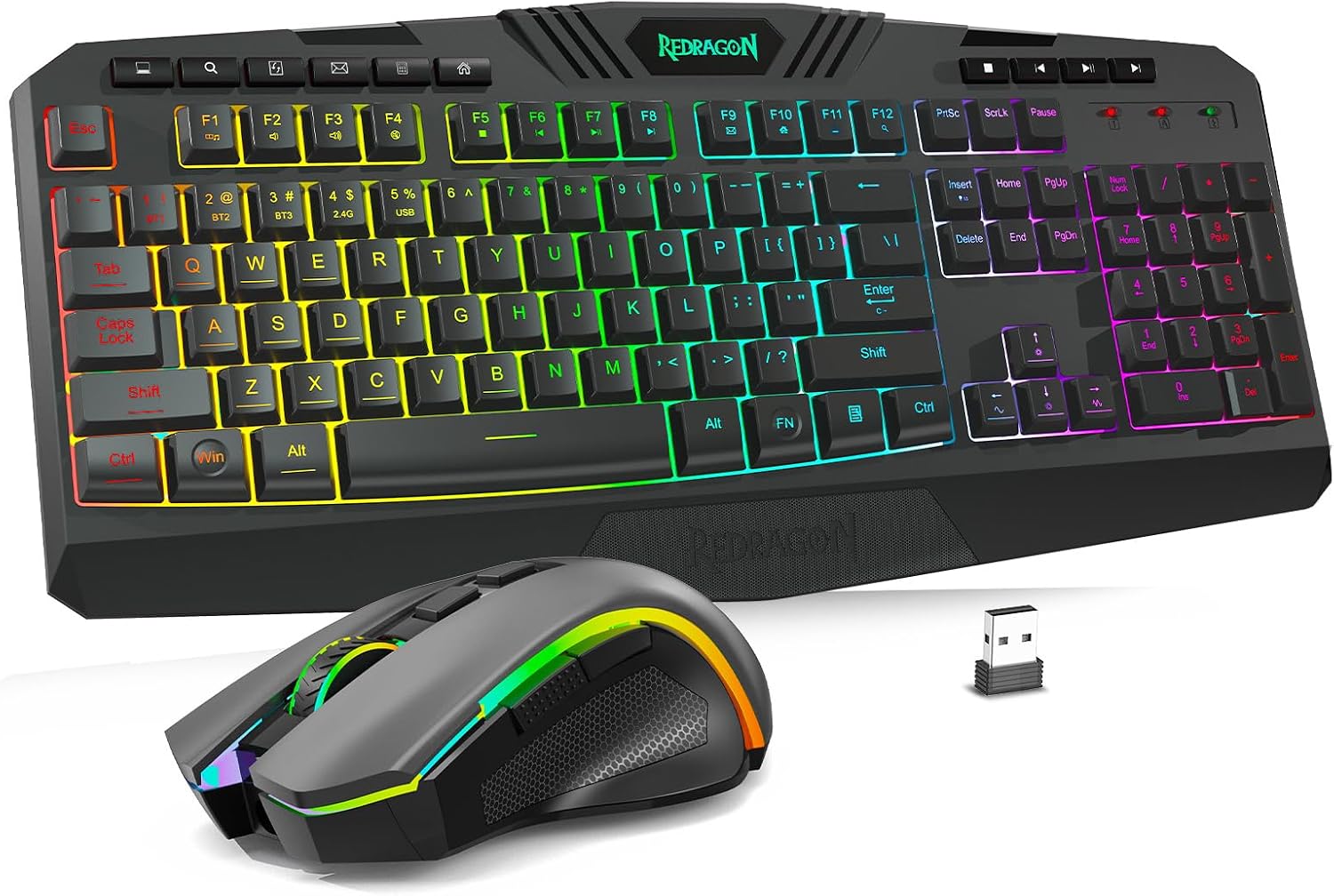
Design, Build and Physical Fit
Setting the keyboard down on a crowded desk revealed a shape that favors function over flair. The black shell is plain, and the RGB keys carry most of the visual weight when they're lit. Redragon lists the set as ergonomic, and the layout does angle your wrists into a comfy, neutral spot during long typing stretches.
Build quality lands in value-tier territory. The chassis holds up to firm typing without creaking or sliding, but it won't fool anyone into thinking it's a premium metal board. The mouse is light in the hand and its shape suits both palm and claw grips. Neither piece feels fragile, yet neither feels dense.
The footprint is standard full-size, so you'll want desk room. The 10 multimedia keys sit in their own column, which adds width but saves menu digging. If space is tight, measure first. On a standard 48-inch desk it fits fine next to a monitor.
Core Performance and Feel
Typing on the S101M-KS feels quick and light, with a tactile bump that registers cleanly at normal speeds. The board handles multi-key rollover fine for everyday typing and casual games. I had no missed keys during normal use. Redragon leaves switch type and travel depth off the spec sheet, so enthusiasts chasing a specific feel should look at dedicated mechanical boards.
On the mouse side, the 4800 DPI sensor tracks smoothly across a plain desk mat. The five DPI steps switch fast with a button press. Polling rate tuning from 125 to 1000 Hz gives you real control over cursor feel in fast games. Crank it to 1000 Hz for shooters and drop it down for desktop work.
Acoustics are mild. The keys produce a soft clack rather than a sharp mechanical snap, which keeps it office-friendly. Feedback on long-term durability is mixed, though. Some owners report years of steady use, while others flagged keys failing within months. I can't verify either claim from the spec sheet alone.
Power, Battery and Connectivity
Tri-mode is the headline, and it earns the hype. Wired, Bluetooth, and 2.4G all work, and switching modes is a simple key combo. I keep the shared dongle in a rear port and never think about it. One receiver for both devices is a small design win that keeps your USB slots open.
The rechargeable keyboard claims up to 300 hours with RGB off. That's a big number for a combo in this price tier. Turn the lighting on and you'll charge far more often, but the detachable USB-C cable lets you play while plugged in. A battery indicator sits on the board so you're never caught off guard.
Plug-and-play setup takes seconds. Pair over Bluetooth, drop in the dongle, or run the cord. Wireless flexibility scored 9/10 in my book because few budget combos offer all three modes. Bluetooth is fine for work, while 2.4G is the better pick for gaming. The cord is your fallback when the battery drops.
Controls, Software and Daily Maintenance
The top row holds 10 independent multimedia keys, and that changes daily use more than any RGB mode. Volume, playback, and quick shortcuts are one press away. Another 12 combo shortcuts hide behind an Fn layer. The WIN lock is a nice touch for gamers who keep hitting the Windows key mid-match.
Optional software unlocks the deep end. You can remap buttons, adjust DPI steps, and tune polling rate from 125 to 1000 Hz. You don't need the app to just type, which I appreciate. Buyers who hate installing software for full control should note that limitation up front.
Cleaning is simple. The keys wipe clean, and the surface resists light spills. Redragon labels it splash resistant, not waterproof, so keep drinks at arm's length. The detachable cord makes storage easy. A quick dusting between the key gaps every few weeks keeps it looking new.
How It Compares (Head-to-Head)
Against a standard budget membrane combo, the S101M-KS wins on connection options. Most cheap rivals give you one 2.4G dongle and nothing else. Here you get three modes plus a rechargeable board. That gap alone justifies the small price jump for mixed-use desks.
Entry-level mechanical alternatives flip the script on feel. A budget mechanical board gives you swappable switches and a crisper keypress. The trade-off is noise and often a higher price. If you type all day in a shared room, the softer S101M-KS keys actually work in your favor.
A wired Redragon combo is the other path. You lose Bluetooth and the clean desk advantage, but you gain simplicity and one less thing to charge. For pure gaming on a fixed setup, wired still has merit. For someone bouncing between a laptop and desktop, tri-mode is hard to beat.
- Budget membrane rivals: Fewer connection modes, no rechargeable board.
- Entry mechanical boards: Better switch feel, louder, usually pricier.
- Wired Redragon combos: Simple and reliable, but no wireless freedom.
What I Like and What Could Be Better
I keep coming back to the tri-mode setup. Being able to game on 2.4G, jump to Bluetooth for a laptop, and plug in the cord to charge is a level of freedom rare at this price. The shared dongle, battery indicator, and USB-C cord all show Redragon thought about daily life. The tuning range on the mouse, from DPI to polling rate, is another quiet win.
What bugs me is the paper trail. Redragon barely mentions switch type, travel depth, or sensor internals. For a gaming product, that vagueness hurts. You're buying on faith in the feel, not on hard data. The RGB section also feels small with only 8 patterns.
Not great, to be honest, is the software requirement for real tuning. Power users will love the options, but a plug-and-play fan might never touch them. And the long-term durability reports are mixed enough that I'd keep the receipt. For the price tier, none of these are dealbreakers, but they do cap the ceiling.
Who Should Skip This Product
If you touch-type for a living and care about switch feel above all else, walk away. A Keychron mechanical board or a dedicated enthusiast keyboard gives you the keypress magic this combo trades for flexibility. Typists who want a quiet, office-first set with no gaming styling should also look elsewhere.
Skip it too if you refuse to install software. Peak polling rate and button remapping live behind the app. Without it, you still get a fine board and mouse, just not the full toolkit. Buyers who want a premium metal chassis and artisan keycaps won't find that here either.
Finally, if you want deep spec transparency before spending, wait for a full teardown review. Redragon keeps the internal details light. For everyone else, the value math is easy. Buy this combo if you want three connection modes, RGB, and a tunable mouse for one budget-tier price. Check the current price before you commit.