
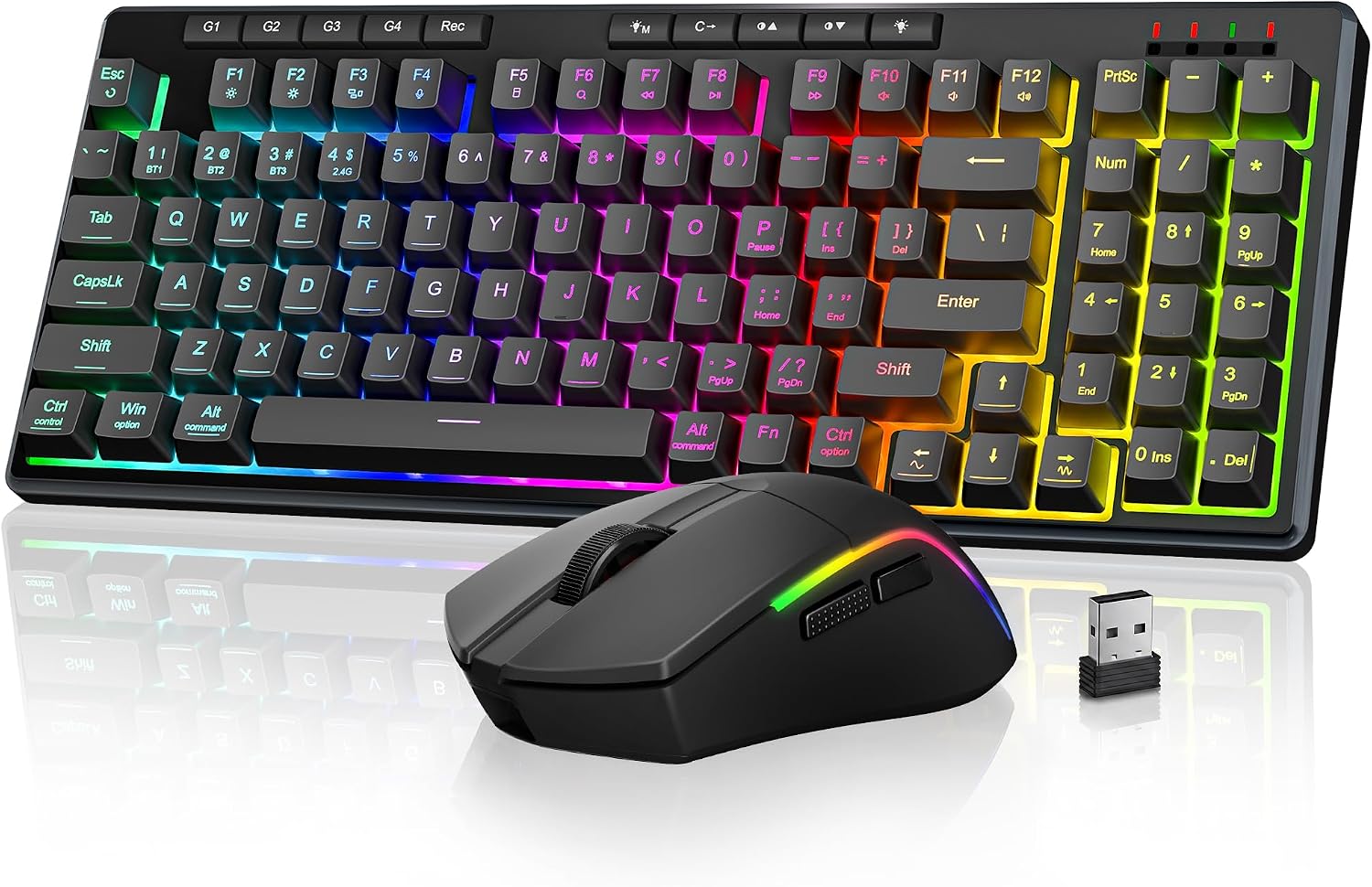
Design, Build & Physical Fit of the Redragon S156
Running your fingers over the keyboard reveals its all-plastic enclosure. This material choice is common for budget keyboards. Despite being plastic, the deck shows very little flex. It feels stable enough on a desk. Integrated rubber feet on the base prevent any unwanted sliding during fast typing or mouse moves.
The keyboard uses a full-size 104-key layout. This means you get a dedicated numpad, which is great for productivity. The S156 features low-profile keys. This design often feels more ergonomic for long use. However, the F and J homing bumps are not very pronounced. Touch typists might find this a slight hurdle initially.
The accompanying mouse is an ultra-light unit. It weighs in at just 61 grams. This lightweight design helps reduce wrist strain. It also allows for quick flicks in games. The combo comes in a standard commercial finish, nothing flashy.
Core Performance & Feel of the Redragon S156
Hitting the keys, you will notice the Mint Mambo switches. These offer a comfortable actuation force. They provide a satisfying tactile feedback. Critically, these keys are quiet in operation. This makes the S156 suitable for shared spaces. It avoids the loud click often heard from mechanical keyboards.
The keyboard boasts a 1000Hz polling rate. This means it reports keystrokes every 1 millisecond. This ensures quick response times for general use. The keyboard also supports N-Key Rollover (NKRO). You can press many keys at once. Every input registers without issue. This is a must-have for speed typists or gamers.
The included mouse offers up to 4800 DPI sensitivity. This allows for precise cursor control. Its ultra-light 61g weight makes it easy to move swiftly. Casual gamers will find this sufficient. More serious players might seek higher DPI options. However, for most users, 4800 DPI is more than enough.
Power, Battery & Connectivity for the Redragon S156
Plugging in the S156 is simple thanks to its tri-mode connection options. You can use it wired with the detachable USB-C cable. It also connects wirelessly via a 2.4GHz USB receiver. For multi-device setups, Bluetooth is also an option. This flexibility is a major plus for any desk setup.
The detachable USB-C cable is a standard type, but it is not braided. This is a minor detail. A braided cable offers more durability. Still, it is a convenient wired connection for charging or latency-sensitive tasks. The hardware connection switch on the keyboard makes toggling modes easy.
The S156 features long battery life. This is great for wireless convenience. Just know that active RGB backlighting will drain power faster. Managing your lighting settings can greatly extend time between charges. For long use, turning RGB off is a smart move.
Redragon S156 Controls, Software & Daily Maintenance
Using the Redragon S156 keyboard provides good control over your media. It features a tactile volume knob. This is far better than digging through software or using awkward key combos. There are also 4 dedicated macro keys. These keys let you automate complex commands with a single press. Integrated Fn shortcuts handle other media and navigation tasks.
Redragon provides software for the S156. This lets you configure macros, remap keys, and modify lighting. To be honest, the software feels basic and clunky. It is also limited compared to more premium offerings. This might be a sticking point for users who like deep customization.
The keyboard is built primarily for Windows. It works fine for basic use on macOS. It also functions with phones and tablets. Linux and ChromeOS users can also connect via standard USB HID. For spill resistance, you should check specific ratings. Do not expose it to liquids without confirming its protection.
How the Redragon S156 Keyboard & Mouse Combo Compares
When you look at the Redragon S156, it stands out as a budget contender. It offers a solid feature set for its price. This makes it a cost-effective peripheral choice. However, it does not aim for the premium market. It has some trade-offs to hit its price point.
- Redragon (Outemu) vs. Cherry MX Switches: Redragon commonly uses Outemu mechanical switches. These switches mimic the feel of Cherry MX switches. They even share compatibility. The core difference is cost. Outemu switches are much cheaper. They often lack the refinement and lifespan of true Cherry MX switches. For the S156, this means good feel without the high price.
- Redragon S156 vs. NuPhy Halo 65 Keyboards: NuPhy keyboards, like the Halo 65, easily cost double the S156. They offer a more premium experience. NuPhy often features aluminum frames and denser builds. This leads to more refined acoustics and a heavier feel. The S156, with its plastic body, delivers comparable core mechanical features. It does this at a much lower $60-$80 price. You get budget value over luxury build here.
- Alternative Combos: The Logitech MK850 and Razer Pro Type Ultra are other wireless options. They often target different user needs. The S156 serves as a strong budget wireless combo. These others might offer specific features at a higher price.
What I Like & What Could Be Better in the Redragon S156 Combo
After using the Redragon S156, its strengths clearly shine through. The quiet operation of its Mint Mambo switches is fantastic. They offer a comfortable actuation. The low-profile keys provide an ergonomic typing feel for long sessions. I also like the 4 dedicated macro keys. The tactile volume knob is very intuitive. Tri-mode connectivity gives amazing flexibility. It supports switching between PC, Mac, tablets, and phones. The hot-swappable switch sockets are a great bonus for a keyboard in this price range. It offers good value for its features.
There are definite areas for improvement. The keyboard's plastic build, while stable, lacks a premium feel. The software to configure macros and lighting feels basic and clunky. It needs an update. Potential for slight input lag exists compared to wired connections. This is common with wireless gear, to be fair. Also, the F and J homing bumps are not very pronounced. This makes touch typing a little harder. Keeping RGB lighting on drains the battery faster. This means more frequent charging.
Who Should Skip the Redragon S156 Combo
Certain buyers will find the Redragon S156 a poor fit. If you are a competitive gamer, especially in fast-paced titles, you should skip this combo. Any potential for input lag over wireless could put you at a disadvantage. A dedicated wired gaming keyboard, perhaps from a brand like SteelSeries or HyperX, would serve you better. Check out their offerings for absolute lowest latency.
Also, if you demand premium build quality, pass on the S156. Its plastic enclosure is robust for the price. However, it will not offer the dense, refined feel of an aluminum frame. For that, you would need to spend more. Keyboards from NuPhy or Keychron offer a much more premium typing experience. Lastly, if you expect robust, feature-rich customization software, look elsewhere. The S156's software is basic. It gets the job done but does not offer deep control.
Is the Redragon S156 keyboard truly quiet for office use?
Yes, the Redragon S156 uses Mint Mambo switches that are specifically designed for quiet operation. This makes the keyboard suitable for shared office spaces or other noise-sensitive environments.
Does the Redragon S156 combo work with macOS and other devices?
The Redragon S156 is built primarily for Windows. However, it functions well for basic use on macOS, as well as phones and tablets via Bluetooth. It also supports Linux and ChromeOS with standard USB HID.
Can I change the switches on the Redragon S156 keyboard?
Yes, the Redragon S156 keyboard features a hot-swappable PCB. This means you can swap out the Mint Mambo switches for other compatible 3-pin or 5-pin mechanical switches without needing to solder.
What kind of wireless connectivity does the Redragon S156 offer?
The Redragon S156 offers tri-mode connectivity. You can use it with a detachable USB-C cable, a 2.4GHz wireless USB dongle, or via Bluetooth. This gives you flexible options for various devices.
Is the mouse included with the Redragon S156 combo good for gaming?
The mouse is ultra-light at 61g and offers up to 4800 DPI, which is suitable for casual gamers. For competitive, fast-paced gaming, a dedicated high-end gaming mouse might offer more precision and lower latency.