
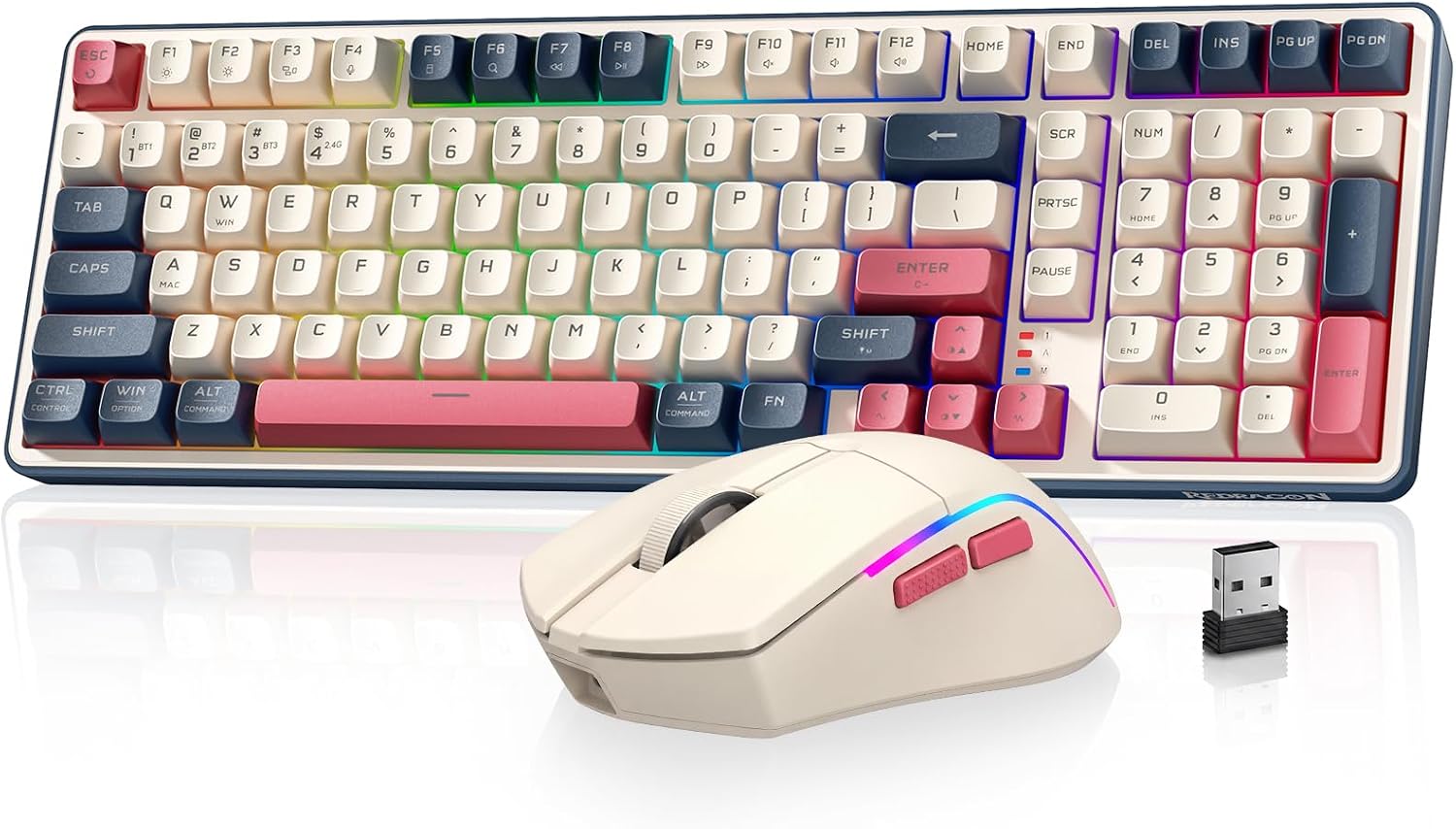
Redragon S174 Design, Build & Physical Fit
Running your fingers across the Redragon S174, you notice its plastic enclosure. It has solid construction despite the material. This keeps deck flex to a minimum. The board feels planted on a desk, which is a big plus for typing. Integrated rubber feet on the base prevent any unwanted sliding, even during active use.
This is a full-sized keyboard. It features 104 keys, including a numpad. This layout is great for office tasks. It gives you all the keys needed for data entry or spreadsheets. On a crowded 48-inch desk, the S174 takes up a good amount of space. Plan for that footprint. The keyboard has a standard commercial finish, nothing flashy. The profile is standard, meaning traditional key travel. It's not a low-profile design. This makes for a familiar feel under the fingers.
Redragon S174 Core Performance & Feel
Under the keycaps sits Redragon's Mint Mambo switches. They deliver a satisfying tone when you type. Actuation force feels comfortable for long use. I found the typing experience generally solid, even for extended writing sessions. The sound profile is not overly loud, making it suitable for shared office spaces.
Testing for key rollover showed N-Key Rollover (NKRO) works as promised. This means every key press registers, even if you hit many at once. This is vital for fast typists and gamers. The keycap font, particularly on rounded characters, looks a bit chipped, almost like brackets. This is a small visual flaw. However, the legends allow the per-key RGB lighting to shine through brightly. This helps in darker rooms. A minor grip: the F and J homing bumps are not very pronounced. This makes it harder to find your home row without looking down.
Redragon S174 Power, Battery & Connection
Plugging the Redragon S174 into a front USB port reveals its tri-mode connection. You get USB-C wired, Bluetooth, and 2.4GHz wireless via a dongle. An on-keyboard switch lets you toggle modes easily. This makes it simple to switch between a PC, tablet, or phone.
The included cable is a detachable USB-C type. It is not braided. While functional, a braided cable would add durability. For daily use, I often opted for wired mode. Wireless is great for convenience, but wired offers max reliability for me. The S174 handles power well. It has low-power operation built in. Standard power management means no special battery needs. Just connect it and it works.
Redragon S174 Controls, Software & Daily Maintenance
The Redragon S174 includes a tactile volume knob. This is a very welcome feature. It makes adjusting sound levels intuitive and quick. You also get integrated Fn shortcuts. These handle media playback and navigation functions. LED indicator lights show lock states clearly.
Redragon provides software for setting macros. It also lets you remap keys and adjust lighting. To be honest, this software feels basic. It's clunky and limiting for deep setup. Don't expect robust customization. The keyboard is hot-swappable. This means you can change switches without soldering. That's a huge plus for those who like to tinker. For cleaning, the S174 is easy to wipe down. A dry microfiber cloth handles dust well. Always check specific spill-resistance ratings before exposing it to liquids, as that information is not detailed.
How the Redragon S174 Compares
Comparing the Redragon S174 to more premium options like the NuPhy Halo 65, the price difference is stark. The S174 usually retails in the under-$80 tier. A NuPhy costs double that or more. The NuPhy gives you aluminum construction and a denser feel. It also offers more refined acoustics. The Redragon S174, in contrast, provides core functions at a budget price using plastic.
Against another Redragon model, the K689 Pro, the S174's lighting stands out. The K689 Pro has weaker RGB lighting. Its thick keycaps often obscure the illumination. The S174, however, pushes brightly through its key legends. This makes its per-key RGB far more effective.
- Price: S174 is a budget pick. NuPhy Halo 65 is easily double the cost.
- Build: S174 uses plastic. NuPhy Halo 65 features aluminum construction.
- Acoustics: S174 has satisfying Mint Mambo switches. NuPhy offers cleaner acoustic refinement.
- Lighting: S174 has bright per-key RGB. Redragon K689 Pro has weaker, obscured lighting.
What I Like & What Could Be Better
After spending time with the Redragon S174, several things stand out positively. It really hits a sweet spot for value.
What I Like:
- Great Switches: The Mint Mambo switches deliver a satisfying tone and comfortable feel. This makes typing pleasant for long periods.
- Multi-mode Connection: Having wired, Bluetooth, and 2.4GHz options is very handy. It lets you connect to various devices easily.
- Hot-swappable PCB: This is a big pro. It allows you to change switches without soldering. You can try different types as your tastes change.
- Bright RGB: Per-key RGB backlighting shines well through the keycap legends. It looks good, especially in dim light.
- Volume Knob: The integrated, tactile volume knob is very intuitive. It's a small but powerful control.
What Could Be Better:
- Basic Software: The customization software feels clunky. It limits deep adjustments for macros or lighting effects.
- Keycap Font: The font for rounded characters looks a bit 'chipped'. It's not the cleanest look.
- Homing Bumps: The F and J key homing bumps are not very pronounced. This makes touch-typing harder without looking.
Who Should Skip the Redragon S174
If you are a competitive esports gamer, you should absolutely skip the Redragon S174. Its plastic build and basic software are not ideal for pro play. You need dedicated gaming hardware with ultra-low latency and robust software for that. Consider a high-end wired-only board from brands like Razer or SteelSeries instead.
Mac users seeking full native support should also look elsewhere. While the S174 works for basic typing on Mac, you lose out on native software and full key mapping. For a truly Mac-centric experience, options like a Keychron K-series keyboard offer better MacOS integration. Also, if a premium feel is key for you, the S174's plastic chassis will disappoint. You would be happier with an aluminum keyboard, like the NuPhy Halo 65, despite its higher price tag.
Is the Redragon S174 good for gaming?
The Redragon S174 is suitable for casual gaming due to its NKRO support. For competitive esports, its plastic build and basic software mean dedicated gaming hardware is a better choice. It handles everyday gaming well enough.
Does the Redragon S174 have RGB lighting?
Yes, the Redragon S174 features per-key RGB backlighting. The keycap legends are designed to let the light shine through brightly. This helps with visibility in darker room settings and adds a nice aesthetic touch.
What kind of switches does the Redragon S174 use?
The Redragon S174 uses Mint Mambo mechanical switches. These switches offer a satisfying tone and a comfortable actuation force. They also reside in hot-swappable sockets, letting you change them without soldering.
Can I use the Redragon S174 with a Mac?
The Redragon S174 works fine for basic typing tasks on a Mac. However, it's built primarily for Windows. Full native Mac software or comprehensive key remapping is not supported, limiting advanced customization.
What are the connection options for the Redragon S174?
The Redragon S174 offers versatile tri-mode connectivity. You can connect it via a detachable USB-C cable for wired use, Bluetooth, or a 2.4GHz wireless USB dongle. An on-keyboard switch lets you change modes.