
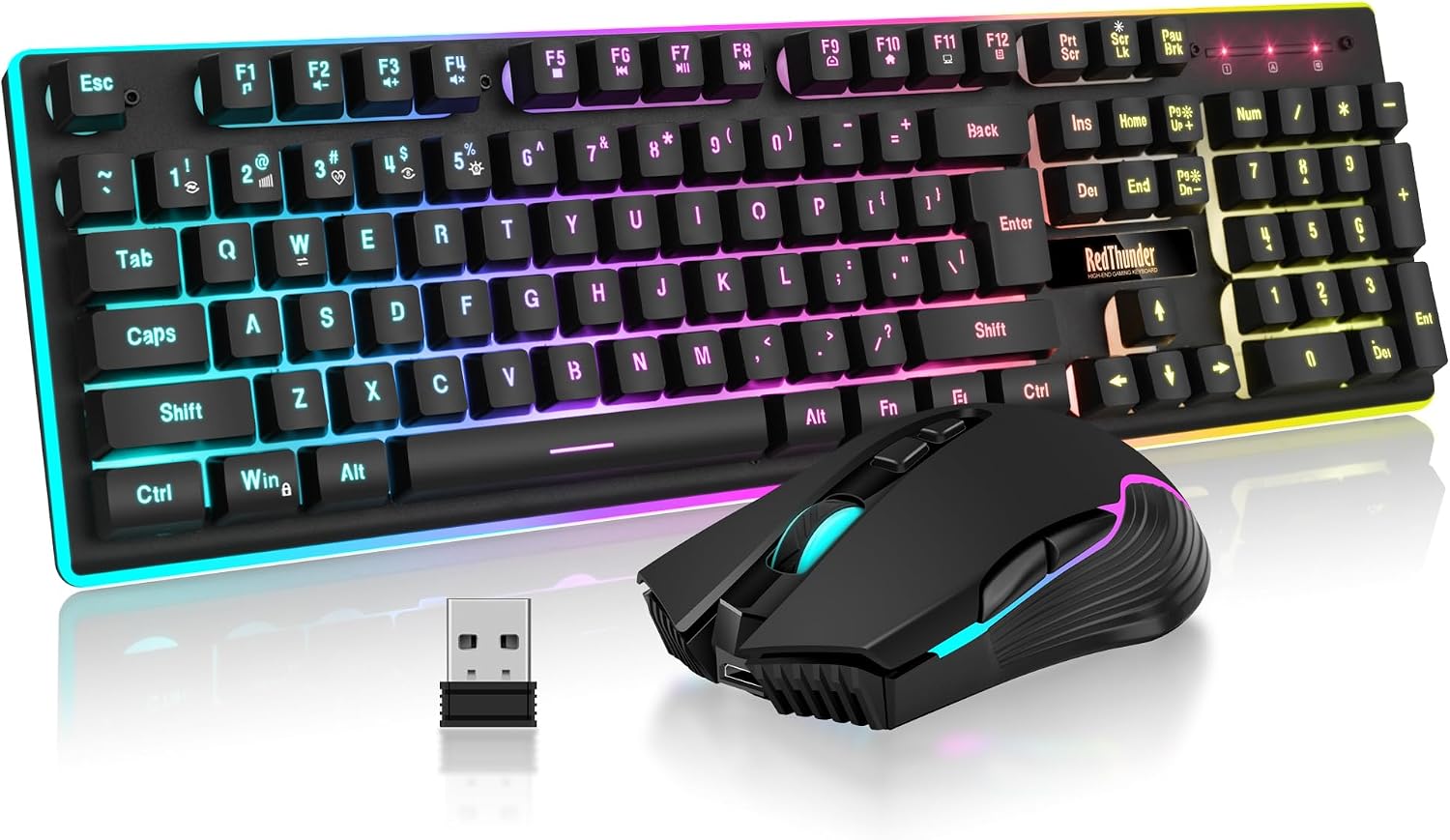
Design, Build & Physical Fit of the RedThunder K10
Running your fingers across the keyboard's top cover, you immediately feel a frosted metal plate. This metal helps stiffen the chassis, giving it a more premium feel than typical budget plastic boards. The base underneath is plastic, completing the build. Weighing 2.09 pounds in total, the combo feels solid enough on the desk for daily use, resisting unwanted flex during typing sessions.
The keyboard is a standard 104-key full-size layout. This means you get a dedicated F-key row and a numeric keypad, making it practical for both office work and gaming. The footprint is what you expect from a full-size board, requiring a fair amount of desk space at 16.93 x 5.12 inches. It’s not overly compact, but it fits fine on a 48-inch desk.
Keycaps on the RedThunder K10 are made from ABS plastic, using a double-shot injection molding process. This process helps prevent the legends from wearing off, which is a common problem on cheaper boards. However, ABS keycaps do tend to get shiny and greasy with long use. Adjustable tilt legs are built into the keyboard, letting you set a comfortable typing angle. The mouse features an ergonomic shape, with an anti-sweat, non-slip design. Users with larger hands might find it a touch small, but for most, it handles fine. The overall fit is good for the price, delivering better rigidity than pure plastic setups.
RedThunder K10 Core Performance & Feel
Under the keycaps sits a membrane switch design. While advertised as having a "mechanical feel," it's important to understand these are not true mechanical switches. The keystrokes offer a tactile bump that's more defined than a flat office membrane board, but it's lighter and mushier than a proper mechanical switch. The feedback is less distinct, and there's no hot-swap support for different switch types. For casual users and light gamers, this feel can be comfortable. However, serious typists or mechanical keyboard fans will find it underwhelming.
The keyboard features 26-key anti-ghosting. This means you can press up to 26 keys at once and have all inputs register correctly, which is good for most gaming situations. For competitive esports, where many simultaneous inputs are critical, some limitations might be noticeable compared to full N-key rollover. Acoustic noise from the keys is lower than a clicky mechanical switch, but more pronounced than a silent membrane board. It's a middle-ground sound, generally unobtrusive.
The accompanying mouse impresses with its specs for this price tier. It uses a 7200 DPI optical sensor, boasting a 12000 frames per second scan rate. A 1000Hz polling rate delivers quick response times, alongside a 40G acceleration tolerance and 400 IPS tracking speed. This combination makes the mouse feel accurate and responsive in most games and desktop use. Its 7 buttons provide good control. Both devices use a high-performance 2.4G wireless connection, which helps keep input lag low for a wireless setup. This makes it a solid pick for casual to mid-level gaming where precision counts.
Power, Battery & RedThunder K10 Connectivity
Plugging the 2.4 GHz dongle into a front USB port revealed an instant connection. Both the RedThunder K10 keyboard and mouse connect via a single, shared 2.4 GHz wireless USB receiver. This keeps your USB ports free, which is nice. There is no Bluetooth support here, so you're tied to the dongle. This is a common setup for budget wireless gaming gear, prioritizing low-latency wireless over multi-device Bluetooth versatility. It works straight out of the box with zero drivers needed, making setup a breeze.
The keyboard comes with a built-in 3000mAh rechargeable lithium battery. The mouse, meanwhile, uses an 800mAh rechargeable lithium battery. RedThunder states you can get about 8 hours of continuous use with the keyboard and mouse lights on. For a full workday or a decent gaming session, this holds up. If you turn the lights off, battery life will naturally extend quite a bit. Initial charging is recommended for 8 hours for both devices. A USB cable is included for charging. A key detail: there's no way to charge both devices at once. You'll need to manually swap the cable between the keyboard and mouse as needed. The combo also features an auto-sleep mode after 2 minutes of inactivity, which helps save power, a practical design choice for wireless peripherals.
Controls, Software & RedThunder K10 Daily Maintenance
The RedThunder K10 keyboard offers a full complement of 104 keys, including standard F-keys and a numeric keypad. Audio and volume controls are accessible through function shortcuts. This is standard on many boards and works as expected. The keyboard's RGB lighting provides three rainbow groups, two breathing modes, three static color modes, and four adjustable brightness levels. This allows for some personal touch, though it's not full per-key customization.
The mouse features its own built-in 7-color cyclic gradient LED effect. This looks decent, but it cannot be manually configured or locked to a single color, which is a missed opportunity for matching setups. Importantly, there is no dedicated software suite or companion app for the RedThunder K10 combo. This means no macro programming, no detailed key remapping, and no granular customization of lighting beyond the built-in modes. It's truly plug-and-play, which is great for simplicity but limits advanced users.
In terms of compatibility, the combo works broadly across Windows systems (2000, XP, Vista, 7, 8, 10). It also works with Linux, Chrome OS, Xbox, and PS4 via plug-and-play. macOS support is present but limited, so Mac users might find some functions missing. For daily care, the board is easy to wipe down with a dry microfiber cloth. While some products boast spill resistance, the K10 doesn't explicitly state a specific rating. It's best to keep liquids away to be safe.
How the RedThunder K10 Wireless Gaming Combo Compares
When you stack the RedThunder K10 against other options, its value proposition becomes clearer. Compared to a standard office membrane keyboard, the K10 offers a noticeably better and more responsive typing feel. The membrane switches here, despite not being true mechanicals, provide a more satisfying tactile bump than the flat, mushy keys found on most basic office boards. The added anti-ghosting and RGB lighting also make it far more appealing for mixed use.
Against a competitor like the Logitech MK270, the K10 stands out for its gaming focus. The MK270 is a wireless, office-oriented combo with lower polling rates and no RGB. The RedThunder K10, by contrast, gives you a higher 1000Hz mouse polling rate, 7200 DPI, and vibrant RGB lighting on both devices. For anyone looking for even casual gaming, the K10 offers far better specs and features than a purely productivity-focused setup.
Looking at other budget gaming options, like the Redragon S101, the K10's mouse holds a stronger hand. The K10's mouse boasts a 1000Hz polling rate, which on paper, is better than the S101's often lower polling rate mouse. This translates to quicker, more precise cursor movements in fast-paced games. The K10 aims to be a top pick among affordable light-up wireless keyboards, thanks to its extensive RGB on the keyboard and mouse.
What I Like & What Could Be Better
After using the RedThunder K10 combo, I found several things to like, balanced by areas that could use improvement.
What I Like:
- Easy Setup: True plug-and-play. No drivers or software needed at all, which is a huge plus for ease of use.
- Broad Compatibility: It works with a wide range of operating systems, including most Windows versions, Linux, Chrome OS, and even consoles like Xbox and PS4. This makes it a versatile choice for many setups.
- Wireless Convenience: A single 2.4G wireless dongle handles both keyboard and mouse, reducing cable clutter and freeing up USB ports.
- Keyboard RGB: The keyboard's rainbow backlighting with multiple modes and brightness settings adds a nice aesthetic touch for a budget product.
- Mouse Performance: The mouse offers solid specs for its price, including a 7200 DPI sensor, 1000Hz polling rate, and good tracking speed, making it suitable for casual gaming.
- Build Feel: The frosted metal top cover on the keyboard gives it a more rigid and premium feel than many plastic-only budget keyboards.
What Could Be Better:
- Membrane Switches: Despite the "mechanical feel" marketing, these are membrane switches. True mechanical switches offer better tactile feedback and durability, something advanced users will notice.
- No Dedicated Software: The complete lack of software means no custom key mapping, macro creation, or granular RGB control. What you get out of the box is all you get.
- ABS Keycap Shine: The ABS plastic keycaps, while double-shot for legend longevity, will likely develop a shiny, greasy look over time with heavy use.
- Limited Mac Support: While it works with macOS, some functionality may be missing or require workarounds.
- Mouse RGB: The mouse's 7-color cyclic gradient lighting cannot be customized or set to a single color. It's a static cycling effect, not great to be honest.
- Keyboard Lighting Gap: The top right corner of the keyboard, near the indicator lights, lacks backlighting. This creates a small visual inconsistency.
Who Should Skip the RedThunder K10
If you fall into specific buyer profiles, the RedThunder K10 will be a poor fit. Serious competitive gamers should skip this combo entirely. The 26-key anti-ghosting is fine for casual play, but it's not full N-key rollover. More critically, the lack of dedicated software means no custom macros or advanced key remapping, which are essential for high-level competitive play. You'd be better off with a wired, true mechanical gaming keyboard from a brand like SteelSeries or Razer, which offers robust software support.
Heavy typists should also look past the K10. While the "mechanical feel" is an improvement over basic membrane boards, it doesn't compare to the tactile feedback or durability of actual mechanical switches. Plus, the ABS keycaps will start to shine quickly under heavy use, affecting both feel and aesthetics. Consider a keyboard with PBT keycaps and genuine mechanical switches for a better long-term typing experience.
Finally, if you're a dedicated macOS user, the RedThunder K10 isn't for you. While it offers limited macOS compatibility, you'll likely run into missing functions or frustrating inconsistencies. For a seamless experience, Mac users should invest in peripherals specifically designed for Apple's ecosystem, such as Logitech's MX series or Apple's Magic Keyboard, which offer full compatibility and software support.