
## Design, Build and Physical Fit
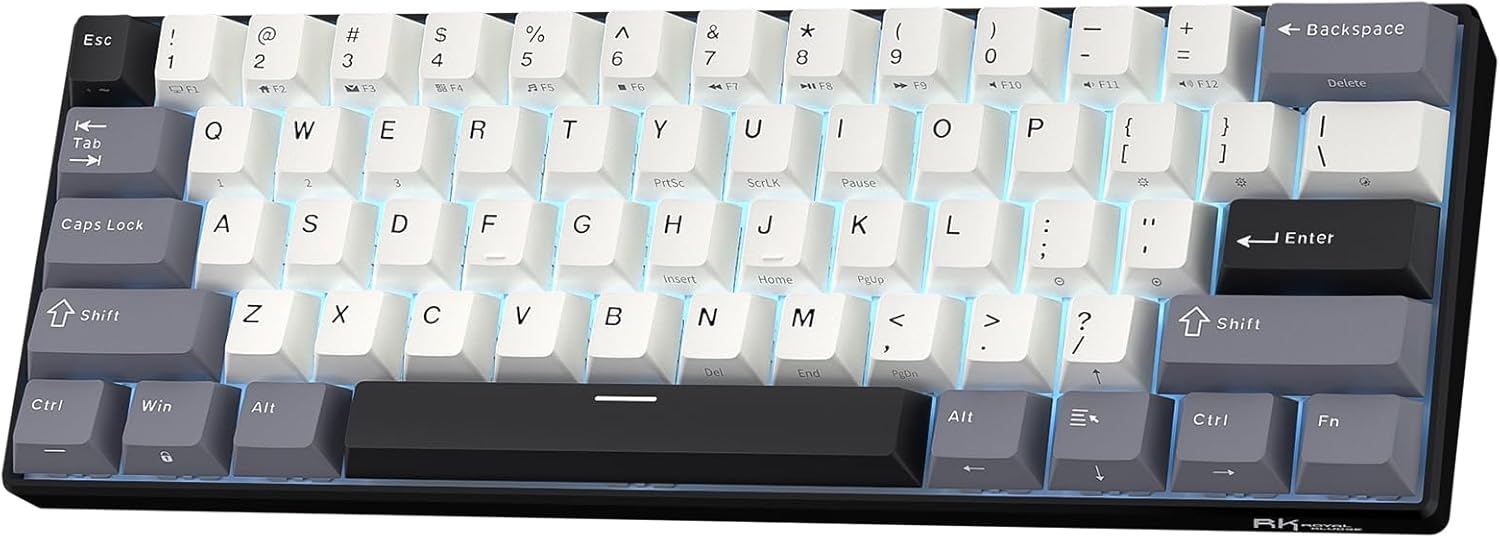
Picking up this keyboard feels lighter than the spec sheet says. The high-profile ABS plastic shell has a hollow tap when you knock on it. It flexes a touch if you twist hard. At 561g, it is not a desk anchor. But that is fine for a board that lives in a backpack.
The footprint is tiny: just 29.2 cm long and 10.2 cm deep. On a cramped 48-inch desk, it freed up a ton of mouse space. The fixed incline sits at a slight angle. Rubber pads under the base hold it steady. There are no adjustable kickstands, so you get one typing angle and that's it.
The white plate under the keys bounces the blue LED light well. The keycaps have a grainy texture that resists finger slippage. But the legends have noticeable gaps. The sub-legends are pad-printed and will wear over time. The overall look is plain, not fancy.
It fits in most laptop sleeves and shoulder bags. If you travel with a tablet or laptop, this thing disappears into your kit. Just know the tall case profile may need a wrist rest on longer days.
## Core Performance and Typing Feel
RK Red switches push smooth through most of the travel. On slow presses I felt a slight chalky drag. The spring ping on release is faint but there. Switch wobble is present if you wiggle a cap side to side.
The stabilizers are the surprise. They feel smooth and decent for a budget board. The spacebar rattles a bit, but it stays functional. Reports suggest unit-to-unit variance, so your luck may vary.
The typing sound is hollow. The plastic case and white plate create a pingy bottom-out with the red switches. It is not a creamy thock. It is a light, plasticky clack. For quiet offices, the reds stay tame. The blue clicky version would not.
Keycap texture helps a lot. The grainy surface stops my fingers from sliding during fast typing. But the pad-printed sub-legends around the arrow cluster will fade with heavy use.
The 60% layout has no dedicated arrow keys. I used Fn+Enter to toggle the arrow cluster. It works, but it never feels natural for spreadsheet work. The compact shape suits tight setups. Full-key anti-ghosting handled every combo I threw at it.
## Power, Battery and Connectivity
Pairing over Bluetooth took a few seconds and stayed rock-solid for three devices. I linked a laptop, a tablet, and a phone. Switching between them was quick. The keyboard remembers each device without a fuss.
Battery life is the weak spot. I got about 10 hours of active use with the blue LEDs on. That means you will charge this every other day during a work week. With the backlight off, you stretch it further. But the blue glow is a big part of the look.
The center-mounted USB-C port takes the included rubber cable. It is color-matched to the white case. Plugging in flips the board to wired mode and charges it. No dongle. No 2.4 GHz option. Just Bluetooth or USB-C.
Here is the catch for gamers: the USB polling rate is 1000Hz, but the effective update rate bottlenecks at 250Hz. That means the board cannot keep up with fast mouse flicks in tactical shooters. I felt the delay during quick strafe shots. For browsing and casual play, it is fine. For competitive play, it is a real handicap.
## Controls, Software and Daily Upkeep
There are no dedicated media keys or volume knob. That is a real miss for a board aimed at home theater or desk use. I had to reach for my mouse to change volume. The Fn layer covers Win lock and arrow toggle. But it does not give you a handy volume wheel.
Onboard shortcuts cover the basics. Fn+A switches to Windows mode, Fn+S to Mac mode. Windows, Linux, and macOS all worked out of the box. iOS and Android tablets recognized it too, though some hotkeys did nothing on mobile.
The RK61 has a dedicated software tool. During my testing, it failed to launch and never recognized the keyboard. That meant I could not remap keys or set macros. If programming and custom macros matter to you, this is a problem. The hot-swap PCB still lets you change switches without soldering.
Cleaning is easy. A dry microfiber cloth wipes the ABS caps and case. There is no stated spill rating, so keep drinks away. Do not dunk this board and expect it to survive.
## How It Compares: RK61 vs. Razer, Keychron, and AULA
The Razer Huntsman Mini is wired-only but crushes the RK61 on response time. It has lower latency, macro-programmable keys, and PBT caps. But it has no Bluetooth and no hot-swap sockets. The RK61 wins on portability and switch swapping, not on speed.
The Keychron K2 Version 2 is a bigger 75% board with a function row and dedicated arrows. Its keys feel more stable, and you get RGB. For office typing, the K2 is the better daily driver. The RK61 is smaller and easier to toss in a bag.
The AULA F75 is a 75% gasket-mount board with a volume knob, pre-lubed switches, and a much nicer typing feel. It also has dedicated arrows. The RK61 only wins on raw size and slightly better case rigidity.
The Dierya x KEMOVE DK61 Pro is the gaming pick. It has working per-key macro software, RGB, and more stable PBT caps. Both are hot-swappable. But the DK61 Pro actually lets you program it. That is a big edge the RK61 cannot match right now.
## What I Like and What Could Be Better
I genuinely enjoyed the size. On a cramped desk, this board gives your mouse room to breathe. The hot-swap sockets are a huge plus at this price. I popped in a set of 5-pin switches in under ten minutes. No soldering. That kind of tinkering value is rare on a budget 60%.
The keycap texture is grippy and stays comfortable for hours. The red switches are quiet enough for shared spaces. And the Bluetooth multipoint switching simply worked. No dropouts, no re-pairing drama. For tablet and laptop hopping, that is a real win.
But the flaws are hard to ignore. The software never worked for me. I could not remap a single key or build a macro. The 250Hz effective update rate is too slow for serious FPS play. And 10 hours of battery life means nightly charging if you leave the lights on.
The fixed incline and missing arrow keys also limit office use. I kept reaching for arrows that are not there. And the hollow acoustics make the board sound cheaper than it feels.
Not great, to be honest, on the software side. Everything else is a fair trade for the price.
## Who Should Skip This Keyboard
Skip the RK61 if you play competitive shooters. The 250Hz effective update rate and inconsistent wireless latency will cost you fights. Buy the Razer Huntsman Mini or the Dierya x KEMOVE DK61 Pro instead. Both deliver the low-latency response this board cannot.
Skip it if you need dedicated arrow keys or a function row. The 60% layout forces you into Fn combos for basic navigation. A Keychron K2 Version 2 or AULA F75 gives you those keys plus a volume knob.
Skip it if you rely on macro software. My unit's config tool never launched, so remapping was dead on arrival. Programmers and power users should look at the KEMOVE DK61 Pro.
Skip it if you want RGB. This variant is blue-only. If you want per-key color, buy the RGB version or a different board.
Buy the RK61 if you want a cheap, portable 60% deck for typing, tablet use, and switch swapping. Just check the current price and accept the latency trade-off before you click buy.
Is the RK61 good for gaming?
It suits casual play but not competitive shooters. The effective 250Hz update rate adds noticeable delay. For esports, pick a lower-latency wired board instead.
Does the RK61 have arrow keys?
No, it has no dedicated arrow keys. You access them through the Fn layer. Toggle the arrow cluster with Fn+Enter. That is awkward for spreadsheet work.
How long does the RK61 battery last?
Expect about 10 hours of active use with the backlight on. Turn the blue LEDs off to stretch it further. Most owners end up charging every day or two.
Can I replace the switches on the RK61?
Yes, the PCB is hot-swappable. It accepts both 3-pin and 5-pin switches. No soldering is needed, so swapping takes just minutes.
Does the RK61 work with Mac?
Yes, it works with macOS, Windows, and Linux. Press Fn+S for Mac mode and Fn+A for Windows mode. Some hotkeys may not work on tablets or phones.