
Design, Build & Physical Fit
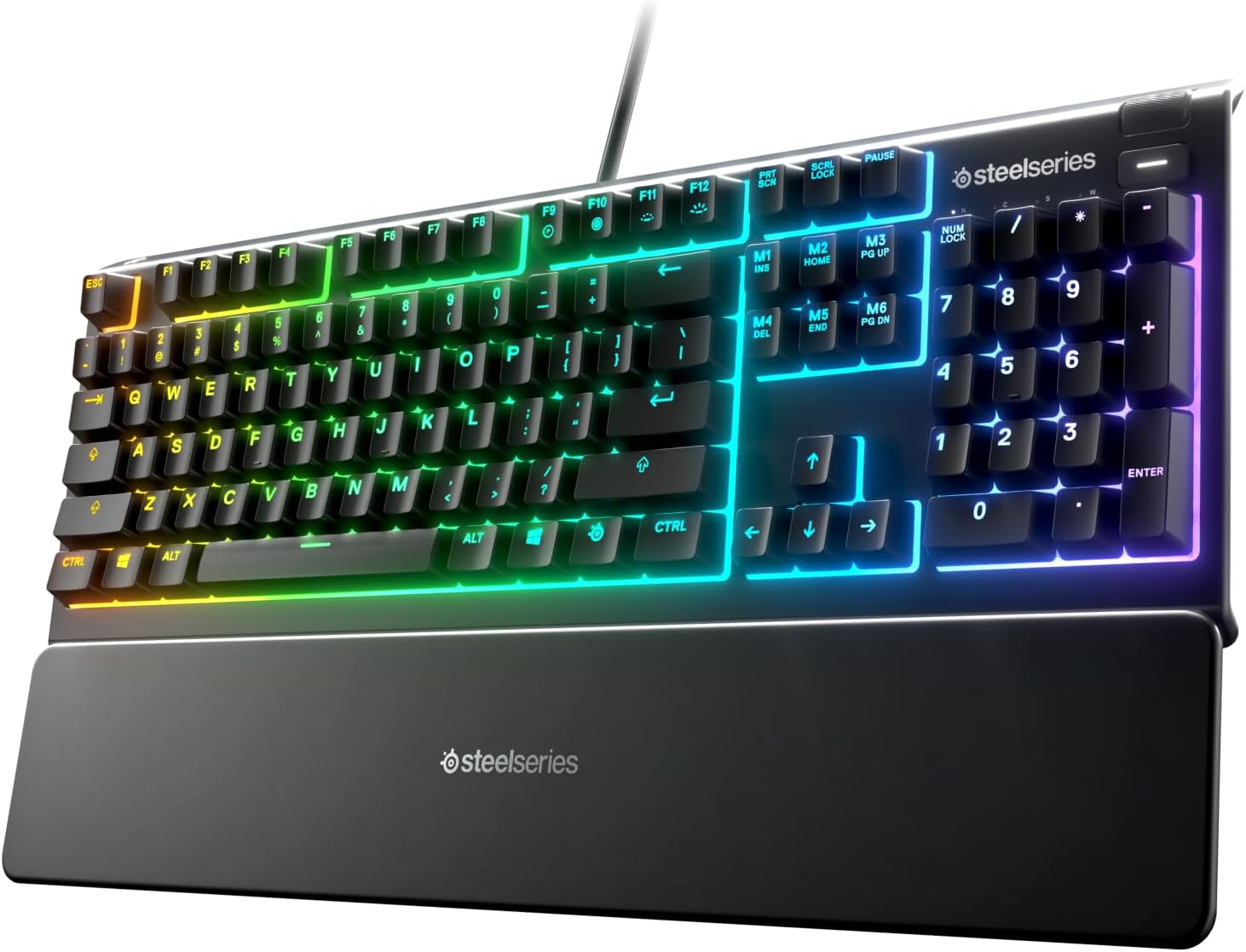
Resting your hands on the matte ABS polymer top frame reveals a sturdy shell with minimal flex. The frame spans 17.52 inches wide and weighs 1.27 pounds, giving it enough heft to resist sliding across bare wood desks. While it relies entirely on dense plastics rather than an aluminum deck, the housing stays quiet when twisted firmly.
The included magnetic wrist rest snaps cleanly onto the front lip. It offers broad palm support that eases strain over multi-hour gaming runs. Smooth ABS keycaps top the switches, which can feel somewhat slick under sweaty fingertips during tense rounds. The full 104-key setup retains the traditional number pad, stretching its footprint across tight workspaces but rewarding anyone doing quick spreadsheet entry.
Underneath the frame, molded three-way cable channels let you route the thick cord straight out the middle, left, or right side. This keeps messy desktop cords managed around monitor risers and mouse mats. The rubber feet along the bottom edges plant the chassis firmly in place during fast-paced play.
Core Performance & Feel: SteelSeries Apex 3 Review
Pressing down on the keys produces a muted, cushioned landing that stays virtually silent. These proprietary Whisper Quiet switches rely on a low-friction rubber dome structure rated for 20 million presses. They require lower operating force than the Corsair K55 RGB, meaning your fingers feel less fatigue during hours of heavy typing.
The trade-off is tactility. If you expect the crisp tactile bump of a mechanical switch, these keys can feel somewhat mushy. However, for shared bedrooms or streaming setups where live microphones pick up every clack, the silence is a massive advantage.
Gaming-grade anti-ghosting prevents key blocking when pressing several movement and action keys at once. While it exhibits lower latency than the hybrid mechanical Apex 5, it cannot match the blazing input speed of optical gaming boards. Serious esports competitors should look elsewhere, but casual matches run without dropped inputs.
Power, Cord & Setup
Plugging the integrated USB cord directly into a desktop port yields instant power with zero driver hurdles. Because this is a corded unit running on DC power through the bus, you never have to think about dead batteries, charging cables, or wireless dropouts. It just stays on.
The built-in wire is stout and thick. While it lacks fancy paracord braiding, it tucks snugly into the molded routing channels underneath the deck. You can feed the line left, center, or right depending on where your tower sits.
This tethered nature makes it a poor pick for living room home theater setups. Couch gaming with a thick cord trailing across the rug feels clunky, and the board lacks an integrated trackpad for casual sofa navigation. On a fixed computer desk, however, the corded reliability keeps you in the game without signal drops.
Controls, Software & Spill Protection
Spinning the clickable metal roller in the upper-right corner gives instant, tactile volume adjustment. Tapping the nearby media button pauses music and skips tracks without making you tab out of full-screen games. These physical controls feel faster and far more practical than hunting through layered function combos.
SteelSeries Engine software handles custom key binds, macros, and lighting schemes on Windows and macOS. Every key can be reprogrammed, though the board lacks onboard memory to store your custom profiles internally. Note that Linux users cannot install the customization suite.
Accidental drink splashes pose little threat thanks to certified IP32 water and dust protection. Internal drainage barriers shield the delicate circuitry underneath from rogue coffee drops or soda splashes. Wiping down the ABS deck after a spill takes just a damp cloth, letting you resume your game with total peace of mind.
How It Compares: Head-to-Head Testing
Stacking the Apex 3 against the Razer Cynosa Chroma highlights contrasting strengths. The Cynosa features per-key backlighting that provides more detailed illumination patterns. Yet our typing tests show the Apex 3 offers a noticeably sturdier chassis feel and softer, more controlled key travel.
Comparing it to the Corsair K55 RGB reveals clear physical differences. The Corsair board exhibits stiffer switch actuation that tires out fingers quicker during long gaming runs. In contrast, the Apex 3 requires lighter operating force and brings superior structural stability, even though the K55 edges ahead in measured input latency.
Looking within the same family, the SteelSeries Apex 5 brings hybrid mechanical switches, an OLED screen, and onboard memory. However, the Apex 5 exhibits higher latency in real tests and carries a much higher price tag. The smaller Apex 3 TKL drops the number pad and cuts the lighting down from 10 zones to 8 zones, leaving this full-size variant as the top pick for general desktop productivity.
What I Like & What Could Be Better
Living with this peripheral on an everyday test rig highlights several distinct strengths alongside clear compromises.
What Stands Out: Muted Typing Sound: The membrane domes make almost no noise, keeping family members and voice channels undisturbed. Physical Volume Wheel: The clickable metal roller lets you tweak audio levels smoothly on the fly. Spill Resistance: Genuine IP32 defense guards against accidental desk spills. Included Palm Support: The detachable magnetic wrist rest prevents joint fatigue over long desktop sessions.
Where It Falls Short: Soft Tactile Bump: Key travel feels slightly spongy compared to true mechanical stems. Zone Lighting Only: 10-zone illumination cannot light individual keys separately. No Internal Memory: Custom macros do not travel with the board to guest PCs. No Dedicated Macro Keys: MMO players miss out on extra programmable edge buttons.
Who Should Skip This Product
Hardcore competitive esports players should look elsewhere. The rubber dome design cannot match the twitch reflexes and ultra-low latency found in optical boards like the Razer Huntsman Mini. If your primary goal is climbing competitive leaderboards in fast shooters, pass on this membrane setup.
Mechanical switch purists will also want to steer clear. If you rely on the sharp, crisp feedback of clicky mechanical switches, the cushioned landing here will leave you cold. Upgrading to the mechanical SteelSeries Apex 7 TKL will better satisfy tactile enthusiasts.
Finally, home theater enthusiasts looking for a living-room companion should skip it. The tethered wire and lack of an integrated trackpad make it awkward to use from a couch. Couch gamers should choose a dedicated wireless keyboard with built-in navigation pads instead.