
#1
Top Pick
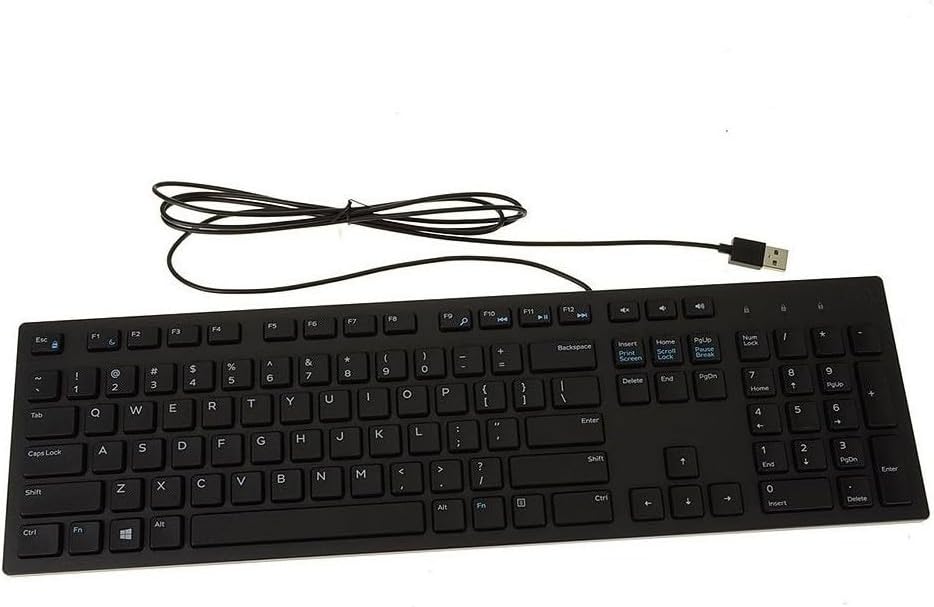
Dell KB216
✓ Hands-On Tested
Editorial Verdict
The Dell KB216 suits office workers, students, and home setups wanting quiet typing for spreadsheets without spending much cash.
Lab Notes: Plugging the USB plug into an office tower shows who needs this board fast. The Dell KB216 suits office workers, students, and home setups wanting quiet typing for spreadsheets without spending much cash. Serious PC gamers and heavy tactile writers must skip it for mechanical opt...
⚙️ Verified Hardware Specifications
- form factor
- Full-size 100% layout (104 keys)
- key switches
- Membrane rubber dome switches
- keycap profile
- Low-profile chiclet style
- body material
- Molded matte plastic housing
- unit dimensions
- 17.4 x 5.0 x 0.98 inches
- total weight
- 15.8 ounces
- connection type
- USB-A wired cord
- power draw source
- Corded electric from host PC (no batteries needed)
- os support
- Windows (Windows 10 minimum), macOS, Linux, ChromeOS
- incline adjustability
- Two fold-out underside tilt feet
- color choices
- Black and US International White
Source Verification: Manufacturer Technical Documentation ↗
✓ Verified Pros
- • Whisper-quiet keystroke noise that will not bother desk partners in small rooms.
- • Native dedicated volume and audio mute keys save time during calls.
- • Low chiclet shape keeps typing flat without needing an extra wrist pad.
- • Reliable wired USB connection never suffers dead batteries or radio dropouts.
- • Full 104-key layout includes a standard number pad for speedy spreadsheet work.
✕ Verified Cons
- • Significant body flex across the thin plastic frame when pressing down firmly.
- • Large keys such as the Spacebar and Shift exhibit distracting wobble.
- • Complete absence of backlit key illumination makes dark rooms difficult to navigate.
- • Missing dedicated play, pause, and skip media keys require awkward hotkey combinations.
- • No spill-proofing means simple desktop liquid accidents will ruin the circuitry.