
#1
Top Pick
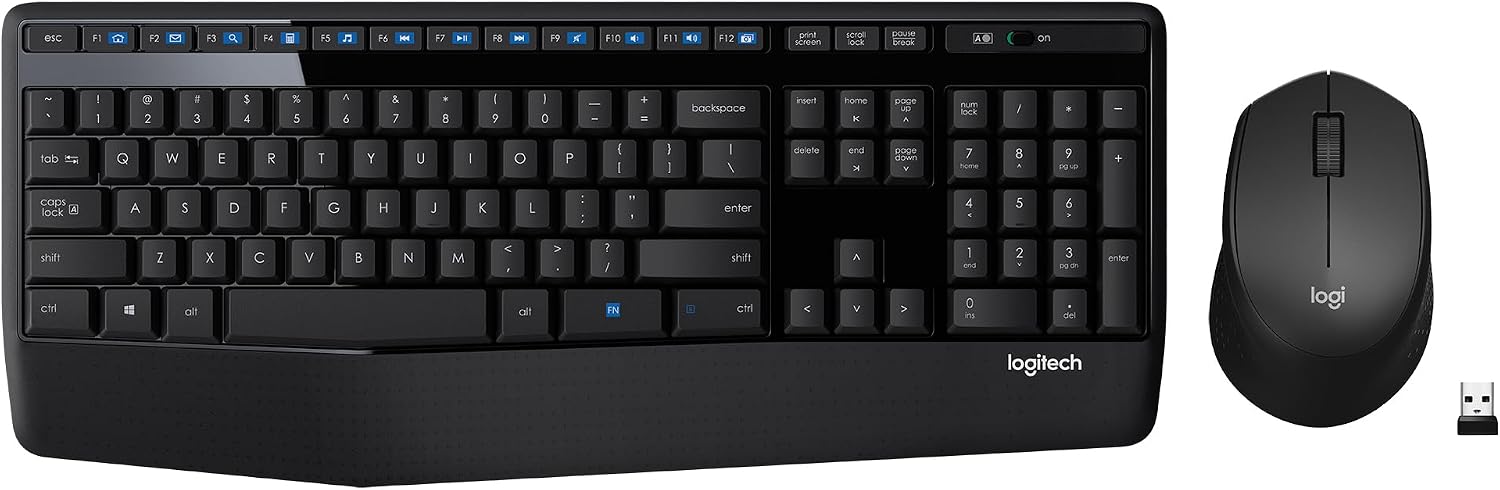
Logitech MK345
✓ Hands-On Tested
Editorial Verdict
Skip it if you use a Mac, type in the dark, or game.
Lab Notes: Buy the MK345 if you want a cheap full-size combo for a Windows or ChromeOS desk and you hate changing batteries. Skip it if you use a Mac, type in the dark, or game. The trade-off is simple. You get a palm rest, spill resistance, and years of battery life, but the mouse feels ho...
⚙️ Verified Hardware Specifications
- model
- Logitech MK345 (ASIN B00QXT5T3U)
- type
- Wireless keyboard and mouse combo
- connection
- 2.4 GHz RF via a single USB receiver
- wireless range
- Up to 10 m (about 33 ft)
- keyboard battery
- Up to 36 months on AAA cells
- mouse battery
- Up to 18 months on AAA cells
- keys
- Full-size layout with number pad and palm rest
- media keys
- 12 enhanced F-keys for volume and media
- indicators
- Caps Lock light present, no Num Lock light
- spill resistance
- Spill-resistant keyboard deck
- mouse shape
- Right-handed contoured body
- setup
- Plug and play, no software needed
- os support
- Windows, macOS, and ChromeOS listed
- color
- Black with a glossy finish
- combo weight
- 3.66 kg (listed as 8.08 lbs in the source)
- combo size
- 45.72 x 20.32 x 5.08 cm (18 x 8 x 2 in)
- not included
- Backlighting, USB-C, key remapping
Source Verification: Manufacturer Technical Documentation ↗
✓ Verified Pros
- • Generous textured palm rest ensures fatigue-free all-day typing
- • Outstanding battery life: up to 36 months keyboard, 18 months mouse
- • Spill-resistant keyboard deck with durable drainage channels
- • 12 enhanced F-keys provide instant media and volume control
- • Single plug-and-play USB receiver connects both keyboard and mouse
✕ Verified Cons
- • Keycap legends can fade over extended heavy typing
- • Missing Num Lock indicator light
- • Mouse is sculpted exclusively for right-handed users